

Cloud

GCP – Updated data processing terms to reflect new EU Standard Contractual Clauses
For years, Google Cloud customers who are subject to European data protection laws1 have relied on our Standard Contractual Clauses (SCCs), as previously approved by regulators, to legitimize overseas transfers of their customer personal data when using our services.
Today, we are glad to announce an update to our data processing terms for Google Cloud Platform, and Google Workspace (including Workspace for Education) and Cloud Identity, to incorporate various modules of the new EU SCCs approved by the European Commission on June 4, 2021, as well as separate UK SCCs.
For all Google Cloud customers, this new approach:
Offers clear and transparent support for their compliance with applicable European data protection laws;
Simplifies the entities involved in contracting by no longer requiring any customer to deal with an additional Google entity only for SCC purposes; and
Aligns more closely with potential flows of data within the services.
For customers located in Europe2, Google has further simplified data transfer compliance by assuming all the responsibilities imposed by the new SCCs.
We have also published a new whitepaper that outlines the European legal rules for data transfers and explains our approach to implementing the new EU SCCs – as well as separate UK SCCs – so that our customers can better understand what our updated terms mean for them and their privacy compliance.
We remain committed to helping all customers who rely on our cloud services meet applicable regulatory requirements by protecting any international transfers of their data.
FOOTNOTES
We refer specifically to the EU GDPR, UK GDPR and Swiss Federal Data Protection Act (FDPA)
We refer specifically to customers located in the EEA, UK and Switzerland
Read More for the details.
GCP – What are the components of a Cloud VM?
Last week, we published our second episode of VM End-to-End, a series of curated conversations between a “VM skeptic” and a “VM enthusiast”. Join Brian and Carter as they explore why VMs are some of Google’s most trusted and reliable offerings, and how VMs benefit companies operating at scale in the cloud. Here’s a transcript:
Carter Morgan: Welcome to VM End to End, a show where we have a VM skeptic and a VM enthusiast try and hash out are VMs still amazing and awesome? So Brian, thanks for coming in today. I appreciate you.
Brian Dorsey: Happy to be here. Let’s get to it.
What a Cloud VM is
Carter: Yes. Yes. Last time, we talked about if cloud VMs are relevant and if VMs are still relevant in a cloud-native future? You said, “definitely yes.” So today I want to go a little bit deeper and find out what exactly is a cloud VM? Can you help me out?
Brian: Absolutely. Let’s get into it. And first, it’s a virtual machine. I think most of what people know about virtual machines is all true for cloud VMs. And the thing I hope we get out of this today is that there’s a bunch of extra stuff you might not know about or might not think to look into.
Carter: Okay. All right. It’s like a regular VM, but not. So a regular VM. We said it’s a machine on a computer. You said a cloud VM is a little bit different. What are the specific differences with the real parts, the physical parts?
Brian: Yeah. In the end, it’s all running on real computers somewhere. So when the VM is up and running, you’ve got a real CPU. You’ve got a physical memory. And I think the parts that are the most fluid are probably the disc and the network. And in Google Cloud, those are both software-defined services that give you a lot of flexibility. So I think the takeaway here is instead of thinking about it as a slice of one computer, think about it as a slice of a data center’s worth of computers.
How we interface with a “slice of the data center”
Carter: Wow. All right. So that’s an interesting thought to me. And what I’m curious about is if I have a slice of a data center, how is that manageable or usable? If I wanted to make a video game, what can I do with a slice of a data center?
Brian: I think that’s a great example. So it’s down to what are you trying to do? And we then take a bunch of the variables that are possible and group them up. So we group them up into compute optimized, memory optimized, accelerator optimized, and then general purpose. So the compute ones are for where you need the lowest latency, single-threaded computation possible. Memory is where you need the maximum memory you can possibly stuff in a machine. You’re running an in-memory database or something. And the accelerator ones are for when you need a GPU or one of our tensor processing units. And then for everything else, general purpose.
Carter: General purpose. It’s like most people just need a laptop. So, okay. You have these specific groupings, maybe families of machines ordered. Within those families, can I specialize, like if I need a high-end gaming laptop versus just a low-end gaming laptop?
Brian: Absolutely. And the first knob you have is just how big it is. So how many CPUs and memory. So you can have a two-core machine or a 20 or a 460-core machine.
Carter: Really?
Brian: Yeah, really. And up to 12 terabytes of memory right now. And those numbers keep getting bigger over time. So it depends when you see this, it might be different. And by default, those come in a preset ratio. So they grow together. But part of the main reason people wanted to use containers at all is that not everything fits in that exact shape. So you end up orphaning some of the capacity and you’re wasting money. So we also allow you with the general purpose machines to pick your own ratio. So if you’re like, “Oh, I know this is a really CPU-heavy thing, but I don’t need that much memory.” You can make a computer that’s that shape, and you’ll only pay for what you actually need.
Where the physical disks live in the data center
Carter: Oh, that’s really cool. Okay. So if you can make your own shape, somewhere there has to be physical memory. So where do we get this in a cloud VM?
Brian: Yep. So when you go to set one of these up, we find one of the machines out there that has space for the shape you want and start it up there. And so this Tetris problem becomes not your problem. And we’re big enough that there’s almost always a good spot for that to fit.
Carter: Yeah. And so these are all on one machine, it just sounded like there.
Brian: Oh. So there’s a data center worth of machines. And so when you go to start yours up, we find the right spot for it, find a computer that has open space.
Carter: So tell me a little bit more about disk then in this slice of a data center world.
Brian: So if we can just turn it on on any one of these computers in a data center, how do the discs work? Where’s my data? And so by default, our discs are almost always network-attached storage. And so instead of a physical disc plugged into one computer… I mean, those still exist, but we provide a virtual disc made up of hundreds or thousands of discs plugged into a whole bunch of computers, and then assemble the blocks together virtually, which gives you… You actually get higher performance than you might get normally. So the throughput is very fast. And then you get a bunch of the features that you might expect from a SAN, a storage area network.
Carter: So you’re going to attach and detach on the fly. You can-
Brian: Yep.
Carter: Okay. That’s really cool.
Brian: So you can do that. You can resize it and use the snapshots to take backups. But the resize thing is amazing. If you run out of disc space, you can actually make the disc bigger while the computer’s running.
What OSes are allowed to run on a Cloud VM
Carter: Brian, you’re blowing my mind right now. I’ve got to act skeptical. I’m going to be skeptical. But you’re blowing my mind. Here’s something I’m curious about: When I’m using containers, I can select an operating system. And so the benefit of that is I can write applications to operating systems that I know and love. I can only use what I need. Is there that same concept in the VM world, or am I stuck… Am I forced to use certain types of operating systems to use a cloud VM.
Brian: Yeah. Very similar concept. Whereas in a container, it’s mostly just the files that make up that system per runtime, whereas here, we have the whole operating system running. But other than that, it’s really pretty much the same concept. Most workloads these days are running on Linux or windows. And so we provide pre-made images of Debbie and CentOS, CoreOS, Ubuntu, Red Hat Enterprise, SUSE, and Windows Server Datacenter, a bunch of different versions. So when you create a VM, you say, “Okay, I want it to run this OS,” and it makes a copy of that image on the fly and boots your machine off of that.
Carter: Okay. That’s really cool. Can you use your own at all?
Brian: Yeah. Two ways to do it. So one, if you want to use one of these OSes and just put your flavor on it, add some tools, configure it the way you want it to be, you can boot off of one of them and then make a new image based off of the work you did. So that’s a really common thing. And then if you want to, it’s a block device. And so you can make a customized version of an OS or develop a whole new OS. And as long as that runs in a virtual machine, you can boot off of it and go.
What you can actually *do* with Cloud VMs
Carter: I got to be honest. It sounded like there’s a lot of flexibility. All these things, I’m like, “Well, in containers you can do this.” And you’re like, “Yes, you can do this in the VM world too.”
Brian: And a lot of it’s based on… So this is a high-level version of what a cloud VM is. You can basically run anything that runs on a computer.
Carter: Okay. All right. We just specified really quick. There’s some virtual parts, there’s some physical parts. Your disks are going to be spread out over a wide data center, pooled together to give you more reliability, more consistency. A lot of times you said it’s even faster throughput. This is really cool. What I’m curious about is what are actual things that are non-obvious extensions of this? What can I do with this?
Brian: I think one of the underused or underknown things is actually running a container, one container per VM as a pattern.
Carter: Yeah. Why would I do that?
Brian: So a couple of different reasons. One, containers have become a distribution format. So a lot of software’s already ready to go in a container. And sometimes, you don’t want to deal with setting up a whole cluster or managing some other stuff. You just want to run one thing. So that’s a reason to do it. And then sometimes, there’s constraints. Like that particular thing, it might make sense to run it on a very large machine for a short amount of time, or it needs some particular configuration that you might not have otherwise. So it may make sense to run-
Carter: Right. And still use that packaging of containers.
Brian: Yeah. One-to-one.
Carter: Okay. That makes a lot of sense. All right. But I mean, in theory, I could still run containers for a lot of this. What are some other features of cloud VMs that you’re excited about?
Brian: Yeah. So one, I think, is it’s really commonly used in almost all architectures, and pretty much everybody has a load balancer when you have multiple machines, right?
Carter: Mm-hmm (affirmative).
Brian: And the non-obvious cool thing is that yes, we have a load balancer, but it’s a load balancer service that is provided at the data center level. It’s not some particular computer that has a certain capacity that as soon as you hit, things start slowing down or getting overdrawn. So you’re actually configuring the data center level load balancer that Google uses for YouTube and Gmail to run your own machines.
Why developers operate at the VM / IaaS level
Carter: So one, that’s just really cool, thinking about that concept. But what I’m blown away right now is thinking that in Kubernetes, I use services all the time. And if I’m using GKE (aka Google Kubernetes Engine), the load balancer that’s provided is the cloud load balancer, the Google one. So even then, I’m using the Google Cloud load balancer. My question though is I can still access this load balancer. It sounds like it’s configured already for me through something like Kubernetes. Is there a reason to go lower? Is there a reason to go to this level?
Brian: So if you’re already using Kubernetes, use Kubernetes. Those patterns are super useful, but not all software is set up to run containers. So if you want to use those same patterns-
Carter: That pattern of having a single end point that you can communicate with.
Brian: Yeah. There’s this idea of having a known endpoint that provides this service. And then there’s a group of containers usually in Kubernetes, but a group of computers, in this case, that do that. And once you do that, you have a known endpoint and a group of computers. And we call that group in Compute Engine a managed instance group. Then you can put a bunch of logic on that. So it’s actually a service in and of itself. So it handles starting up new machines when they’re needed. If you turn the dial up and you’re like, “Oh, I have five now and I want to have 10,” it starts the new ones. That can be set up to be run automatically depending on the load you get. And then you can spread those out across the world. You can have some of them running in one country, some of them running somewhere else, and route the traffic to the closest one for your users, that sort of thing.
What’s next?
Carter: I’m going to have to find out more about this. I’m going to have to dig in deeper because I want to be skeptical. And I’m like, “This all sounds amazing.” Further, I think… I don’t want this conversation to go too long, but I’m definitely going to want to dig in deeper here. In fact, maybe we can have an episode… Would you count this as an admin infrastructure networking? What is this that we’re talking about?
Brian: Yeah. I think we should dive into networking a bit more next and how that actually works. And when I say it’s not running on one box, how does, “Wait, what? How do you distribute traffic if it’s not going through one machine?” So let’s do networking. And then I love the discs, and there’s a lot more to talk about there. Let’s do that. What else do you want to hear about?
Carter: There is, for sure. I want to hear about costs. I’m going to have to do some of my own homework after hearing about machine families and all of this. I need to go start and create a VM. And I hope people listening at home do the same thing. Yes. Because I’m going to be more skeptical next episode. Okay? I’m going deeper. But this episode, I have to admit, cloud VMs sound pretty cool.
Brian: They are. Give it a try.
Carter: All right. Well, thank you, Brian. And I’ll catch up with you next time.
Brian: See you soon.
So they’re you have it: we learned what cloud VMs were last time, but this time we focused on what cloud VMs are made of. Since cloud VMs are a slice of a data center, they have some benefits over traditional VMs: for example, disks can be fit to exactly the workload you’re trying to run. In other instances, cloud VMs behave like traditional VMs and, as Brian stated, can “run anything a computer can run.”
If you want to learn more about GCE, be sure to check it out here: https://cloud.google.com/compute
Read More for the details.
AWS – Amazon Macie adds support for selecting managed data identifiers
Amazon Macie now allows you to select which managed data identifiers to use when you create a sensitive data discovery job. This allows you to customize what data types you deem sensitive and would like Macie to alert on per specific data governance and privacy needs in your organization. When you create a job, choose from the growing list of managed data identifiers such as personally identifiable information (PII), financial information, or credential materials that you would like to target for each sensitive data discovery job you configure and run with Macie.
Read More for the details.
AWS – Amazon Connect Customer Profiles adds product purchase history to personalize customer interactions
Amazon Connect Customer Profiles now supports out-of-the-box integration with product purchase history from Salesforce. When a customer calls or messages a contact center for service, Amazon Connect Customer Profiles equips contact center agents with the customer information they need to deliver personalized customer service and resolve issues quickly. Customer Profiles helps make it simple to bring together customer information (e.g., name, address, phone number, contact history, purchase history, open issues) from multiple applications into a unified customer profile, delivering the profile directly to the agent as soon as they begin interacting with the customer. If an agent wants to understand previous interactions to service a customer, they can visit Contact Trace Record (CTR) details page by clicking “CTR Details” to review information such as call categorization, call sentiments and transcripts. Customer Profiles can be used out of the box by agents or embedded in your existing agent application.
Read More for the details.
AWS – Amazon ElastiCache now supports M6g and R6g Graviton2-based instances in additional regions
Amazon ElastiCache for Redis and Memcached now supports Graviton2 M6g and R6g instance families in additional regions: South America (Sao Paulo), Asia Pacific (Hong Kong, Seoul), Europe (London, Stockholm), North America (Montreal), US East (GovCloud US East), US West (GovCloud US West), and mainland China (Ningxia, Beijing). Customers choose Amazon ElastiCache for workloads that require blazing-fast performance with sub-millisecond latency and high throughput. Now, with Graviton2 M6g and R6g instances, customers can enjoy up to a 45% price/performance improvement over previous generation instances. Graviton2 instances are now the default choice for Amazon ElastiCache customers.
Read More for the details.
AWS – AQUA is now available for Amazon Redshift RA3.xlplus nodes
AQUA (Advanced Query Accelerator) for Amazon Redshift is now generally available for Amazon Redshift RA3.xlplus nodes.
Read More for the details.
AWS – Customers can now manage AWS Service Catalog AppRegistry applications in AWS Systems Manager
AWS Service Catalog AppRegistry and AWS Systems Manager Application Manager now provide an end-to-end AWS application management experience. With this release, customers can use AppRegistry to create applications within their infrastructure as code, CI/CD pipelines, and post-provisioning processes, and use Application Manager to view application operational data and perform operational actions.
Read More for the details.
AWS – Announcing General Availability of Tracing Support in AWS Distro for OpenTelemetry
Today, we are announcing the general availability of AWS Distro for OpenTelemetry (ADOT) for tracing, a secure, production-ready, AWS-supported distribution of the OpenTelemetry project. With this launch, customers can use OpenTelemetry APIs and SDKs in Java, .Net, Python, Go, and JavaScript to collect and send traces to AWS X-Ray and monitoring destinations supported by the OpenTelemetry Protocol (OTLP).
Read More for the details.
GCP – Behind the scenes: WebGL-powered Maps demos for Google I/O
In preparation for the announcement of the beta release of WebGL-powered Maps features at Google I/O 2021, the Google Maps Platform team worked with Ubilabs, a Google Cloud partner since 2012, to show developers what’s possible when 3D rendering comes to the map. The first of these demos, ‘Google Maps Platform WebGL-powered Maps Features,’ walks developers through each of the WebGL features and how they can be used effectively.
Developer-focused demo showing GMP developers how they can use WebGL-powered Maps features.
The second demo, ‘Travel with Next Generation Maps,’ provides an end-to-end look at how the new 3D features in Google Maps Platform can transform mapping experiences, by applying them to a fictional travel app.
Ubilabs travel demo showed business audiences the power of WebGL-powered mapping experiences.
Showcasing new WebGL-powered Maps features
Martin Schuhfuss, a software engineer at Ubilabs who worked on the project, remembers talking with Google Maps Platform Engineering Lead Travis McPhail at Google I/O in 2019 about changes the Google Maps Platform team was considering for some of the APIs and working to support vector maps and even 3D content. Fast-forward to 2021, and Schuhfuss found himself on a call with the Google Maps Platform team about creating demos for Google I/O 2021 that would showcase Google Maps Platform’s new WebGL features. As a trusted Google Cloud partner, Ubilabs was entrusted with being early users of the features, which was likely to require some debugging and even the creation of initial documentation during the development process.
Ubilabs co-founder and head of development Martin Kleppe, a Google Maps Platform Google Developer Expert, also worked on the project, along with a project manager, a designer, and three other developers.
“We scoured the internet for interesting maps use cases, especially with a 3D aspect to it,” says Schuhfuss. “We were building small test pieces at the same time, to try out what we could do. The documentation didn’t even exist yet.”
Ubilabs decided to focus one demo on developers, walking them through the new capabilities step by step and showing them how to use them, with code samples included. The second demo, a travel app, shows the new features in the context of a plane flight, a taxi ride, finding a hotel, and going out to eat. Schuhfuss wrote text to guide users through the demo that effectively summarized everything he learned as one of the first users of the WebGL beta features. Much of that copy ended up in the documentation, to guide other users as they try out the features for the first time.
“For each feature, we asked ourselves, what could we do with Google Maps Platform to show what you can do now and how it could look?” says Schuhfuss. “We decided to create a travel demo, to showcase the whole process of going on a trip to a city.”
Developers are used to seeing north-up maps, with 2D top-down views, so Schuhfuss was excited to show them how they could animate the camera and add information to the map using verticality in any storytelling context. For example, in the screenshot below, notice how just adding a simple tilt and rotation to the map changes the whole experience.
In this example, developers are shown the new tilt and rotation features.
“The technology underlying the WebGL features uses GPU accelerated rendering services, where you use the graphic card in your machine to render 3D buildings and place 3D objects in space,” explains Kleppe. “Before, your data was an additional layer on top that covered the map, and now, you have a new level of control. This will provide the user an immersive experience, like looking at a view of a city.”
The team created smaller demos first, then put them in the larger context of click-through demos. When something didn’t work as expected, Ubilabs tried to troubleshoot and collaborated with the Google Maps Platform engineering team to fix the issue. In one case, when Schuhfuss added three different objects to a scene, the third object consistently disappeared after a few seconds, and the second object disappeared after another few seconds. Ubilabs shared feedback about the issue with the Google Maps Platform engineering team, who were able to solve the problem in the following release to improve the product for users.
“I spent time debugging, trying to figure out what was happening,” Schuhfuss says. “In order to have the ability to have occlusion–stuff you render to hide behind buildings, you need to share the WebGL context–the interface that lets you talk with the graphics card, and it’s really sensitive to small state changes.”
Schuhfuss found that the rest of the development involved fairly straightforward Three.js capabilities, except understanding and computing coordinates from latitude and longitude. The team had regular calls with the Google Maps Platform team to sync on their progress and address technical questions and updates.
Interactive Demos for Google I/O
Ubilabs made sure to conclude each demo by showcasing something impressive developers could create using WebGL features.
“The last page of the travel demo is my absolute favorite,” says Schuhfuss, who completely rebuilt that page several days before I/O. “What I love about that is the way the text labels behave when you rotate the camera around, and that they get these little stems when the buildings disappear.”
Text labels for the sights of London appear above each location, and as the map is rotated, small stems appear to point clearly to each building.
The last page of the developer-focused demo encourages users to ‘Reimagine the Map’ and includes embedded video and fireworks.
“The next best thing was the fireworks,” Schuhfuss says. “We are able to embed video, and we wanted to show that somewhere, so we built the video wall in the harbor. I think at some point during development it even played Rick Astley.”
WebGL features allow video to be embedded in a map and features like fireworks to be added to maps.
“We can combine many different data sources—the base map with streets, a layer to draw business information, an extra API to calculate directions, and then you can place your own information on top of that,” he says. “You’re not limited to the set of data in the API; you’re always free to merge your own data in an abstract view of the world.”
Schuhfuss, who also runs the three.js community slack workspace, says he has seen many awed responses online.
“I’m really looking forward to seeing examples of people using these features,” he says.
For more information on Google Maps Platform, visit our website.
Read More for the details.
GCP – Cloud DNS explained!
How many times have you heard this:
“It’s not DNS.”
“NO way it is DNS.”
“It was the DNS!”
When you are building and managing cloud native or hybrid cloud applications you don’t want to add more stuff to your plate, especially not DNS. DNS is one of the necessary services for your application to function but you can rely on a managed service to take care of DNS requirements. Cloud DNS is a managed, low latency DNS service running on the same infrastructure as Google which allows you to easily publish and manage millions of DNS zones and records.
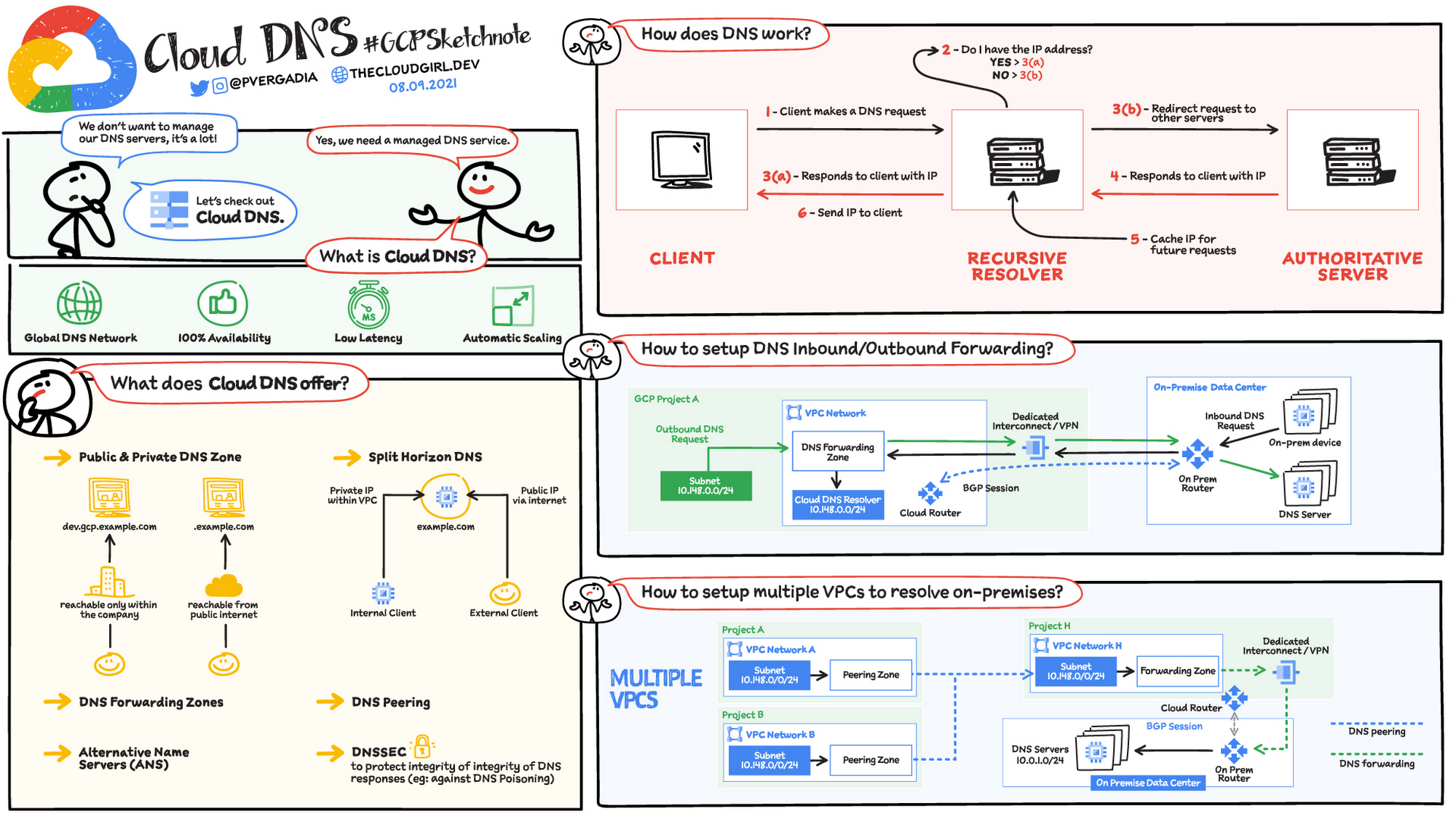
How does DNS work?
When a client requests a service, the first thing that happens is DNS resolution. Which means hostname to IP address translation. Here is how the request flow works:
Step 1 – A client makes a DNS request
Step 2 – The request is received by a recursive resolver which checks if it already knows the response to the request
Step 3 (a)- If yes, the recursive resolver responds to request if it has it stored in cache already.
Step 3 (b) – If no, the recursive resolver redirects request to other servers
Step 4 – The authoritative server then responds to requests
Step 5 – Recursive resolver caches the result for future queries.
Step 6 – And finally sends the information to the client
What does Cloud DNS offer?
Global DNS Network: Managed Authoritative Domain Name System (DNS) service running on the same infrastructure as Google. You don’t have to manage your DNS server, Google does it for you.
100% Availability & Automatic Scaling: Cloud DNS uses Google’s global network of anycast name servers to serve your DNS zones from redundant locations around the world, providing high availability and lower latency for users. Allows customers to create, update, and serve millions of DNS records
Private DNS Zones: Used for providing a namespace that is only visible inside the VPC or hybrid network environment. Example – a business organization has a domain dev.gcp.example.com, reachable only from within the company intranet
Public DNS Zones: Used for providing authoritative DNS resolution to clients on the public internet. Example – a business has an external website, example.com accessible directly from the Internet. Not to be confused with Google Public DNS (8.8.8.8) which is just a public recursive resolver
Split horizon DNS: Used to serve different answers (different resource record sets) for the same name depending on who is asking – internal or external network resource.
DNS peering: DNS peering makes available a second method of sharing DNS data. All or a portion of the DNS namespace can be configured to be sent from one network to another and, once there, will respect all DNS configuration defined in the peered network.
Security: Domain Name System Security Extensions (DNSSEC) is a feature of the Domain Name System (DNS) that authenticates responses to domain name lookups. It prevents attackers from manipulating or poisoning the responses to DNS requests.
Hybrid Deployments: DNS Forwarding
Google Cloud offers inbound and outbound DNS forwarding for private zones. You can configure DNS forwarding by creating a forwarding zone or a Cloud DNS server policy. The two methods – inbound and outbound. You can simultaneously configure inbound and outbound DNS forwarding for a VPC network.
Inbound
Create an inbound server policy to enable an on-premises DNS client or server to send DNS requests to Cloud DNS. The DNS client or server can then resolve records according to a VPC network’s name resolution order. On-premises clients use Cloud VPN or Cloud Interconnect to connect to the VPC network.
Outbound
You can configure VMs in a VPC network to do the following:
Send DNS requests to DNS name servers of your choice. The name servers can be located in the same VPC network, in an on-premises network, or on the internet.
Resolve records hosted on name servers configured as forwarding targets of a forwarding zone authorized for use by your VPC network
Create an outbound server policy for the VPC network to send all DNS requests an alternative name server.
For more #GCPSketchnote, follow the GitHub repo. For similar cloud content follow me on Twitter @pvergadia and keep an eye out on thecloudgirl.dev
Read More for the details.
GCP – Announcing Apigee’s native support for managing lifecycle of GraphQL APIs
Application Programming Interfaces (APIs) are the de facto standard for building and connecting technology solutions. They facilitate software-to-software interactions that allow developers to leverage data and functionality at scale. APIs come in various styles such as REST, gRPC, GraphQL, and Async, and each style has its own features. Picking the right API style completely depends on your use case and what you are solving for. While REST is widely used, of late, formats like GraphQL are gaining popularity among developers.
GraphQL is a query language for APIs and a runtime for fulfilling those queries with your existing data. Developers are increasingly adopting GraphQL for its flexibility and ease of use. It provides a single endpoint for all data exchange, prevents over- or under-fetching of data, and lets developers make one API call that seamlessly aggregates data from multiple apps and services.
Today, we are excited to announce that Google Cloud’s Apigee API management platform natively supports GraphQL APIs, allowing developers to productize and manage their lifecycle in Apigee. Before we learn more about these capabilities, let’s take a closer look at GraphQL.
REST and GraphQL API styles differ across many dimensions
REST and GraphQL API styles differ across many dimensions:
Endpoints- REST provides multiple endpoints and a URL taxonomy that’s used as a logical resource manager. In GraphQL, there’s one endpoint that captures all fields for a given operation.
Interactions – REST commonly uses HTTP verbs and JSON/XML to exchange data. GraphQL mostly uses the HTTP POST verb, and uses a custom query language called Schema Definition Language for request with standard JSON returned in response.
Documentation- While REST uses OpenAPI specs and portals, GraphQL most frequently employs schema-generated documentation. Developers frequently use browser-based development environments such as GraphQL playground in order to interact with schema-based endpoints.
Discovery- To discover and interact with REST APIs, developers usually use the portal provided by the management vendor, whereas GraphQL APIs tend to be offered with a built-in portal that enables users to explore new queries on the fly.
Therefore, instead of picking one style over another, consider using them together in your API program, to solve for the use cases they’re best suited for.
Why GraphQL APIs need to be managed
Regardless of their design styles, APIs provide access to your enterprise’s most valuable data and functionality. They’re how developers leverage your data for new partnerships and digital services. This means enterprises must control and understand how and by whom APIs are used. Moreover, beyond access management, enterprises need to design and deploy APIs that give developers a first-class experience and help them to be productive. Consequently, APIs should not be viewed as snippets of code but rather as digital products that need full lifecycle management.
Packaging GraphQL APIs as products allows you to overcome some limitations of this style such as:
Limited authorization capabilities especially for schema browsing
No standard for throttling or quotas
No unified analytics for consumption
Lack of version control
As you scale the adoption of GraphQL APIs for solving business critical problems, it becomes extremely important to manage those APIs as products. This is where there’s a huge opportunity to extend the proven best practices of REST API management to GraphQL.
Using Apigee for GraphQL APIs
Apigee is a market-leading full lifecycle API management platform trusted by thousands of enterprises across the globe. With the new native support, Apigee now allows you to productize and manage full lifecycle of GraphQL APIs for consumption, just like REST.

Developers can use the GraphQL policy to:
Impose restrictions on the payload by setting a maximum on the number of fragments allowed.
Associate GraphQL with API products.
Leverage the OAuth2, VerifyAPIKey, and Quota policy features, just as in REST.
Validate and authenticate requests at the schema level.

Getting Started
Visit the documentation and get step-by-step instructions on how to get started. If you are not familiar with Apigee, click here to sign up for a free trial.
Read More for the details.
GCP – Data Driven Price Optimization
When companies can optimize their pricing to take into account market conditions dynamically, they can use it as an important lever for differentiation.
In order to optimize pricing, organizations need to be able to respond to market changes faster, which means optimizing for a continuum of decisions (such as list price or promotions) and context (such as localization or special occasion) to serve the function of multiple business objectives (such as net revenue growth or cross-selling).
“Thanks to a comprehensive approach to monitoring our eCommerce jewelry business, we’ve been reacting dynamically to our pricing and marketing strategy, which resulted in doubling our sales. This wouldn’t have been possible without the Google Cloud smart analytics suite and in particular Dataprep by Trifacta, which gives us the ability to combine and standardize our data in a single view in record time.” Joel Chaparro, Head of Data Analytics, PDPAOLA Jewelry – www.pdpaola.com.
Common Data Model: The First Step Toward Trustworthy Pricing Models
Data is the biggest challenge for modern pricing implementation. Building a robust pricing model requires large quantities of data that must be successfully ingested, maintained, and managed among the right stakeholders. All too often, however, organizations face repeated “trust” issues due to a lack of data quality, poor data governance across multiple geographies or business units, and extremely long and inefficient deployments.
One of the first steps towards resolving these issues is developing a Common Data Model (CDM). Having a centralized model for all required data is essential to ensure that business stakeholders have a single source of truth. A CDM defines standards for the key components influential to pricing optimization, including transactions, products, prices, and customers. From there, the standards are applied through a blended data pipeline and serve the downstream systems to leverage pricing data (business applications, dashboards, microservices, etc.) with one homogeneous data model. The CDM also offers a consistent way for team members to collaborate better using a common language.
BigQuery offers the perfect place to host the CDM table with a scalable infrastructure to run the necessary analysis to discover patterns and trends that guide pricing strategy.
Cloud Data Engineering for Pricing Analytics
Having a Common Data Model and a modern data processing environment such as BigQurey in place are essential foundational components. But the true test of pricing optimization efficiency is measured in how rapidly users can act on this data. In other words, how easily can users prepare data, the first and most critical step in data analysis? Historically, the answer has been “not very.” Preparing data, which can include everything from addressing null values to standardizing mismatched data to splitting or joining columns, is a time-consuming process requiring great attention to detail and, often, many technical skills. It can take up to 80% of the overall analytics process. But by and large, it’s worth the extra time spent—properly prepared data can make the difference between a faulty and accurate final analysis.
Google Cloud’s answer to data preparation and building scalable data pipelines is offered through the data engineering cloud platform Google Cloud Dataprep by Trifacta. This fully managed service leverages Trifacta technology and allows users to access, standardize, and unify required data sources for pricing analysis.

Reference Pattern for Pricing Optimization
To enable your organization to succeed in a data-led strategy for pricing optimization, we have put together a pricing optimization reference pattern that provides the guidance you need to kick start your solution. The reference pattern includes the necessary components (Dataprep, BigQuery, BigQueryML, Looker), the guidelines, and the sample assets you need to test the solution with sample data, build dashboards, and create predictive models to guide your pricing strategy. In the reference pattern, we walk you through the following:
Assess Data Sources
Pricing optimization often requires analyzing several different data sources, including historical transactions, list price for products, and metadata about products and customers. Each source system will have its way of describing and storing data, and each may also have different levels of accuracy or granularity. In this first step, we connect and explore disparate data sources in DataPrep to understand discrepancies in the data and make decisions on how to combine sources.
Standardize Data
After identifying the source systems and assessing their data quality, the next step is actually resolving those issues to ensure data accuracy, integrity, consistency, and completeness.
Unify in One Structure
Once the data has been cleaned and standardized, the different sources are joined in a single table consisting of attributes from each data class at the finest level of granularity. This step creates a single, de-normalized source of trusted data for all pricing optimization work.
Deliver Analytics & ML/AI
Once data is clean and formatted for analysis, analysts can explore historical data to understand the impact of prior pricing changes. Additionally, BigQuery ML can be used to create predictive models that estimate future sales. The output of these models can be incorporated into dashboards within Looker to create “what-if scenarios” where business users can analyze what sales may look like with certain price changes.
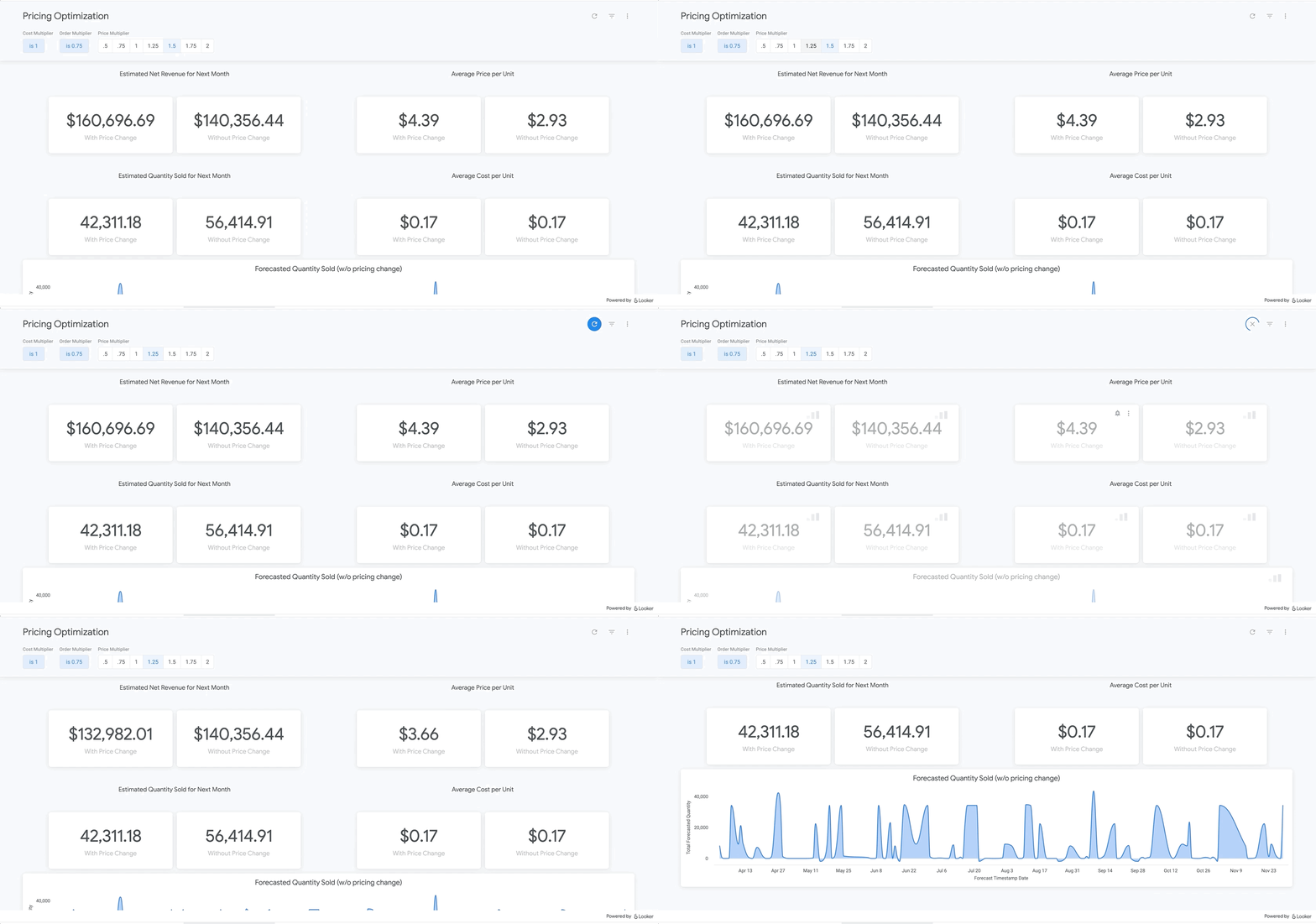
With this approach, your organization will start to see dramatic changes to your bottom line—but without all the hard work of preparing and transforming data. Check out the sample dashboard here!
Learn More
Want to learn more? We’ve put together an entire whitepaper so you can identify your organization’s weakness, better understand the data sources needed on your pricing optimization journey, and review astep-by-step guideof how the Google Cloud Smart Analytics suite enables an essential Common Data Model (CDM).
Read More for the details.
GCP – Building the data engineering driven organization from the first principles
In the “What type of data processing organisation” paper, we examined that you can build a data culture whether your organization consists mostly of data analysts, or data engineers, or data scientists. However, the path and technologies to become a data-driven innovator are different and success comes from implementing the right tech in a way that matches a company’s culture. In this blog we will expand the data engineering driven organizations and provide how it can be built from the first principles.
Not all organizations are alike. All companies have similar functions (sales, engineering, marketing), but not all functions have the same influence on the overall business decisions. Some companies are more engineering-driven, others are sales-driven, others are marketing-driven. In practice, all companies are a mixture of all these functions. In the same way, the data strategy can be more focused on data analysts, and others on data engineering. Culture is a combination of several factors, business requirements, organizational culture, and skills within the organization.
Traditionally organizations that focused on engineering mainly came from technology driven digital backgrounds. They built their own frameworks or used programming frameworks to build repeatable data pipelines. Some of this is due to the way the data is received, the shape the data is received and the speed of the data arrival as well. If your data allows it, your organization can be more focused on data analysis, and not so much on data engineering. If you can apply an Extract-Load-Transform approach (ELT) rather than the classic Extract-Transform-Load (ETL), then you can focus on data analysis and might not need extensive data engineering capability. For example, data that can be loaded directly into the data warehouse allows data analysts to also do data engineering work and apply transformations to the data.
This does not happen so often though. Sometimes your data is messy, inconsistent, bulky, and encoded in legacy file formats or as part of legacy databases or systems, with a little potential to be actionable by data analysts.
Or maybe you need to process data in streaming, applying complex event processing to obtain competitive insights in near real time. The value of data decays exponentially with time. Most companies can process data by the next day in batch mode. However, not so many are probably obtaining such knowledge the next second data is produced.
In these situations, you need the talent to unveil the insights hidden in that amalgam of data, either messy or fast changing (or both!). And almost as importantly, you need the right tools and systems to enable that talent too.
What are those right tools? Cloud provides the scalability and flexibility for data workloads that are required in such complex situations. Long gone are the times when data teams had to beg for the resources that were required to have an impact in the business. Data processing systems are no longer scarce, so your data strategy should not generate that scarcity artificially.
In this article, we explain how to leverage Google Cloud to enable data teams to do complex processing of data, in batch and streaming. By doing so, your data engineering and science teams can have an impact when (in seconds) after the input data is generated.
Data engineering driven organizations
When the complexity of your data transformation needs is high, data engineers have a central role in the data strategy of your company, leading to data engineering driven organization. In this type of organization, data architectures are organized in three layers: business data owners, data engineers, and data consumers.
Data engineers are at the crossroads between data owners and data consumers, with clear responsibilities:
Transporting data, enriching data whilst building integrations between analytical systems and operational systems ( as in the real time use cases)
Parsing and transforming messy data coming from business units into meaningful and clean data, with documented metadata
Applying DataOps, that is, functional knowledge of the business plus software engineering methodologies applied to the data lifecycle
Deployment of models and other artifacts analyzing or consuming data
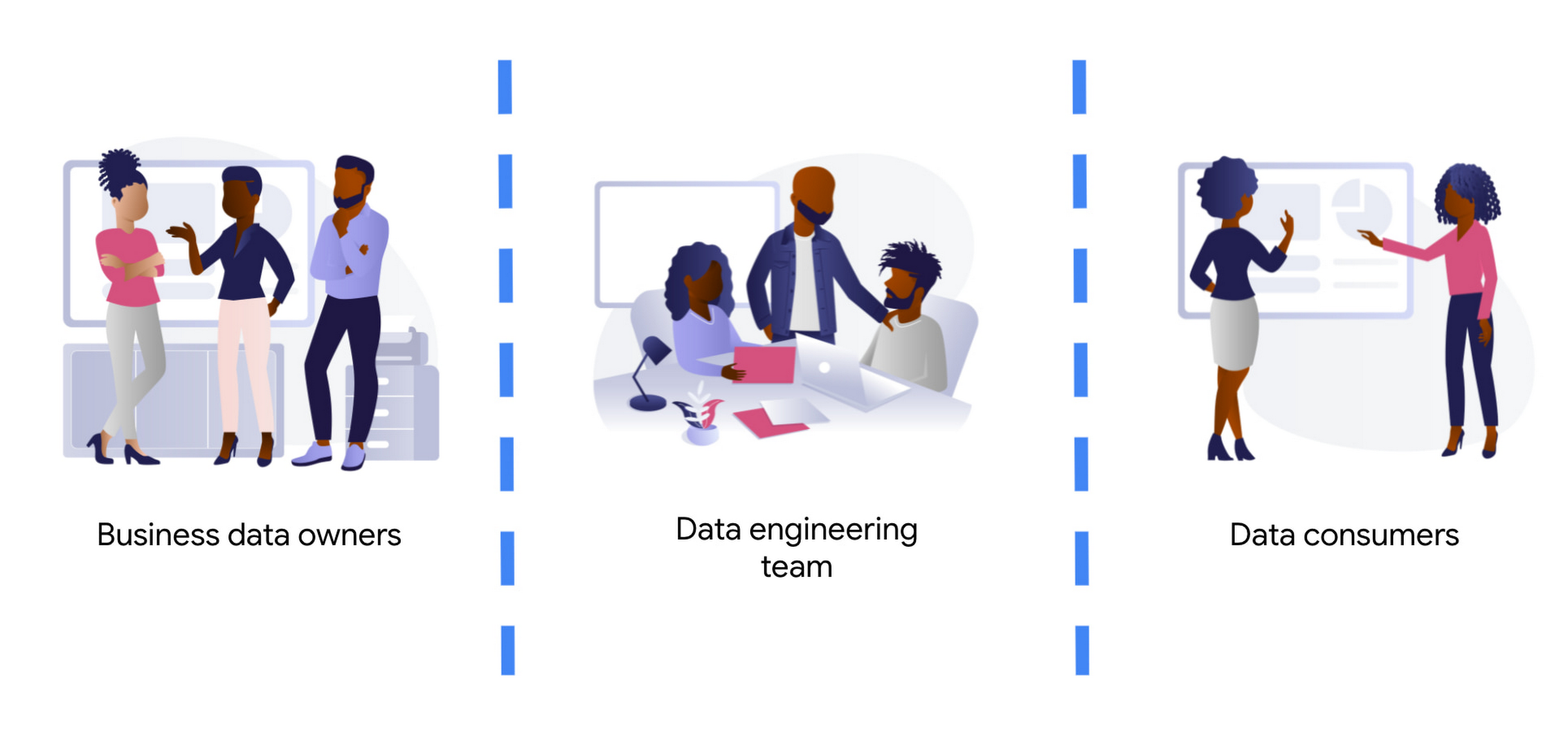
Business data owners are cross-functional domain-oriented teams. These teams know the business in detail, and are the source of data that feeds the data architecture. Sometimes these business units may also have some data-specific roles, such as data analysts, data engineers, or data scientists, to work as interfaces with the rest of the layers. For instance, these teams may design a business data owner, that is the point of contact of a business unit in everything that is related to the data produced by the unit.
At the other end of the architecture, we find the data consumers. Again, also cross-functional, but more focused on extracting insights from the different data available in the architecture. Here we typically find data science teams, data analysts, business intelligence teams, etc. These groups sometimes combine data from different business units, and produce artifacts (machine learning models, interactive dashboards, reports, and so on). For deployment, they require the help of the data engineering team so that data is consistent and trusted.
At the center of these crossroads, we find the data engineering team. Data engineers are responsible for making sure that the data generated and needed by different business units gets ingested into the architecture. This job requires two disparate skills: functional knowledge and data engineering/software development skills. This is often coined under the term DataOps (which evolved from DevOps methodologies developed within the past decades but applied to data engineering practices).
Data engineers have another responsibility too. They must help in the deployment of artifacts produced by the data consumers. Typically, the data consumers do not have the deep technical skills and knowledge to take the sole responsibility for deployment of their artifacts.This is also true for highly sophisticated data science teams. So data engineers must add other skills under their belt: machine learning and business intelligence platform knowledge. Let’s clarify this point, we don’t expect data engineers to become machine learning engineers. Data engineers need to understand ML to ensure that the data delivered to the first layer of a model ( the input ) is correct. They will also become key when delivering that first layer of data in the inference path, as here the data engineering skills around scale / HA etc really need to shine.
By taking the responsibility of parsing and transforming messy data from various business units, or for ingesting in real time, data engineers allow the data consumers to focus on creating value. Data science and other types of data consumers are abstracted away from data encodings, large files, legacy systems, complex message queue configurations for streaming. The benefits of concentrating that knowledge in a highly skilled data engineering team are clear, notwithstanding that other teams (business units and consumers) may also have their data engineers to work as interfaces with other teams. More recently, we even see squads created with members of the business units (data product owners), data engineers, data scientists, and other roles. Effectively creating complete teams with autonomy and full responsibility over a data stream, from the incoming data down to the data driven decision with impact in the business.
Reference architecture – Serverless
The number of skills required for the data engineering team is vast and diverse. We should not make it harder by expecting the team to maintain the infrastructure where they run data pipelines. They should be focusing on how to cleanse, transform, enrich, and prepare the data rather than how much memory or how many cores their solution may require.
The reference architectures presented here are based on the following principles:
Serverless no-ops technologies
Streaming-enabled for low time-to-insight
We present different alternatives, based on different products available in Google Cloud:
Dataflow, the built-in streaming analytics platform in Google Cloud
Dataproc, the Google Cloud’s managed platform for Hadoop and Spark.
Data Fusion, a codeless environment for creating and running data pipelines
Let’s dig into these principles.
By using serverless technology we eliminate the maintenance burden from the data engineering team, and we provide the necessary flexibility and scalability for executing complex and/or large jobs. For example, scalability is essential when planning for traffic spikes during mega Friday for retailers. Using serverless solutions allows retailers to look into how they are performing during the day. They no longer need to worry about resources needed to process massive data generated during the day.
The team needs to have full control and write their own code for the data pipelines because of the type of pipelines that the team develops. This is true either for batch or streaming pipelines. In batch, the parsing requirements can be complex and no off the shelf solution works. In streaming, if the team wants to fully leverage the capabilities of the platform, they should implement all the complex business logic that is required, without artificially simplifying the complexity in exchange for some better latency. They can develop a pipeline that achieves a low latency with highly complex business logic. This again requires the team to start writing code from first principles.
However, that the team needs to write code should not imply that they need to rewrite any existing piece of code. For many input/output systems, we can probably reuse code from patterns, snippets, and similar examples. Moreover, a logical pipeline developed by a data engineering team does not necessarily need to map to a physical pipeline. Some parts of the logic can be easily reused by using technologies like Dataflow templates, and use those templates in orchestration with other custom developed pipelines. This brings the best of both worlds (reuse and rewrite), while saving precious time that can be dedicated to higher impact code rather than common I/O tasks. The reference architecture presented has another important feature: the possibility to transform existing batch pipelines to streaming.
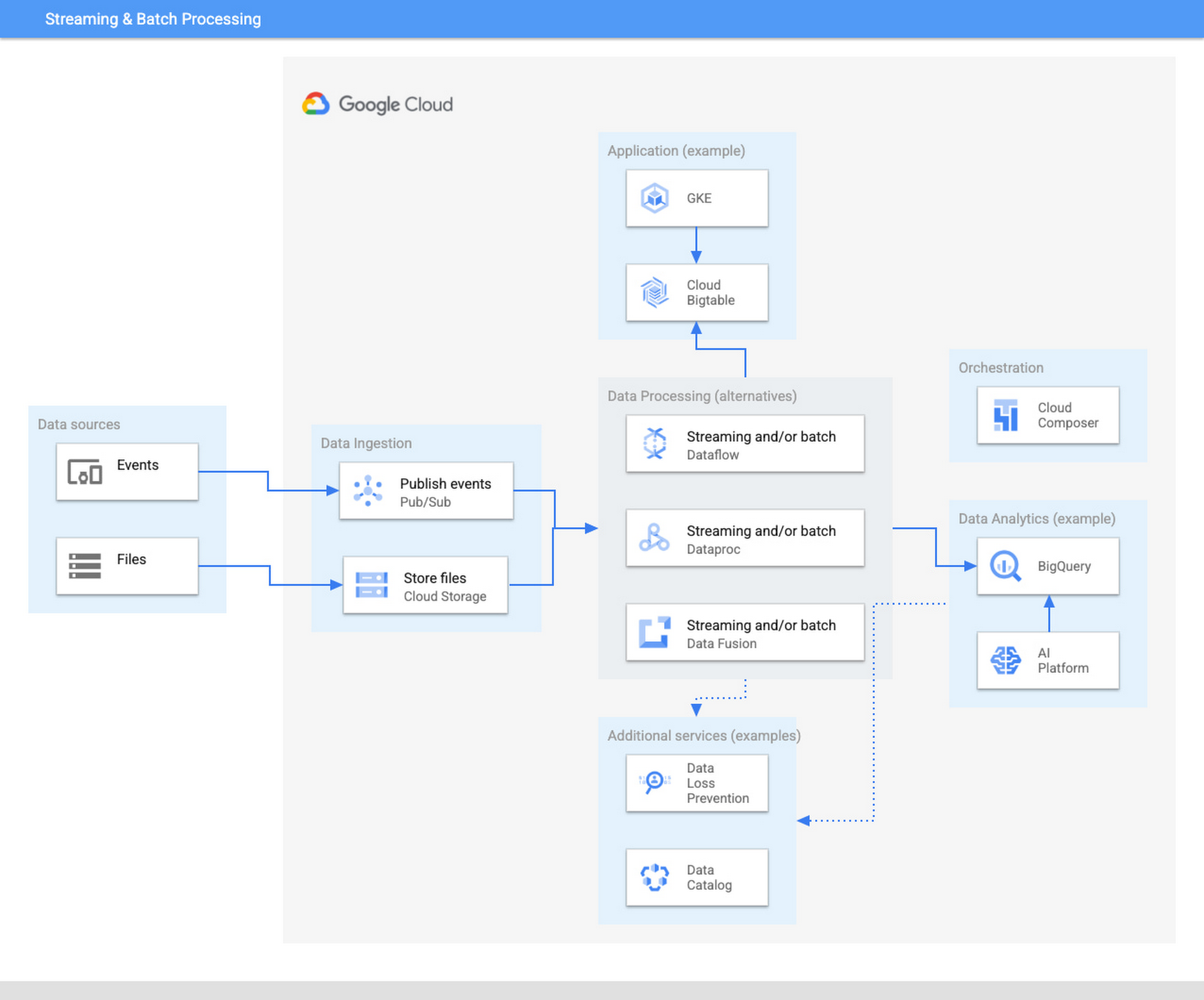
The ingestion layer consists of Pub/Sub for real time and Cloud Storage for batch and does not require any preallocated infrastructure. Both Pub/Sub and Cloud Storage can be used for a range of cases as it can automatically scale up with the input workload.
Once the data has been ingested, our proposed architecture follows the classical division in three stages: Extract, Transform, and Load (ETL). For some types of files, direct ingestion into BigQuery (following an ELT approach) is also possible.
In the transform layer, we primarily recommend Dataflow as the data process component. Dataflow uses Apache Beam as SDK. The main advantage of Apache Beam is the unified model for batch and streaming processing. As mentioned before, the same code can be adapted to run in batch or streaming by adapting input and output. For instance, switching the input from files in Cloud Storage to messages published in a topic in Pub/Sub.
One of the alternatives to Dataflow in this architecture is Dataproc, Google Cloud’s solution for managed Hadoop and Spark clusters. The main use case is for those teams that are migrating to Google Cloud but have large amounts of inherited code in Spark or Hadoop. Dataproc enables a direct path to the cloud, without having to review all those pipelines.
Finally, we also present the alternative of Data Fusion, a codeless environment for creating data pipelines using a drag-and-drop interface. Data Fusion actually uses Dataproc as its Compute Engine, so everything we have mentioned earlier applies also to the case of Data Fusion. If your team prefers to create data pipelines without having to write any code, Data Fusion is the right tool.
So in summary, these are the three recommended components for the transform layer:
Dataflow, powerful and versatile with a unified model for batch and streaming processing. Straightforward path to move from batch processing to streaming
Dataproc, for those teams that want to reuse existing code from Hadoop or Spark environments.
Data Fusion, if your team does not want to write any code.
Challenges and opportunities
Data platforms are complex. Having on top of that data responsibility the duty to maintain infrastructure is a wasteful use of valuable skills and talent. Often data teams end up managing infrastructure rather than focusing on analyzing the data. The architecture presented in this article liberates the data engineering team from having to allocate infrastructure and tweak clusters but instead to focus on providing value through data processing pipelines.
For data engineers to focus on what they do best, you need to fully leverage the cloud. A lift & shift approach from any on-premise installation is not going to provide that flexibility and liberation. You need to leverage serverless technologies. As an added advantage, serverless lets you also scale your data processing capabilities with your needs, and be able to respond to peaks of activity, however large these are.
Serverless technologies sometimes face the doubts of practitioners: will I be locked in with my provider if I fully leverage serverless? This is actually a question that you should be asking when deciding whether to set up your architecture on top of a provider.
The components presented here for data processing are based on open source technologies, and fully interoperable with other open source equivalent components. Dataflow uses Apache Beam, which not only unifies batch and streaming, but also offers a widely compatible runner. You can take your code elsewhere to any other runner. For instance, Apache Flink or Apache Spark. Dataproc is a fully managed Hadoop and Spark based on the vanilla open source components of this ecosystem. Data Fusion is actually the Google Cloud version of CDAP, an open source project.
On the other hand, for the serving layer, BigQuery is based on standard Ansi SQL. Whereas in the case of Bigtable and Google Kubernetes Engine, Bigtable is compatible at API level with HBase, and Kubernetes is an open source component.
In summary, when your components are based on open source, like the ones included in this architecture, serverless does not lock you in. The skills required to encode business logic in the form of data processing pipelines are based on engineering principles that remain stable across time. The same principles apply if you are using Hadoop, Spark, or Dataflow or UI driven ETL tooling. In addition, there are now new capabilities, such as low-latency streaming, that were not available before. A team of data engineers that learn the fundamental principles of data engineering will be able to quickly leverage those additional capabilities.
Our recommended architecture separates the logical level, the code of your applications, from the infrastructure where they run. This enables data engineers to focus on what they do best and on where they provide the highest added value. Let your Dataflow and your engineers impact your business, by adopting the technologies that liberate them and allow them to focus on adding business value. To learn more about building an unified data analytics platform, take a look at our recently published Unified Data Analytics Platform paper and Converging Architectures paper.
Read More for the details.
AWS – Amazon Simple Email Service is now available in the Asia Pacific (Osaka) Region
Amazon Simple Email Service (Amazon SES) is now available in the Asia Pacific (Osaka) AWS Region. Amazon SES is a scalable, cost-effective, and flexible cloud-based email service that allows digital marketers and application developers to send marketing, notification, and transactional emails from within any application. To learn more about Amazon SES, visit this page.
Read More for the details.
AWS – AWS WAF now offers in-line regular expressions
AWS WAF extends its regular expression (regex) support, allowing regex patterns to be expressed in-line within a rule statement. Previously, you had to create a regex pattern set, which provides a collection of regex patterns in a rule statement, even if you wanted to use just a single regex pattern in your WAF rule logic. With in-line regex, you can now include a single regex pattern directly inside a WAF rule statement, simplifying how WAF rules are expressed within your web ACL.
Read More for the details.
Azure – General availability: Azure Sphere OS version 21.09
This quality release includes an upgrade to the Linux Kernel and bug fixes in the Azure Sphere OS.
Read More for the details.
GCP – Deploying the Cloud Spanner Emulator remotely
Welcome to the third part of our series on the Cloud Spanner Emulator. In the first part, we got an overview of Cloud Spanner and the emulator, as well as the various ways that it can be provisioned. In the second part, we explored the various options available for running the emulator locally, as well as how to build the emulator as one of the components in an application container.
The emulator can also be deployed on a remote GCE instance or Cloud Run. Today, we will deploy the emulator services on a GCE host manually and via Terraform. Finally, we will also run the emulator on Cloud Run.
Cloud Spanner emulator on GCE
In the previous post, we have deployed the application and the emulator on separate containers by attaching both containers to a Docker network. In environments with VPC / project level separation for dev, stage and production it might be useful to run an emulator on a dedicated remote host. Apart from the ability to point your applications to the public/private IP of the emulator instance, this also allows for collaborative troubleshooting of failed test cases, etc.
Manual deployment
This section covers the steps to provision a GCE instance and start the emulator services. For the sake of completeness, it has instructions starting from creating a VPC; however, you can skip this and make changes according to your environment.
If you have been working through this series so far, your gcloud config is likely set to the emulator. Before you proceed with the commands below, please switch to a different configuration (e.g., your default one)
Next, you need to ensure the default gcloud configuration is set correctly. Below we are enabling authentication, unsetting any API endpoint URL set previously, and setting the GCP project we intend to use in the default gcloud configuration.
Create a VPC, subnet and firewall rules (you might want to edit the firewall rule source range to be more restrictive):
Create an emulator VM. We will run the emulator service with the instance creation itself by passing –metadata startup-script. Replace the placeholder [Your-Project-ID] with your GCP project ID.
Once the instance comes up and the emulator services are running, you can follow the instructions from the earlier blog posts to deploy the sample application. The only difference is that we change localhost to the public IP address (or private IP address if you are working from the same VPC or connected via VPN).
NOTE – If you are using a public IP address here, all of the data exchanged between your client and the remote emulator will be transmitted in plain text over the internet. Please ensure that you’re not sending privacy-sensitive data.
Example configuration below:
Provisioning an emulator GCE instance via Terraform
In an environment that follows the GitOps style of deployments, having a Terraform template for provisioning the emulator instance can be useful as well. You can follow the instructions below to spin up an instance with the emulator running.
Clone this repo which contains the Terraform code modules that we will be using:
First, we will have to initialize Terraform so it would download and install the provider plugin and configure the child module.
Open the terraform.tfvars file and edit the name of the VM, Project ID, Region and Zone based on your environment.
Initialize Terraform:
And apply:
You can now connect to the VM verify if the emulator services are up and running.
Once the VM is up and running with the emulator services started, you can use the VM’s public or private IP address to configure SPANNER_EMULATOR_HOST and connect, similar to what we described in the Manual Deployment section above.
Cloud Spanner emulator on Cloud Run
Since the emulator is available as a pre-built Docker image (or you can manually build from the source), deploying the emulator services on Cloud Run is straightforward. Cloud Run supports gRPC (after enabling HTTP2). However, it is important to remember that when using Cloud Run, you will be able to route requests to only one port at any given point in time.
NOTE – While it is possible to run multiple processes inside the same container in Cloud Run (in this case, gRPC server and REST server), the requests can only be sent to one port.
If your application uses only client libraries or RPC API (gRPC), then you can configure Cloud Run to send requests to the 9010 port. If you use only the REST API, then you can configure port 9020. Also, remember to set minimum instances to ‘1’ to prevent the container from being removed and thereby losing data when there is no activity.
You can choose from any of the following options:
Option 1: Deploy emulator gRPC on Cloud Run
Option 2: Deploy REST server on Cloud Run
NOTE – Avoid using both options simultaneously, as that will create two different instances of the emulator, and two different copies of your database that would be out of sync, i.e. depending on which emulator instance serves your request, you may get completely different results.
Once done, you can configure your emulator profile pointing to Cloud Run’s URL like below:
If you are using REST server:
If you are using gRPC:
NOTE – We have not specified a port number above since the requests to the Cloud Run URL already route to the port used (9010 or 9020) directly. Therefore, you just need to add the Cloud Run URL, without the port.
Conclusion
Through this 3-part series of blogs, we introduced the Cloud Spanner Emulator and detailed various options available to start and use the emulator both locally and on a remote host. We also demonstrated how the emulator can be used in a development workflow as a no-cost experience for Cloud Spanner using a sample application.
Hope you found this useful!
To learn more about Cloud Spanner, visit the product page here and to learn more about the Cloud Spanner emulator, please see the documentation here.
Read More for the details.
AWS – Amazon DynamoDB now provides you more granular control of audit logging by enabling you to filter Streams data-plane API activity in AWS CloudTrail
You now can use AWS CloudTrail to filter and retrieve Amazon DynamoDB Streams data-plane API activity, giving you more granular control over which DynamoDB API calls you want to selectively log and pay for in CloudTrail and to help address compliance and auditing requirements.
Read More for the details.
AWS – Amazon Lex announces utterances statistics for bots built using Lex V2 console and API
Amazon Lex is a service for building conversational interfaces into any application using voice and text. Starting today, Amazon Lex makes utterances statistics available through the Amazon Lex V2 console and API. You can now use utterances statistics to tune bots built on Lex V2 console and APIs to further improve conversational experience for your users. With this launch, you can view and analyze utterance information processed by the bot. This information can be used to improve performance of your bot by adding new utterances to existing intents and helping you discover new intents that can be serviced by the bot. Utterances statistics also enable you to compare performance across multiple versions of a bot.
Read More for the details.