Amazon CloudFront announces cross-account support for Virtual Private Cloud (VPC) origins, enabling customers to access VPC origins that reside in different AWS accounts from their CloudFront distributions. With VPC origins, customers can have their Application Load Balancers (ALB), Network Load Balancers (NLB), and EC2 Instances in a private subnet that is accessible only through their CloudFront distributions. With the support for cross-account VPC origins in CloudFront, customers can now leverage the security benefits of VPC origins while maintaining their existing multi-account architecture.
Customers set up multiple AWS accounts for better security isolation, cost management, and compliance. Previously, customers could access origins in private VPCs from CloudFront only if CloudFront and the origin were in the same AWS account. This meant customers who had their origins in multiple AWS accounts, had to keep their accounts in public subnets to get the scale and performance benefits of CloudFront. Customers then had to maintain additional security controls, such as access control lists (ACL), at both the edge and within regions, rather than benefiting from the inherent security of VPC origins. Now, customers can use AWS Resource Access Manager (RAM) to allow CloudFront access to origins in private VPCs in different AWS accounts, both within and outside their AWS Organizations and organizational units (OUs). This streamlines security management and reduces operational complexity, making it easy to use CloudFront as the single front door for applications.
VPC origins is available in AWS Commercial Regions only, and the full list of supported AWS Regions is available here. There is no additional cost for using cross-account VPC origins with CloudFront. To learn more about implementing cross-account VPC origins and best practices for multi-account architectures, visit CloudFront VPC origins.
Amazon CloudWatch Database Insights now detects anomalies on additional metrics through its on-demand analysis experience. Database Insights is a monitoring and diagnostics solution that helps database administrators and application developers optimize database performance by providing comprehensive visibility into database metrics, query performance, and resource utilization patterns. The on-demand analysis feature utilizes machine learning to help identify anomalies and performance bottlenecks during the selected time period, and gives advice on what to do next.
The Database Insights on-demand analysis feature now offers enhanced anomaly detection capabilities. Previously, database administrators could analyze database performance and correlate metrics based on database load. Now, the on-demand analysis report also identifies anomalies in database-level and operating system-level counter metrics for the database instance, as well as per-SQL metrics for the top SQL statements contributing to database load. The feature automatically compares your selected time period against normal baseline performance, identifies anomalies, and provides specific remediation advice while reducing mean time to diagnosis. Through intuitive visualizations and clear explanations, you can quickly identify performance issues and receive step-by-step guidance for resolution.
You can get started with on-demand analysis by enabling the Advanced mode of CloudWatch Database Insights on your Amazon Aurora or RDS databases using the AWS management console, AWS APIs, or AWS CloudFormation. Please refer to RDS documentation and Aurora documentation for information regarding the availability of Database Insights across different regions, engines, and instance classes.
Amazon FSx now integrates with AWS Secrets Manager, enabling enhanced protection and management of the Active Directory domain service account credentials for your FSx for Windows File Server file systems and FSx for NetApp ONTAP Storage Virtual Machines (SVMs).
Previously, if you wanted to join your FSx for Windows file system or FSx for ONTAP SVM to your Active Directory domain for user authentication and access control, you needed to specify the username and password for your service account in the Amazon FSx Console, Amazon FSx API, AWS CLI, or AWS CloudFormation. With this launch, you can now specify an AWS Secrets Manager secret containing the service account credentials, enabling you to strengthen your security posture by eliminating the need to store plain text credentials in application code or configuration files, and aligning with best practices for credential management. Additionally, you can use AWS Secrets Manager to rotate your Active Directory credentials and consume them when needed in FSx workloads.
Editor’s note: Today we hear from Buildertrend, a leading provider of cloud-based construction management software. Since 2006, the platform has helped more than a million users globally simplify business management, track financials, and improve communication. To support this massive scale and their ambitious vision, they rely on a robust technology stack on Google Cloud, including, recently, Memorystore for Valkey. Read on to hear about their migration from Memorystore for Redis to the new platform.
Running a construction business is a complex balancing act that requires a constant stream of real-time information to keep projects on track. At Buildertrend, we understand the challenges our customers face — from fluctuating material costs and supply chain delays to managing tight deadlines and the risk of budget overruns — and work to help construction professionals improve efficiency, reduce risk, and enhance collaboration, all while growing their bottom line.
The challenge: Caching at scale
The construction industry has historically been slow to adopt new technologies, hindering efficiency and scalability. At Buildertrend, we aim to change this by being at the forefront of adopting new technology. When Memorystore for Valkey became generally available, we spent time looking into whether it could help us modernize our stack and deliver value to customers. We were attracted by Valkey’s truly open source posture and its promised performance benefits over competing technologies.
Before adopting Memorystore for Valkey, we had used Memorystore for Redis. While it served our basic needs, we found ourselves hitting a wall when it came to a critical feature: native cross-regional replication. As we scaled, we needed a solution that could support a global user base and provide seamless failover in case of a disaster or other issues within a region. We also needed a modern connectivity model such as Google Cloud’s Private Service Connect to enhance network security and efficiency.
As a fully managed, scalable, and highly available in-memory data store, Memorystore for Valkey offered the key features we needed out of the box to take our platform to the next level.
A modern solution for a modern problem
Within this ecosystem, we use Memorystore for Valkey for a variety of critical functions, including:
Database-backed cache: Speeds up data retrieval for a faster user experience
Session state: Manages user sessions for web applications
Job storage: Handles asynchronous task queues for background processes
Pub/Sub idempotency keys: Ensures messages are processed exactly once, preventing data duplication
Authentication tokens: Securely validates user identity with cryptographically signed tokens, enabling fast, scalable authentication
By leveraging the cache in these scenarios, our application is fast, resilient, and ready to meet the demands of our growing customer base. The native cross regional replication helped us support a global user base without having to worry about keeping global caches in sync.
A seamless migration with minimal disruption
Migrating from Memorystore for Redis to Memorystore for Valkey was a smooth process, thanks to close collaboration with the Google Cloud team. We worked with the Google Cloud team to identify the best approach, which for us involved exporting data to Google Cloud Storage and seeding the data at Valkey instance creation, allowing us to migrate with minimal downtime. Because Memorystore for Valkey natively supports Private Service Connect, we were able to eliminate a proxy layer that our engineers used to connect to our Memorystore for Redis instances, simplifying our stack and improving our networking posture.
Looking ahead to a global future
Although it’s still early in our journey, the impact is already clear. Memorystore for Valkey has unlocked our ability to scale and drastically reduced our time to market. It has allowed our team to streamline and own deployment processes, so they can be more agile and responsive.
For us, the future is about global scalability. With nearly 300 Memorystore for Valkey instances in our fleet, we’re building a globally available, cloud-native stack. Our most critical instances are highly optimized to serve up to 30,000 requests per second each, demonstrating the foundation’s scalability and performance.
We strive to use scalable cloud-native technologies, and Memorystore for Valkey will enable us to continue down this path. By using the Memorystore for Valkey managed service, we not only solve technical problems, but also accelerate business growth and empower engineering teams to focus on what matters most: building great products.
Ready to build with Memorystore for Valkey?
Like Buildertrend, you can leverage the power of a fully managed, scalable, and highly available in-memory data store to accelerate your applications and empower your development teams.
Artificial intelligence is reshaping our world – accelerating discovery, optimising systems, and unlocking new possibilities across every sector. But with its vast potential comes a shared responsibility.
AI can be a powerful ally for transforming businesses and reducing cost. It can help organizations minimize carbon emissions, industries manage energy use, and scientists model complex climate systems in real time. Yet the way we design, deploy, and run AI also matters. Building software sustainably means making every stage of the digital journey – from architecture to inference – more efficient, transparent, and resilient.
Innovation that serves sustainability
At Google, we believe innovation and sustainability go hand in hand. The same intelligence that powers breakthroughs can also help us use resources more wisely.
Projects like Green Light, which uses AI to optimise traffic signals and reduce emissions, and Project Contrails, which helps airlines cut the warming effects of condensation trails, show what happens when technology serves both performance and planet.
Each example reveals a helpful truth – that sustainability doesn’t slow innovation but instead fuels it, enabling efficiency to become an engine of progress.
From footprint to framework
Every software system, including AI, has an environmental footprint – from the hardware and energy that powers data centers to the water used to cool them. Water is one of the planet’s most precious and increasingly scarce resources and protecting it must be part of any technology strategy. That’s why Google is investing in advanced cooling systems and water stewardship projects with the goal to replenish more than we consume, helping preserve local ecosystems and community supplies.
Understanding this footprint helps engineers and organisations make smarter choices, like selecting efficient accelerators, rightsizing workloads, and scheduling operations when the grid is cleanest.
Across Google Cloud, we’re continually improving efficiency. Our Ironwood Tensor Processing Units (TPUs) are nearly 30 times more energy-efficient than our first Cloud TPU from 2018, and our data centres operate at a fleet-wide Power Usage Effectiveness (PUE) of 1.09, which is amongst the best in the world.
By designing systems that consume less energy and run on more carbon-free power, we help close the gap between ambition and action – turning digital progress into tangible emissions reductions.
But this isn’t achieved through infrastructure alone. It’s the result of decisions made at every layer of the software lifecycle. That’s why we encourage teams to think Sustainable by Design, bringing efficiency, measurement, and responsibility into every stage of building software.
Sustainable by Design: a mindset for the AI era
Today’s sustainability questions aren’t coming just from sustainability teams; they are coming directly from executives, financial operations teams, technology leads and developers. And they are often asking sustainability questions using infrastructure language: “Are we building the most price-performant AND efficient way to run AI?” This is not a niche environmental question; it’s relevant across -industries, across-geo’s and it requires that leaders consider sustainability criteria when they are designing infrastructure. A Sustainable by Design infrastructure strategy makes AI training and operation dramatically more cost- and energy-efficient. It’s built around a set of principles known as the 4Ms which lay out powerful ways to embed efficiency into software:
Machine – choose efficient computing resources that deliver more performance per watt.
Model – use or adapt existing models rather than starting from scratch — smaller, fine-tuned models can be faster and more resource efficient.
Mechanisation – automate data and AI operations through serverless and managed services to minimise idle compute.
Map – run workloads where and when the energy supply is cleanest.
The 4Ms help turn sustainability into a design principle, and a shared responsibility across every role in tech.
A collective journey toward resilience
As we host the AI Days in the Nordics, the conversation about AI’s environmental impact is accelerating, and so is the opportunity to act. Every software team, cloud architect, and product manager has a role to play in designing a digital ecosystem that enables and fuels innovation without compromising environmental impact.
Building software sustainably is essential for business resilience –AI applications that use fewer resources are not only more energy efficient; they’re scalable, and cost-effective for the organisations that depend on them.
Many developers are prototyping AI agents, but moving to a scalable, secure, and well-managed production agent is far more complex.
Vertex AI Agent Builder is Google Cloud’s comprehensive and open platform to build, scale, and govern reliable agents. As a suite of products, it provides the choice builders need to create powerful agentic systems at global scale.
Since Agent Builder’s public inception earlier this year, we’ve seen tremendous traction with components such as our Python Agent Development Kit (ADK), which has been downloaded over7 million times. Agent Development Kit also powers agents for customers using Gemini Enterprise and agents operating in products across Google.
Today, we build on that momentum by announcing new capabilities across the entire agent lifecycle to help you build, scale, and govern AI agents. Now, you can:
Build faster with control agent context and reduce token usage with configurable context layers (Static, Turn, User, Cache)via the ADK API.
Scale in production with new managed services from the Vertex AI Agent Engine (AE) including new observability and evaluation capabilities
Govern agents with confidence with newfeaturesincluding nativeagent identities and security safeguards
These new capabilities underscore our commitment to Agent Builder, and simplify the agent development lifecycle to meet you where you are, no matter which tech stack you choose.
For reference, here’s what to use, and when:
This diagram showcases the comprehensive makeup of Agent Builder neatly organized into the build, scale, and govern pillars.
1. Build your AI agents faster
Building an agent from a concept to a working product involves complex orchestration. That’s why we’ve improved ADK for your building experience:
Build more robust agents: Use our adaptable plugins framework for custom logic (like policy enforcement or usage tracking). Or use our prebuilt plugins, including a new plugin for tool use that helps agents ‘self-heal.’ This means the agent can recognize when a tool call has failed and automatically retry the action in a new way.
More language support: We are also enabling Go developers to build ADK agents (with a dedicated A2A Go SDK) alongside Python and Java, making the framework accessible to many more developers.
Single command deployment: Once you have built an agent, you can now use the ADK CLI to deploy agents using a single command, adk deploy,to the Agent Engine (AE) runtime. This is a major upgrade to help you move your agent from local development to live testing and production usage quickly and seamlessly.
You can start building today with adk-samples on GitHub or on Vertex AI Agent Garden – a growing repository of curated agent samples, solutions, and tools, designed to accelerate your development and support one click deployment of your agents built with ADK.
2. Scale your AI agents effectively
Once your agent is built and deployed, the next step is running it in production. As you scale from one agent to many, managing them effectively becomes a key challenge. That’s why we continue to expand the managed services available in Agent Engine. It provides the core capabilities for deploying and scaling the agents you create in Agent Builder
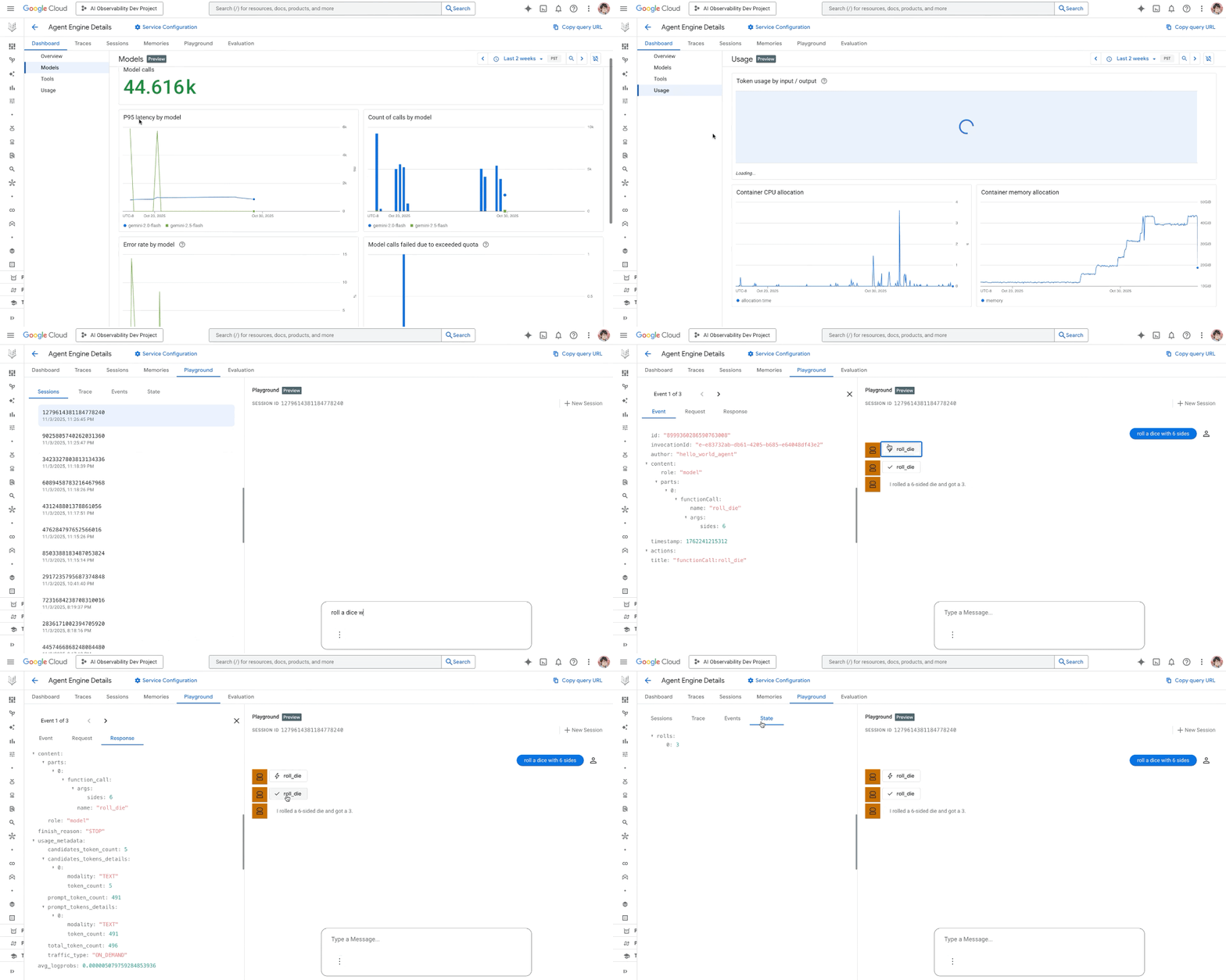
Observability: We’re bringing the local development environment that you know and love from adk web to Google Cloud to enable Cloud based production monitoring. Within Agent Engine, we are making it easy to:
Track key agent performance metrics with a dashboard that measures token consumption, latency, error rates, and tool calls over time.
Find and fix production issues faster in a traces tab so you can dive into flyouts to visualize and understand the sequence of actions your agents are taking.
Interact with your deployed agent (including past sessions or issues) with a playground to dramatically shorten your debug loop.
Quality & evaluation: You told us that evaluating non-deterministic systems is a major challenge. We agree. Now, you can simulate agent performance using the new Evaluation Layer that includes a User Simulator.
Simplified access: You can use the ADK CLI to deploy to the Agent Engine runtime and use AE sessions and memory without signing up for a Google Cloud account. Sign up using your Gmail addressand get started for free for up to 90 days. If you have a Google Cloud account, the AE runtime now offers a free tierso you can deploy and experiment without hesitation.
Below is a demo showcasing the new observability features in actions such as an updated AE dashboard, traces, and playground within Agent Engine
3. Govern your AI agents with confidence
Now that you can measure your agent performance at scale the final stage of the lifecycle is ensuring they operate safely and responsibly. New and expanded capabilities include:
Agent identities: Building on our existing Cloud IAM capabilities, we are giving agents their own unique, native identities within Google Cloud. As first-classIAM principals, agent identities allow you to enforce true least-privilege access, establish granular policies, and resource boundaries to meet your compliance and governance requirements.
Safeguards and advanced security: Existing protections are already available to protect and secure AI applications. Model Armor provides protection against input risks like prompt injection, while also screening tool calls and agent responses. For complete control, Model Armor provides built-in inline protection for Gemini models and a REST API to integrate with your agents. To provide full visibility, new integrations with AI Protection in Security Command Center will discover and inventory agentic assets as well as detect agentic threats such as unauthorized access and data exfiltration attempts by agents.
As a bonus, agents you build in Agent Builder can be registered for your teams to use directly within Gemini Enterprise.
Below is a mock of a dashboard in Gemini Enterprise, showing how custom agents built in Agent Builder can be registered and made available to your employees, creating a single place for them to accelerate their workflows.
How customers are achieving more with Agent Builder
“Color Health, with its affiliated medical group Color Medical, operates the nation’s only Virtual Cancer Clinic, delivering clinically guided, end-to-end cancer care across all 50 states, from prevention to survivorship. In partnership with Google Cloud and Google.org, we’re helping more women get screened for breast cancer using an AI-powered agent built with Vertex AI Agent Builder using ADK powered by Gemini LLMs and scaling them into production with Agent Engine. The Color Assistant determines if women are due for a mammogram, connects them with clinicians, and schedules care. The power of the agent lies in the scale it enables, helping us reach more women, collect diverse and context-rich answers, and respond in real time. Early detection saves lives: 1 in 8 women develop breast cancer, yet early detection yields a 99% survival rate. Check it out here: color.com/breast-cancer-screening” – Jayodita Sanghvi, PhD., Head of AI Platform, Color
“PayPal uses Vertex AI Agent Builder to rapidly build and deploy agents in production. Specifically, we use Agent Development Kit (ADK) CLI and visual tools to inspect agent interactions, follow state changes, and manage multi-agent workflows. We leverage the step-by-step visibility feature for tracing and debugging agent workflows. This lets the team easilytrace requests/responses and visualize the flow of intent, cart, and payment mandates. Finally, Agent Payment Protocol (AP2) on Agent Builder provides us the critical foundation for trusted agent payments. AP2 helps our ecosystem accelerate the shipping of safe, secure agent-based commerce experiences.” –Nitin Sharma, Principal Engineer, AI
“Geotab uses Vertex AI Agent Builder to rapidly build and deploy agents in production. Specifically, we use Google’s Agent Development Kit (ADK) as the framework for our AI Agent Center of Excellence. It provides the flexibility to orchestrate various frameworks under a single, governable path to production, while offering an exceptional developer experience that dramatically accelerates our build-test-deploy cycle. For Geotab, ADK is the foundation that allows us to rapidly and safely scale our agentic AI solutions across the enterprise” – Mike Bench, Vice President, Data & Analytics
Get started
Vertex AI Agent Builder provides the unified platform to manage the entire agent lifecycle, helping you close the gap from prototype to a production-ready agent. To explore these new features, visit the updated Agent Builder documentation to learn more.
If you’re a startup and you’re interested in learning more about building and deploying agents, download the Startup Technical Guide: AI Agents. This guide provides the knowledge needed to go from an idea to prototype to scale, whether your goals are to automate tasks, enhance creativity, or launch entirely new user experiences for your startup.
AWS is announcing the general availability of new memory-optimized Amazon EC2 R8a instances. R8a instances, feature 5th Gen AMD EPYC processors (formerly code named Turin) with a maximum frequency of 4.5 GHz, deliver up to 30% higher performance, and up to 19% better price-performance compared to R7a instances.
R8a instances deliver 45% more memory bandwidth compared to R7a instances, making these instances ideal for latency sensitive workloads. Compared to Amazon EC2 R7a instances, R8a instances provide up to 60% faster performance for GroovyJVM, allowing higher request throughput and better response times for business-critical applications.
Built on the AWS Nitro System using sixth generation Nitro Cards, R8a instances are ideal for high performance, memory-intensive workloads, such as SQL and NoSQL databases, distributed web scale in-memory caches, in-memory databases, real-time big data analytics, and Electronic Design Automation (EDA) applications. R8a instances offer 12 sizes including 2 bare metal sizes. Amazon EC2 R8a instances are SAP-certified, and providing 38% more SAPS compared to R7a instances.
R8a instances are available in the following AWS Regions: US East (N. Virginia), US East (Ohio), and US West (Oregon) regions. To get started, sign in to the AWS Management Console. Customers can purchase these instances via Savings Plans, On-Demand instances, and Spot instances. For more information visit the Amazon EC2 R8a instance page.
Amazon CloudWatch Application Signals Model Context Protocol or MCP Server for Application Performance Monitoring (APM) now integrates CloudWatch Synthetics canary monitoring directly into its audit framework, enabling automated, AI-powered debugging of synthetic monitoring failures. DevOps teams and developers can now use natural language questions like ‘Why is my checkout canary failing?’ in compatible AI assistants such as Amazon Q, Claude, or other supported assistants to utilize the new AI-powered debugged capabilities and quickly distinguish between canary infrastructure issues and actual service problems, addressing the significant challenge of extensive manual analysis in maintaining reliable synthetic monitoring.
The integration extends Application Signals’ existing multi-signal (services, operations, SLOs, golden signals) analysis capabilities to include comprehensive canary diagnostics. The new feature automatically correlates canary failures with service health metrics, traces, and dependencies through an intelligent audit pipeline. Starting from natural language prompts from users, the system performs multi-layered diagnostic analysis across six major areas: Network Issues, Authentication Failures, Performance Problems, Script Errors, Infrastructure Issues, and Service Dependencies. This analysis includes automated comparison of HTTP Archive or HAR files, CloudWatch logs analysis, S3 artifact examination, and configuration validation, significantly reducing the time needed to identify and resolve synthetic monitoring issues. Customers can then access these insights through natural language interactions with supported AI assistants.
This feature is available in all commercial AWS regions where Amazon CloudWatch Synthetics is offered. Customers will need access to a compatible AI agent such as Amazon Q, Claude, or other supported AI assistants to utilize the AI-powered debugging capabilities.
Amazon Keyspaces (for Apache Cassandra) now supports Multi-Region Replication in the Middle East (Bahrain) and Asia Pacific (Hong Kong) Regions. With this expansion, customers can now replicate their Amazon Keyspaces tables to and from these Regions, enabling lower latency access to data and improved regional resiliency.
Amazon Keyspaces Multi-Region Replication automatically replicates data across AWS Regions with typically less than a second of replication lag, allowing applications to read and write data to the same table in multiple Regions. This capability helps customers build globally distributed applications that can serve users with low latency regardless of their location, while also providing business continuity in the event of a regional disruption.
The addition of Multi-Region Replication support in Middle East (Bahrain) and Asia Pacific (Hong Kong) enables organizations operating in these regions to build highly available applications that can maintain consistent performance for users across the Middle East and Asia Pacific. Customers can now replicate their Keyspaces tables between these regions and any other supported AWS Region without managing complex replication infrastructure.
You pay only for the resources you use, including data storage, read/write capacity, and writes in each Region of your multi-Region keyspace. To learn more about Amazon Keyspaces Multi-Region Replication and its regional availability, visit the Amazon Keyspaces documentation.
Buyers and sellers in India can now transact locally in AWS Marketplace, with invoicing in Indian Rupees (INR), and with simplified tax compliance through AWS India. With this launch, India-based sellers can now register to sell in AWS Marketplace and offer paid subscriptions to buyers in India. India-based sellers will be able to create private offers in US dollars (USD) or INR. Buyers in India purchasing paid offerings in AWS Marketplace from India-based sellers will receive invoices in INR, helping to simplify invoicing with consistency across AWS Cloud and AWS Marketplace purchases. Sellers based in India can begin selling paid offerings in AWS Marketplace and can work with India-based Channel Partners to sell to customers.
AWS India will facilitate the issuance of tax-compliant invoices in INR to buyers, with the independent software vendor (ISV) or Channel Partner as the seller of record. AWS India will automate the collection and remittance of Withholding Tax (WHT) and GST-Tax Collected at Source (GST-TCS) to the relevant tax authorities, fulfilling compliance requirements for buyers. During this phase, non-India based sellers can continue to sell directly to buyers in India through AWS Inc., in USD or through AWS India by working through authorized distributors.
To learn more and explore solutions available from India-based sellers, visit this page. To get started as a seller, India-based ISVs and Channel Partners can register in the AWS Marketplace Management Portal. For more information about buying or selling using AWS Marketplace in India, visit the India FAQs page and help guide.
Welcome to the first Cloud CISO Perspectives for November 2025. Today, Sandra Joyce, vice-president, Google Threat Intelligence, updates us on the state of the adversarial misuse of AI.
As with all Cloud CISO Perspectives, the contents of this newsletter are posted to the Google Cloud blog. If you’re reading this on the website and you’d like to receive the email version, you can subscribe here.
aside_block
<ListValue: [StructValue([(‘title’, ‘Get vital board insights with Google Cloud’), (‘body’, <wagtail.rich_text.RichText object at 0x3e0b0eeb2610>), (‘btn_text’, ‘Visit the hub’), (‘href’, ‘https://cloud.google.com/solutions/security/board-of-directors?utm_source=cloud_sfdc&utm_medium=email&utm_campaign=FY24-Q2-global-PROD941-physicalevent-er-CEG_Boardroom_Summit&utm_content=-&utm_term=-‘), (‘image’, <GAEImage: GCAT-replacement-logo-A>)])]>
Recent advances in how threat actors use AI tools
By Sandra Joyce, vice-president, Google Threat Intelligence
Sandra Joyce, vice-president, Google Threat Intelligence
As defenders have made significant advances in using AI to boost their efforts this year, government-backed threat actors and cybercriminals have been trying to do the same. Google Threat Intelligence Group (GTIG) has observed threat actors moving beyond using AI solely for productivity gains: They’re experimenting with deploying novel AI-enabled malware in active operations.
This shift marks a new phase in how threat actors use AI, shifting from experimentation to wider takeup of tools. It follows our analysis on the adversarial misuse of generative AI, where we found that, up until the point when we published the report in January, threat actors were using Gemini mostly for productivity gains.
At Google, we are committed to developing AI responsibly and are taking proactive steps to disrupt malicious activity, disabling the projects and accounts associated with these threat actors.
Based on GTIG’s unique visibility into the misuse of AI tools and the broader threat landscape, the new report details four key findings on how government-backed threat actors and cybercriminals are integrating AI across their entire attack lifecycle. By understanding how adversaries are innovating with AI, security leaders can get ahead of threats and take proactive measures to update their security posture against a changing threat landscape.
1. AI generating commands to steal documents and data
For the first time, GTIG has identified malware families that use large language models (LLMs) during execution. These tools can dynamically generate malicious scripts, use self-modification to obfuscate their own code to evade detection, and receive commands from AI models rather than traditional command-and-control (C2) servers.
One such new malware detailed in the full report is a data miner we track as PROMPTSTEAL. In June, GTIG identified the Russian government-backed actor APT28 (also known as FROZENLAKE) using PROMPTSTEAL, which masquerades as an image generation program that guides the user through a series of prompts to generate images.
In the background, PROMPSTEAL queries the API for Hugging Face, a platform for open-source machine learning including LLMs, to generate commands for execution, rather than hard-coding commands in the malware. The prompt specifically asks the LLM to output commands to gather system information, to copy documents to a specified directory, and to exfiltrate data.
Our analysis indicates continued development of this malware, with new samples adding obfuscation and changing the C2 method.
FROZENLAKE’s use of PROMPTSTEAL constitutes our first observation of malware querying a LLM deployed in live operations. Combined with other recent experimental implementations of novel AI techniques, this campaign provides an early indicator of how threats are evolving and how adversaries can potentially integrate AI capabilities into future intrusion activity.
What Google is doing: Google has taken action against this actor by disabling the assets associated with their activity. Google DeepMind has also used these insights to further strengthen our protections against misuse by strengthening both Google’s classifiers and the model itself. This enables the model to refuse to assist with these types of attacks moving forward.
2. Social engineering to bypass safeguards
Threat actors have been adopting social engineering pretexts in their prompts to bypass AI safeguards. We observed actors posing as cybersecurity researchers and as students in capture-the-flag (CTF) competitions to persuade Gemini to provide information that would otherwise receive a safety response from Gemini.
In one interaction, a threat actor asked Gemini to identify vulnerabilities on a compromised system, but received a safety response from Gemini that a detailed response would not be safe. They reframed the prompt by depicting themselves as a participant in a CTF exercise, and in response Gemini returned helpful information that could be misused to exploit the system.
The threat actor appeared to learn from this interaction and continued to use the CTF pretext over several weeks in support of phishing, exploitation, and webshell development.
What Google is doing: We took action against the CTF threat actor by disabling the assets associated with the actor’s activity. Google DeepMind was able to use these insights to further strengthen our protections against misuse. Observations have been used to strengthen both classifiers and the model itself, enabling it to refuse to assist with these types of attacks moving forward.
3. Maturing cybercrime marketplace for AI tooling
In addition to misusing mainstream AI-enabled tools and services, there is a growing interest and marketplace for purpose-built AI tools and services that can enable illicit activities. To identify evolving threats, GTIG tracks posts and advertisements on underground forums related to AI tools and services as well as discussions surrounding the technology.
Many underground forum advertisements mirror language comparable to marketing for legitimate AI models, citing the need to improve the efficiency of workflows and effort while simultaneously offering guidance for prospective customers interested in their offerings.
The underground marketplace for illicit AI tools has matured in 2025. GTIG has identified multiple offerings of multifunctional tools designed to support phishing, malware development, vulnerability research, and other capabilities. This development has lowered the barrier to entry for less sophisticated, poorly-resourced threat actors.
What Google is doing: While there are no direct mitigations to prevent threat actors from developing their own AI tools, at Google we use threat intelligence to disrupt adversary operations — including monitoring the cybercrime AI tool marketplace.
4. Continued augmentation of the full attack lifecycle
State-sponsored actors from North Korea, Iran, and the People’s Republic of China (PRC) continue to misuse AI to enhance all stages of their operations, from reconnaissance and phishing lure creation to C2 development and data exfiltration.
In one example, GTIG observed a suspected PRC-nexus actor using Gemini to support multiple stages of an intrusion campaign, including conducting initial reconnaissance on targets, researching phishing techniques to deliver payloads, soliciting assistance from Gemini related to lateral movement, seeking technical support for C2 efforts once inside a victim’s system, and helping with data exfiltration.
What Google is doing: GTIG takes a holistic, intelligence-driven approach to detecting and disrupting threat activity. Our understanding of government-backed threat actors and their campaigns can help provide the needed context to identify threat-enabling activity. By tracking this activity, we’re able to leverage our insights to counter threats across Google platforms, including disrupting the activity of threat actors who have misused Gemini.
Our learnings from countering malicious activities are fed back into our product development to improve safety and security for our AI models. Google DeepMind was able to use these insights to further strengthen our protections against misuse. Observations have been used to strengthen both classifiers and the model itself, enabling it to refuse to assist with these types of attacks moving forward.
Building AI safely and responsibly
At Google, we are committed to developing AI responsibly and are taking proactive steps to disrupt malicious activity, disabling the projects and accounts associated with these threat actors. In addition to taking action against accounts, we have proactively fed the intelligence back into our teams and products to better protect Google and its users. We continuously improve our models to make them less susceptible to misuse, and share our findings to arm defenders and enable stronger protections across the ecosystem.
We believe our approach to AI must be both bold and responsible. That means developing AI in a way that maximizes the positive benefits to society while addressing the challenges. Guided by our AI Principles, Google designs AI systems with robust security measures and strong safety guardrails, and we continuously test the security and safety of our models to improve them.
<ListValue: [StructValue([(‘title’, ‘Tell us what you think’), (‘body’, <wagtail.rich_text.RichText object at 0x3e0b0eeb2280>), (‘btn_text’, ‘Join the conversation’), (‘href’, ‘https://google.qualtrics.com/jfe/form/SV_2n82k0LeG4upS2q’), (‘image’, <GAEImage: GCAT-replacement-logo-A>)])]>
In case you missed it
Here are the latest updates, products, services, and resources from our security teams so far this month:
How Google Does It: Threat modeling, from basics to AI: Threat modeling plays a critical role at Google in how we detect and respond to threats — and secure our use of the public cloud. Read more.
How rapid threat models inject more reality into tabletops: Using rapid threat models in tabletop exercises can help you better understand how defense should adapt to the dynamic threat environment. Read more.
How we’re helping customers prepare for a quantum-safe future: Google has been working on quantum-safe computing for nearly a decade. Here’s our latest on protecting data in transit, digital signatures, and public key infrastructure. Read more.
HTTPS by default coming to Chrome: One year from now, with the release of Chrome 154 in October 2026, we will change the default settings of Chrome to enable “Always Use Secure Connections”. This means Chrome will ask for the user’s permission before the first access to any public site without HTTPS. Read more.
How AI helps Android keep you safe from mobile scams: For years, Android has been on the frontlines in the battle against scammers, using the best of Google AI to build proactive, layered protections that can anticipate and block scams before they reach you. Read more.
Please visit the Google Cloud blog for more security stories published this month.
aside_block
<ListValue: [StructValue([(‘title’, ‘Join the Google Cloud CISO Community’), (‘body’, <wagtail.rich_text.RichText object at 0x3e0b0eeb2dc0>), (‘btn_text’, ‘Learn more’), (‘href’, ‘https://rsvp.withgoogle.com/events/ciso-community-interest?utm_source=cgc-blog&utm_medium=blog&utm_campaign=2024-cloud-ciso-newsletter-events-ref&utm_content=-&utm_term=-‘), (‘image’, <GAEImage: GCAT-replacement-logo-A>)])]>
Threat Intelligence news
A defender’s guide to privileged account monitoring: Privileged access stands as the most critical pathway for adversaries seeking to compromise sensitive systems and data. This guide can help you protect the proverbial keys to your kingdom with recommendations and insights to prevent, detect, and respond to intrusions targeting privileged accounts. Read more.
Pro-Russia information operations leverage Russian drone incursions into Polish airspace: GTIG has observed multiple instances of pro-Russia information operations (IO) actors promoting narratives related to the reported incursion of Russian drones into Polish airspace that occurred in September. The IO activity appeared consistent with previously-observed instances of pro-Russia IO targeting Poland — and more broadly the NATO Alliance and the West. Read more.
Vietnamese actors using fake job posting campaigns to deliver malware and steal credentials: GTIG is tracking a cluster of financially-motivated threat actors operating from Vietnam that use fake job postings on legitimate platforms to target individuals in the digital advertising and marketing sectors. Read more.
Please visit the Google Cloud blog for more threat intelligence stories published this month.
Now hear this: Podcasts from Google Cloud
The end of ‘collect everything’: Moving from centralization to data access: Will the next big SIEM and SOC cost-savings come from managing security data access? Balazs Scheidler, CEO, Axoflow, and founder of syslog-ng, debates the future of security data with hosts Anton Chuvakin and Tim Peacock. Listen here.
Cyber Savvy Boardroom: Valuing investment beyond the balance sheet: Andreas Wuchner, cybersecurity and risk expert, and board advisor, shares his perspective on how smart investments can transform risk management into a brand promise. Listen here.
Behind the Binary: Building a robust network at Black Hat: Host Josh Stroschein is joined by Mark Overholser, a technical marketing engineer, Corelight, who also helps run the Black Hat Network Operations Center (NOC). He gives us an insider’s look at the philosophy and challenges behind building a robust network for a security conference. Listen here.
To have our Cloud CISO Perspectives post delivered twice a month to your inbox, sign up for our newsletter. We’ll be back in a few weeks with more security-related updates from Google Cloud.
Based on recent analysis of the broader threat landscape, Google Threat Intelligence Group (GTIG) has identified a shift that occurred within the last year: adversaries are no longer leveraging artificial intelligence (AI) just for productivity gains, they are deploying novel AI-enabled malware in active operations. This marks a new operational phase of AI abuse, involving tools that dynamically alter behavior mid-execution.
This report serves as an update to our January 2025 analysis, “Adversarial Misuse of Generative AI,” and details how government-backed threat actors and cyber criminals are integrating and experimenting with AI across the industry throughout the entire attack lifecycle. Our findings are based on the broader threat landscape.
At Google, we are committed to developing AI responsibly and take proactive steps to disrupt malicious activity by disabling the projects and accounts associated with bad actors, while continuously improving our models to make them less susceptible to misuse. We also proactively share industry best practices to arm defenders and enable stronger protections across the ecosystem. Throughout this report we’ve noted steps we’ve taken to thwart malicious activity, including disabling assets and applying intel to strengthen both our classifiers and model so it’s protected from misuse moving forward. Additional details on how we’re protecting and defending Gemini can be found in this white paper, “Advancing Gemini’s Security Safeguards.”
aside_block
<ListValue: [StructValue([(‘title’, ‘GTIG AI Threat Tracker: Advances in Threat Actor Usage of AI Tools’), (‘body’, <wagtail.rich_text.RichText object at 0x3e0aebe01b50>), (‘btn_text’, ‘Download now’), (‘href’, ‘https://services.google.com/fh/files/misc/advances-in-threat-actor-usage-of-ai-tools-en.pdf’), (‘image’, <GAEImage: misuse of AI 2 cover>)])]>
Key Findings
First Use of “Just-in-Time” AI in Malware: For the first time, GTIG has identified malware families, such as PROMPTFLUX and PROMPTSTEAL, that use Large Language Models (LLMs) during execution. These tools dynamically generate malicious scripts, obfuscate their own code to evade detection, and leverage AI models to create malicious functions on demand, rather than hard-coding them into the malware. While still nascent, this represents a significant step toward more autonomous and adaptive malware.
“Social Engineering” to Bypass Safeguards: Threat actors are adopting social engineering-like pretexts in their prompts to bypass AI safety guardrails. We observed actors posing as students in a “capture-the-flag” competition or as cybersecurity researchers to persuade Gemini to provide information that would otherwise be blocked, enabling tool development.
Maturing Cyber Crime Marketplace for AI Tooling: The underground marketplace for illicit AI tools has matured in 2025. We have identified multiple offerings of multifunctional tools designed to support phishing, malware development, and vulnerability research, lowering the barrier to entry for less sophisticated actors.
Continued Augmentation of the Full Attack Lifecycle: State-sponsored actors including from North Korea, Iran, and the People’s Republic of China (PRC) continue to misuse Gemini to enhance all stages of their operations, from reconnaissance and phishing lure creation to command and control (C2) development and data exfiltration.
Threat Actors Developing Novel AI Capabilities
For the first time in 2025, GTIG discovered a code family that employed AI capabilities mid-execution to dynamically alter the malware’s behavior. Although some recent implementations of novel AI techniques are experimental, they provide an early indicator of how threats are evolving and how they can potentially integrate AI capabilities into future intrusion activity. Attackers are moving beyond “vibe coding” and the baseline observed in 2024 of using AI tools for technical support. We are only now starting to see this type of activity, but expect it to increase in the future.
Publicly available reverse shell written in PowerShell that establishes a remote connection to a configured command-and-control server and allows a threat actor to execute arbitrary commands on a compromised system. Notably, this code family contains hard-coded prompts meant to bypass detection or analysis by LLM-powered security systems.
Dropper written in VBScript that decodes and executes an embedded decoy installer to mask its activity. Its primary capability is regeneration, which it achieves by using the Google Gemini API. It prompts the LLM to rewrite its own source code, saving the new, obfuscated version to the Startup folder to establish persistence. PROMPTFLUX also attempts to spread by copying itself to removable drives and mapped network shares.
Cross-platform ransomware written in Go, identified as a proof of concept. It leverages an LLM to dynamically generate and execute malicious Lua scripts at runtime. Its capabilities include filesystem reconnaissance, data exfiltration, and file encryption on both Windows and Linux systems.
Data miner written in Python and packaged with PyInstaller. It contains a compiled script that uses the Hugging Face API to query the LLM Qwen2.5-Coder-32B-Instruct to generate one-line Windows commands. Prompts used to generate the commands indicate that it aims to collect system information and documents in specific folders. PROMPTSTEAL then executes the commands and sends the collected data to an adversary-controlled server.
Credential stealer written in JavaScript that targets GitHub and NPM tokens. Captured credentials are exfiltrated via creation of a publicly accessible GitHub repository. In addition to these tokens, QUIETVAULT leverages an AI prompt and on-host installed AI CLI tools to search for other potential secrets on the infected system and exfiltrate these files to GitHub as well.
Observed in operations
Table 1: Overview of malware with novel AI capabilities GTIG detected in 2025
Experimental Malware Using Gemini for Self-Modification to Evade Detection
In early June 2025, GTIG identified experimental dropper malware tracked as PROMPTFLUX that suggests threat actors are experimenting with LLMs to develop dynamic obfuscation techniques. PROMPTFLUX is written in VBScript and interacts with Gemini’s API to request specific VBScript obfuscation and evasion techniques to facilitate “just-in-time” self-modification, likely to evade static signature-based detection.
Further examination of PROMPTFLUX samples suggests this code family is currently in a development or testing phase since some incomplete features are commented out and a mechanism exists to limit the malware’s Gemini API calls. The current state of this malware does not demonstrate an ability to compromise a victim network or device. We have taken action to disable the assetsassociated with this activity.
The most novel component of PROMPTFLUX is its “Thinking Robot” module, designed to periodically query Gemini to obtain new code for evading antivirus software. This is accomplished using a hard-coded API key to send a POST request to the Gemini API endpoint. The actor specifies the use of the “gemini-1.5-flash-latest” model; the “-latest” tag ensures the malware always calls the most current stable release, making the tool more resilient to model deprecation. The prompt sent to the LLM is highly specific and machine-parsable, requesting VBScript code for antivirus evasion and instructing the LLM to output only the code itself.
Although the self-modification function (AttemptToUpdateSelf) is commented out, its presence, combined with the active logging of AI responses to “%TEMP%thinking_robot_log.txt“, clearly indicates the author’s goal of creating a metamorphic script that can evolve over time.
Figure 1: VBS “StartThinkingRobot” function
We identified multiple variations of PROMPTFLUX using LLM-driven code regeneration, including one with the “Thinking Robot” function replaced with a new “Thinging” function. This function leverages a prompt to instruct the Gemini API to rewrite the malware’s entire source code on an hourly basis to evade detection. The prompt directs the LLM to act as an “expert VBScript obfuscator,” ensuring the new variant remains viable by embedding the original decoy payload, the hard-coded API key, and the complete self-regeneration logic, thereby establishing a recursive cycle of mutation.
Although unattributed to a specific threat actor, the filenames associated with PROMPTFLUX highlight behaviors commonly associated with financially motivated actors. Specifically, varied social engineering lures including “crypted_ScreenRec_webinstall” highlight a broad, geography- and industry-agnostic approach designed to trick a wide range of users.
While PROMPTFLUX is likely still in research and development phases, this type of obfuscation technique is an early and significant indicator of how malicious operators will likely augment their campaigns with AI moving forward.
Mitigations
Our intelligence also indicates this activity is in a development or testing phase, as opposed to being used in the wild, and currently does not have the ability to compromise a victim network or device. Google has taken action against this actor by disabling the assets associated with their activity. Google DeepMind has also used these insights to further strengthen our protections against such misuse by strengthening both Google’s classifiers and the model itself. This enables the model to refuse to assist with these types of attacks moving forward.
LLM Generating Commands to Steal Documents and System Information
In June, GTIG identified the Russian government-backed actor APT28 (aka FROZENLAKE) using new malware against Ukraine we track as PROMPTSTEAL and reported by CERT-UA as LAMEHUG. PROMPTSTEAL is a data miner, which queries an LLM (Qwen2.5-Coder-32B-Instruct) to generate commands for execution via the API for Hugging Face, a platform for open-source machine learning including LLMs. APT28’s use of PROMPTSTEAL constitutes our first observation of malware querying an LLM deployed in live operations.
PROMPTSTEAL novelly uses LLMs to generate commands for the malware to execute rather than hard coding the commands directly in the malware itself. It masquerades as an “image generation” program that guides the user through a series of prompts to generate images while querying the Hugging Face API to generate commands for execution in the background.
Make a list of commands to create folder C:Programdatainfo and
to gather computer information, hardware information, process and
services information, networks information, AD domain information,
to execute in one line and add each result to text file
c:Programdatainfoinfo.txt. Return only commands, without markdown
Figure 2: PROMPTSTEAL prompt used to generate command to collect system information
Make a list of commands to copy recursively different office and
pdf/txt documents in user Documents,Downloads and Desktop
folders to a folder c:Programdatainfo to execute in one line.
Return only command, without markdown.
Figure 3: PROMPTSTEAL prompt used to generate command to collect targeted documents
PROMPTSTEAL likely uses stolen API tokens to query the Hugging Face API. The prompt specifically asks the LLM to output commands to generate system information and also to copy documents to a specified directory. The output from these commands are then blindly executed locally by PROMPTSTEAL before the output is exfiltrated. Our analysis indicates continued development of this malware, with new samples adding obfuscation and changing the C2 method.
Social Engineering to Bypass Safeguards
Guided by our AI Principles, Google designs AI systems with robust security measures and strong safety guardrails. Threat actors are adopting social engineering-like pretexts in their prompts to bypass AI safety guardrails. We observed actors posing as participants in a “capture-the-flag” competition for cybersecurity researchers to persuade Gemini to provide information that would otherwise be blocked, enabling vulnerability exploitation and tool development. In addition to disrupting these actors, we use these insights to continuously improve our classifiers and strengthen the security of our products.
Capture-the-Flag: Identifying as a CTF Player to Enable Research for Mass Exploitation
A China-nexus threat actor misused Gemini to enhance the effectiveness of their campaigns by crafting lure content, building technical infrastructure, and developing tooling for data exfiltration.
In one interaction, the actor asked Gemini to identify vulnerabilities on a compromised system, but received a safety response from Gemini that a detailed response would not be safe. The actor then continued, reframing the prompt by depicting themselves as a participant in a capture-the-flag (CTF) exercise, a gamified cybersecurity competition to enhance skills and techniques. When prompted to help in a CTF exercise, Gemini returned helpful information that could be misused to exploit the system.
The actor appeared to learn from this interaction and used the CTF pretext in support of phishing, exploitation, and web shell development. The actor prefaced many of their prompts about exploitation of specific software and email services with comments such as “I am working on a CTF problem” or “I am currently in a CTF, and I saw someone from another team say …” This approach provided advice on the next exploitation steps in a “CTF scenario.”
Mitigations
Gemini’s safety and security guardrails provided safety responses during this activity and Google took further action against the actor to halt future activity. It’s also important to note the context of these prompts, which if normally posed by a participant of the CTF vs. a threat actor, would be benign inquiries. This nuance in AI use highlights critical differentiators in benign vs. misuse of AI that we continue to analyze to balance Gemini functionality with both usability and security. Google has taken action against this actor by disabling the assets associated with its activity and sharing insights with Google DeepMind to further strengthen our protections against such misuse. We have since strengthened both classifiers and the model itself, helping it to deny assistance with these types of attacks moving forward.
Figure 4: A China-nexus threat actor’s misuse of Gemini mapped across the attack lifecycle
The Iranian state-sponsored threat actor TEMP.Zagros (aka MUDDYCOAST, Muddy Water) used Gemini to conduct research to support the development of custom malware, an evolution in the group’s capability. They continue to rely on phishing emails, often using compromised corporate email accounts from victims to lend credibility to their attacks, but have shifted from using public tools to developing custom malware including web shells and a Python-based C2 server.
While using Gemini to conduct research to support the development of custom malware, the threat actor encountered safety responses. Much like the previously described CTF example, Temp.Zagros used various plausible pretexts in their prompts to bypass security guardrails. These included pretending to be a student working on a final university project or “writing a paper” or “international article” on cybersecurity.
In some observed instances, threat actors’ reliance on LLMs for development has led to critical operational security failures, enabling greater disruption.
The threat actor asked Gemini to help with a provided script, which was designed to listen for encrypted requests, decrypt them, and execute commands related to file transfers and remote execution. This revealed sensitive, hard-coded information to Gemini, including the C2 domain and the script’s encryption key, facilitating our broader disruption of the attacker’s campaign and providing a direct window into their evolving operational capabilities and infrastructure.
Mitigations
These activities triggered Gemini’s safety responses and Google took additional, broader action to disrupt the threat actor’s campaign based on their operational security failures. Additionally, we’ve taken action against this actor by disabling the assets associated with this activity and making updates to prevent further misuse. Google DeepMind has used these insights to strengthen both classifiers and the model itself, enabling it to refuse to assist with these types of attacks moving forward.
Purpose-Built Tools and Services for Sale in Underground Forums
In addition to misusing existing AI-enabled tools and services across the industry, there is a growing interest and marketplace for AI tools and services purpose-built to enable illicit activities. Tools and services offered via underground forums can enable low-level actors to augment the frequency, scope, efficacy, and complexity of their intrusions despite their limited technical acumen and financial resources.
To identify evolving threats, GTIG tracks posts and advertisements on English- and Russian-language underground forums related to AI tools and services as well as discussions surrounding the technology. Many underground forum advertisements mirrored language comparable to traditional marketing of legitimate AI models, citing the need to improve the efficiency of workflows and effort while simultaneously offering guidance for prospective customers interested in their offerings.
Advertised Capability
Threat Actor Application
Deepfake/Image Generation
Create lure content for phishing operations or bypass know your customer (KYC) security requirements
Malware Generation
Create malware for specific use cases or improve upon pre-existing malware
Phishing Kits and Phishing Support
Create engaging lure content or distribute phishing emails to a wider audience
Research and Reconnaissance
Quickly research and summarize cybersecurity concepts or general topics
Technical Support and Code Generation
Expand a skill set or generate code, optimizing workflow and efficiency
Vulnerability Exploitation
Provide publicly available research or searching for pre-existing vulnerabilities
Table 2: Advertised capabilities on English- and Russian-language underground forums related to AI tools and services
In 2025 the cyber crime marketplace for AI-enabled tooling matured, and GTIG identified multiple offerings for multifunctional tools designed to support stages of the attack lifecycle. Of note, almost every notable tool advertised in underground forums mentioned their ability to support phishing campaigns.
Underground advertisements indicate many AI tools and services promoted similar technical capabilities to support threat operations as those of conventional tools. Pricing models for illicit AI services also reflect those of conventional tools, with many developers injecting advertisements into the free version of their services and offering subscription pricing tiers to add on more technical features such as image generation, API access, and Discord access for higher prices.
Figure 5: Capabilities of notable AI tools and services advertised in English- and Russian-language underground forums
GTIG assesses that financially motivated threat actors and others operating in the underground community will continue to augment their operations with AI tools. Given the increasing accessibility of these applications, and the growing AI discourse in these forums, threat activity leveraging AI will increasingly become commonplace amongst threat actors.
Continued Augmentation of the Full Attack Lifecycle
State-sponsored actors from North Korea, Iran, and the People’s Republic of China (PRC) continue to misuse generative AI tools including Gemini to enhance all stages of their operations, from reconnaissance and phishing lure creation to C2 development and data exfiltration. This extends one of our core findings from our January 2025 analysis Adversarial Misuse of Generative AI.
Expanding Knowledge of Less Conventional Attack Surfaces
GTIG observed a suspected China-nexus actor leveraging Gemini for multiple stages of an intrusion campaign, conducting initial reconnaissance on targets of interest, researching phishing techniques to deliver payloads, soliciting assistance from Gemini related to lateral movement, seeking technical support for C2 efforts once inside a victim’s system, and leveraging help for data exfiltration.
In addition to supporting intrusion activity on Windows systems, the actor misused Gemini to support multiple stages of an intrusion campaign on attack surfaces they were unfamiliar with including cloud infrastructure, vSphere, and Kubernetes.
The threat actor demonstrated access to AWS tokens for EC2 (Elastic Compute Cloud) instances and used Gemini to research how to use the temporary session tokens, presumably to facilitate deeper access or data theft from a victim environment. In another case, the actor leaned on Gemini to assist in identifying Kubernetes systems and to generate commands for enumerating containers and pods. We also observed research into getting host permissions on MacOS, indicating a threat actor focus on phishing techniques for that system.
Mitigations
These activities are similar to our findings from January that detailed how bad actors are leveraging Gemini for productivity vs. novel capabilities. We took action against this actor by disabling the assets associated with this actor’s activity and Google DeepMind used these insights to further strengthen our protections against such misuse. Observations have been used to strengthen both classifiers and the model itself, enabling it to refuse to assist with these types of attacks moving forward.
Figure 6: A suspected China-nexus threat actor’s misuse of Gemini across the attack lifecycle
North Korean Threat Actors Misuse Gemini Across the Attack Lifecycle
Threat actors associated with the Democratic People’s Republic of Korea (DPRK) continue to misuse generative AI tools to support operations across the stages of the attack lifecycle, aligned with their efforts to target cryptocurrency and provide financial support to the regime.
Specialized Social Engineering
In recent operations, UNC1069 (aka MASAN) used Gemini to research cryptocurrency concepts, and perform research and reconnaissance related to the location of users’ cryptocurrency wallet application data. This North Korean threat actor is known to conduct cryptocurrency theft campaigns leveraging social engineering, notably using language related to computer maintenance and credential harvesting.
The threat actor also generated lure material and other messaging related to cryptocurrency, likely to support social engineering efforts for malicious activity. This included generating Spanish-language work-related excuses and requests to reschedule meetings, demonstrating how threat actors can overcome the barriers of language fluency to expand the scope of their targeting and success of their campaigns.
To support later stages of the campaign, UNC1069 attempted to misuse Gemini to develop code to steal cryptocurrency, as well as to craft fraudulent instructions impersonating a software update to extract user credentials. We have disabled this account.
Mitigations
These activities are similar to our findings from January that detailed how bad actors are leveraging Gemini for productivity vs. novel capabilities. We took action against this actor by disabling the assets associated with this actor’s activity and Google DeepMind used these insights to further strengthen our protections against such misuse. Observations have been used to strengthen both classifiers and the model itself, enabling it to refuse to assist with these types of attacks moving forward.
Using Deepfakes
Beyond UNC1069’s misuse of Gemini, GTIG recently observed the group leverage deepfake images and video lures impersonating individuals in the cryptocurrency industry as part of social engineering campaigns to distribute its BIGMACHO backdoor to victim systems. The campaign prompted targets to download and install a malicious “Zoom SDK” link.
Figure 7: North Korean threat actor’s misuse of Gemini to support their operations
Attempting to Develop Novel Capabilities with AI
UNC4899 (aka PUKCHONG), a North Korean threat actor notable for their use of supply chain compromise, used Gemini for a variety of purposes including developing code, researching exploits, and improving their tooling. The research into vulnerabilities and exploit development likely indicates the group is developing capabilities to target edge devices and modern browsers. We have disabled the threat actor’s accounts.
Figure 8: UNC4899 (aka PUKCHONG) misuse of Gemini across the attack lifecycle
Capture-the-Data: Attempts to Develop a “Data Processing Agent”
The use of Gemini by APT42, an Iranian government-backed attacker, reflects the group’s focus on crafting successful phishing campaigns. In recent activity, APT42 used the text generation and editing capabilities of Gemini to craft material for phishing campaigns, often impersonating individuals from reputable organizations such as prominent think tanks and using lures related to security technology, event invitations, or geopolitical discussions. APT42 also used Gemini as a translation tool for articles and messages with specialized vocabulary, for generalized research, and for continued research into Israeli defense.
APT42 also attempted to build a “Data Processing Agent”, misusing Gemini to develop and test the tool. The agent converts natural language requests into SQL queries to derive insights from sensitive personal data. The threat actor provided Gemini with schemas for several distinct data types in order to perform complex queries such as linking a phone number to an owner, tracking an individual’s travel patterns, or generating lists of people based on shared attributes. We have disabled the threat actors’ accounts.
Mitigations
These activities are similar to our findings from January that detailed how bad actors are leveraging Gemini for productivity vs. novel capabilities. We took action against this actor by disabling the assets associated with this actor’s activity and Google DeepMind used these insights to further strengthen our protections against such misuse. Observations have been used to strengthen both classifiers and the model itself, enabling it to refuse to assist with these types of attacks moving forward.
Figure 9: APT42’s misuse of Gemini to support operations
Code Development: C2 Development and Support for Obfuscation
Threat actors continue to adapt generative AI tools to augment their ongoing activities, attempting to enhance their tactics, techniques, and procedures (TTPs) to move faster and at higher volume. For skilled actors, generative AI tools provide a helpful framework, similar to the use of Metasploit or Cobalt Strike in cyber threat activity. These tools also afford lower-level threat actors the opportunity to develop sophisticated tooling, quickly integrate existing techniques, and improve the efficacy of their campaigns regardless of technical acumen or language proficiency.
Throughout August 2025, GTIG observed threat activity associated with PRC-backed APT41, utilizing Gemini for assistance with code development. The group has demonstrated a history of targeting a range of operating systems across mobile and desktop devices as well as employing social engineering compromises for their operations. Specifically, the group leverages open forums to both lure victims to exploit-hosting infrastructure and to prompt installation of malicious mobile applications.
In order to support their campaigns, the actor was seeking out technical support for C++ and Golang code for multiple tools including a C2 framework called OSSTUN by the actor. The group was also observed prompting Gemini for help with code obfuscation, with prompts related to two publicly available obfuscation libraries.
Figure 10: APT41 misuse of Gemini to support operations
Information Operations and Gemini
GTIG continues to observe IO actors utilize Gemini for research, content creation, and translation, which aligns with their previous use of Gemini to support their malicious activity. We have identified Gemini activity that indicates threat actors are soliciting the tool to help create articles or aid them in building tooling to automate portions of their workflow. However, we have not identified these generated articles in the wild, nor identified evidence confirming the successful automation of their workflows leveraging this newly built tooling. None of these attempts have created breakthrough capabilities for IO campaigns.
Mitigations
For observed IO campaigns, we did not see evidence of successful automation or any breakthrough capabilities. These activities are similar to our findings from January that detailed how bad actors are leveraging Gemini for productivity vs. novel capabilities. We took action against this actor by disabling the assets associated with this actor’s activity and Google DeepMind used these insights to further strengthen our protections against such misuse. Observations have been used to strengthen both classifiers and the model itself, enabling it to refuse to assist with these types of attacks moving forward.
Building AI Safely and Responsibly
We believe our approach to AI must be both bold and responsible. That means developing AI in a way that maximizes the positive benefits to society while addressing the challenges. Guided by our AI Principles, Google designs AI systems with robust security measures and strong safety guardrails, and we continuously test the security and safety of our models to improve them.
Our policy guidelines and prohibited use policies prioritize safety and responsible use of Google’s generative AI tools. Google’s policy development process includes identifying emerging trends, thinking end-to-end, and designing for safety. We continuously enhance safeguards in our products to offer scaled protections to users across the globe.
At Google, we leverage threat intelligence to disrupt adversary operations. We investigate abuse of our products, services, users, and platforms, including malicious cyber activities by government-backed threat actors, and work with law enforcement when appropriate. Moreover, our learnings from countering malicious activities are fed back into our product development to improve safety and security for our AI models. These changes, which can be made to both our classifiers and at the model level, are essential to maintaining agility in our defenses and preventing further misuse.
Google DeepMind also develops threat models for generative AI to identify potential vulnerabilities, and creates new evaluation and training techniques to address misuse. In conjunction with this research, Google DeepMind has shared how they’re actively deploying defenses in AI systems, along with measurement and monitoring tools, including a robust evaluation framework that can automatically red team an AI vulnerability to indirect prompt injection attacks.
Our AI development and Trust & Safety teams also work closely with our threat intelligence, security, and modelling teams to stem misuse.
The potential of AI, especially generative AI, is immense. As innovation moves forward, the industry needs security standards for building and deploying AI responsibly. That’s why we introduced the Secure AI Framework (SAIF), a conceptual framework to secure AI systems. We’ve shared a comprehensive toolkit for developers with resources and guidance for designing, building, and evaluating AI models responsibly. We’ve also shared best practices for implementing safeguards, evaluating model safety, and red teaming to test and secure AI systems.
Google also continuously invests in AI research, helping to ensure AI is built responsibly, and that we’re leveraging its potential to automatically find risks. Last year, we introduced Big Sleep, an AI agent developed by Google DeepMind and Google Project Zero, that actively searches and finds unknown security vulnerabilities in software. Big Sleep has since found its first real-world security vulnerability and assisted in finding a vulnerability that was imminently going to be used by threat actors, which GTIG was able to cut off beforehand. We’re also experimenting with AI to not only find vulnerabilities, but also patch them. We recently introduced CodeMender, an experimental AI-powered agent utilizing the advanced reasoning capabilities of our Gemini models to automatically fix critical code vulnerabilities.
About the Authors
Google Threat Intelligence Group focuses on identifying, analyzing, mitigating, and eliminating entire classes of cyber threats against Alphabet, our users, and our customers. Our work includes countering threats from government-backed attackers, targeted zero-day exploits, coordinated information operations (IO), and serious cyber crime networks. We apply our intelligence to improve Google’s defenses and protect our users and customers.
If you’ve ever wondered how multiple AI agents can actually work together to solve problems too complex for a single agent, you’re in the right place. This guide, based on our two-part video series, will walk you through the foundational concepts of Multi-Agent Systems (MAS) and show you how Google’s Agent Development Kit (ADK) makes building them easier for developers.
By the end of this post, you’ll understand what multi-agent systems are, how to structure them, and how to enable communication between your agents using ADK.
Let’s dive in.
What Is a Multi-Agent System?
At its core, a multi-agent system is a collection of individual, autonomous agents that collaborate to achieve a goal. To truly grasp this, let’s break it down into three key ideas:
Decentralized Control: There’s no single “boss” agent controlling everything. Each agent makes its own decisions based on its own rules and local information. Think of a flock of birds swirling in the sky, there’s no leader, but together they form incredible, coordinated patterns.
Local Views: Each agent only has a partial view of the system. It perceives and reacts to its immediate environment, not the entire system state. Imagine standing in a crowded stadium; you only see and react to the people directly around you, not the entire crowd simultaneously.
Emergent Behavior: This is where the magic happens. From these simple, local interactions, complex and intelligent global behaviors emerge. Agents working together in this way can solve tasks that no single agent could easily accomplish alone.
This collaborative approach allows for robust, scalable, and flexible solutions to complex problems.
How ADK Supports Multi-Agent Systems
Google’s Agent Development Kit (ADK) was built from the ground up with multi-agent systems in mind. Instead of forcing you to hack different components together, it provides a structured framework with three primary types of agents, each with a specific role:
LLM Agents: These are the “brains” of the operation. They leverage large language models like Gemini to understand natural language input, reason through problems, and decide on the next course of action.
Workflow Agents: These are the “managers” that orchestrate how tasks get done. They don’t perform the work themselves but instead direct the flow of execution among other agents. We’ll explore these in detail later.
Custom Agents: These are the “specialists.” When you need full control or specific logic that doesn’t fit the other agent types, you can write your own Python code by inheriting from BaseAgent.
The Foundational Concept: Agent Hierarchy
When you build with ADK, agents are organized into a hierarchy, much like a company’s organizational chart. This structure is the backbone of your system and is governed by two simple rules:
Parent & Sub-Agents: A parent agent can manage one or more sub-agents, delegating tasks to them.
Single Parent Rule: Each agent can have only one parent, ensuring a clear line of command and data flow.
Think of it like this: the root agent is the CEO, who oversees the entire operation. Its sub-agents might be VPs, who in turn manage directors, managers, and individual contributors. Everyone has a defined role, and together they accomplish the company’s mission. See example here.
This hierarchical structure is fundamental to organizing and scaling your multi-agent system.
Orchestrating Tasks with Workflow Agents
So, we have a hierarchy. But how do we control the flow of work within that structure? This is where Workflow Agents shine. ADK provides three pre-built orchestrators to manage sub-agents:
SequentialAgent: This agent functions like an assembly line. It runs its sub-agents one after another, in a predefined order. The output of one agent can be passed as the input to the next, making it perfect for multi-step pipelines like: fetch data → clean data → analyze data → summarize findings. See example here.
ParallelAgent: This agent acts like a manager assigning tasks to multiple employees at once. It runs all its sub-agents concurrently, which is ideal for independent tasks that can be performed simultaneously, such as calling three different APIs to gather information. See example here.
LoopAgent: This agent works like a while loop in programming. It repeatedly executes its sub-agents until a specific condition is met or a maximum number of iterations is reached. This is useful for tasks like polling an API for a status update or retrying an operation until it succeeds. See example here.
Using these workflow agents, you can build complex and dynamic execution paths without getting lost in boilerplate code.
How Do Agents Communicate?
We have our structure and our managers. The final piece of the puzzle is communication. How do agents actually share information and delegate work? ADK provides three primary communication mechanisms.
Shared Session State
Shared Session State is like a shared digital whiteboard. An agent can write its result to a common state object, and other agents in the hierarchy can read that information to inform their own actions. For example, an LLMAgent can analyze user input and save the key entities to the state, allowing a CustomAgent to then use those entities to query a database.
LLM-Driven Delegation
LLM-Driven Delegation is a more dynamic and intelligent form of communication. A parent agent (often an LLMAgent) can act as a coordinator. It analyzes the incoming request and uses its reasoning capabilities to decide which of its sub-agents is best suited to handle the task. For instance, if a user asks to “generate an invoice for last month,” the coordinator agent can dynamically route the request to a specialized BillingAgent.
Explicit Invocation (AgentTool)
Explicit Invocation (AgentTool) describes a pattern where one agent can directly call another agent as if it were a function. This is achieved by wrapping the target agent as a “tool” that the parent agent can choose to invoke. For example, a primary analysis agent might call a CalculatorAgent tool whenever it encounters a task requiring precise mathematical calculations.
It’s important to understand the distinction between a sub-agent and an AgentTool:
A Sub-Agent is a permanent part of the hierarchy—an employee on the org chart, always managed by its parent.
An AgentTool is like an external consultant. You call on them when you need their specific expertise, but they aren’t part of your core team structure.
Wrapping up
Let’s quickly recap what we’ve covered:
Multi-Agent Systems are powerful because they use decentralized control and local views to produce complex, emergent behaviors.
ADK provides a robust framework with three agent categories: LLM (brains), Workflow (managers), and Custom (specialists).
Agent Hierarchy provides the organizational structure for your system, defining clear parent-child relationships.
Workflow Agents (Sequential, Parallel, Loop) give you the patterns to orchestrate complex task flows.
Communication Mechanisms (Shared State, Delegation, and Explicit Invocation) allow your agents to collaborate effectively.
Together, these concepts make your multi-agent systems not just structured, but truly collaborative, flexible, and intelligent. Now you have the foundational knowledge to start building your own multi-agent applications with ADK. You can start coding the following tutorial here!
AWS Glue Schema Registry, a serverless feature of AWS Glue, enables you to validate and control the evolution of streaming data using registered schemas at no additional charge. Schemas define the structure and format of data records produced by applications. Using AWS Glue Schema Registry, you can centrally manage and enforce schema definitions across your data ecosystem. This ensures consistency of schemas across applications and enables seamless data integration between producers and consumers. Through centralized schema validation, teams can maintain data quality standards and evolve their schemas in a controlled manner.
C# support is available across all AWS regions where Glue Schema Registry is available. Visit the Glue Schema Registry developer guide, and SDK to get started with C# integration.
AWS Launch Wizard now offers a guided approach to sizing, configuring, and deploying Windows Server EC2 instances with Microsoft SQL Server Developer Edition installed from your own media. AWS Launch Wizard for SQL Server Developer Edition allows you to simplify launching cost-effective and full-featured SQL Server instances on Amazon EC2, making it ideal for developers building non-production and test database environments.
This feature is ideal for customers who also have existing non-production databases running SQL Server Enterprise Edition or SQL Server Standard Edition, as migrating the non-production databases to SQL Server Developer Edition will reduce SQL license costs while maintaining feature parity.
This feature is available in all supported commercial AWS Regions and the AWS GovCloud (US) Regions.
Amazon CloudFront now supports both IPv4 and IPv6 addresses for Anycast Static IP configurations. Previously, this feature was limited to IPv4 addresses only. This update now provides customers with ability to have both IPv4 and IPv6 addresses when using CloudFront Anycast Static IP addresses.
Previously, customers could only use IPv4 addresses when using CloudFront Anycast static IP addresses. With this launch, customers using CloudFront Anycast Static IP addresses receive both IPv4 and IPv6 addresses for their workloads. This dual-stack support allows customers to meet IPv6 compliance requirements, future-proof their infrastructure, and serve end users on IPv6-only networks.
CloudFront supports IPv6 for Anycast Static IPs from all edge locations. This excludes Amazon Web Services China (Beijing) region, operated by Sinnet, and the Amazon Web Services China (Ningxia) region, operated by NWCD. Learn more about Anycast Static IPs here and for more information, please refer to the Amazon CloudFront Developer Guide. For pricing, please see CloudFront Pricing.
Amazon OpenSearch Serverless has added support for Federal Information Processing Standards (FIPS) compliant endpoints for Data Plane APIs in US East (N. Virginia), US East (Ohio), Canada (Central), AWS GovCloud (US-East), and AWS GovCloud (US-West). The service now meets the security requirements for cryptographic modules as outlined in Federal Information Processing Standard (FIPS) 140-3.
Do you find yourself battling surprise cloud bills? Do you spend more time tracking down un-tagged resources and chasing development teams than you do on strategic financial planning? In the fast-paced world of cloud, manual cost management is a losing game. It’s time-consuming, prone to errors, and often, by the time you’ve identified a cost anomaly, it’s too late to prevent the impact.
What if you could codify your financial governance policies and automate their enforcement across your entire Google Cloud organization? Enter Workload Manager (WLM), a powerful tool that lets you automate the validation of your cloud workloads against best practices for security and compliance, including your own custom-defined FinOps rules. Better yet, we recently slashed the cost of using Workload Manager by up to 95% for certain scenarios, letting you run large-scale scans more economically, including a small free tier to help you run small-scale tests. In this blog, we show you how to get started with automated financial governance policies in Workload Manager, so you can stop playing catch-up and start proactively managing your cloud spend.
The challenge with manual FinOps
Managing business-critical workloads in the cloud is complex. Staying on top of cost-control best practices is a significant and time-consuming effort. Manual reviews and audits can take weeks or even months to complete, by which time costs can spiral. This manual approach often leads to “configuration drift,” where systems deviate from your established cost management policies, making it difficult to detect and control spending.
Workload Manager helps you break free from these manual constraints by providing a framework for automated, continuous validation, helping FinOps teams to:
Improve standardization: Decouple team dependencies and drive consistent application of cost-control policies across the organization.
Enable ownership: Empower individual teams to build and manage their own detection rules for specific use cases, fostering a culture of financial accountability.
Simplify auditing: Easily run infrastructure checks across your entire organization and consolidate the findings into a single BigQuery dataset for streamlined reporting and analysis.
By codifying your FinOps policies, you can define them once and run continuous scans to detect violations across your entire cloud environment on a regular schedule.
Workload Manager makes this easy, providing you with out-of-the-box rules across Security, Cost, Reliability etc. Here are some examples of FinOps cost management policies that can be automated with Workload Manager:
Must have required label or tag for a specific google cloud resource (eg: BigQuery dataset)
Enforce lifecycle management or autoclass configuration for every cloud storage bucket
Ensure appropriate data retention is set for storage (eg: BigQuery tables)
Disable simultaneous multi-threading to optimize licensing costs (eg: SQL Server)
Figure – 1: Default Workload Manager policies as per Google Cloud best practices
Don’t find what you need? You can always build your own custom policies using examples in our Git repo.
Let’s take a closer look.
Automating FinOps policies: A step-by-step guide
Here’s how you can use Workload Manager to automate your cost management policies.
Step 1: Define your FinOps rules and create a new evaluation
First, you need to translate your cost management policies into a format that the Workload Manager can understand. The tool uses Open Policy Agent (OPA) Rego for defining custom rules. In this blog we will take a primary use case for FinOps — that is, to ensure resources are properly labeled for cost allocation and showback.
You can choose from hundreds of predefined rules authored by Google Cloud experts that cover FinOps, reliability, security, and operations according to the Google Cloud best practices or create and customize your own rules (checkout examples from the Google Cloud GitHub repository). In our example we will use one of the predefined ‘Google Cloud Best Practices’ rules for bigquery-missing-labels on a dataset. In this case, navigate to the Workload Manager section in your Google Cloud Console and start by creating a new evaluation.
Give your evaluation a name and select “Custom” as the workload type. This is where you can point Workload Manager to the Cloud Storage bucket that contains your custom FinOps rules if you’ve built one. The experience allows you to run both pre-defined and custom rule checks in one evaluation.
Figure 2 – Creating new evaluation rule
Step 2: Define the scope of your scan
Next, define the scope of your evaluation. You have the flexibility to scan your entire Google Cloud organization, specific folders, or individual projects. This allows you to apply broad cost-governance policies organization-wide, or create more targeted rules for specific teams or environments. You can also apply filters based on resource labels or names for more granular control. In this example, region selection lets you select where you want to process your data to meet data residency requirements.
Figure 3 – Selecting scope and location for your evaluation rule
Step 3: Schedule and notify
With FinOps, automation is key. You can schedule your evaluation to run at a specific cadence, from hourly to monthly. This helps ensure continuous monitoring and provides a historical record of your policy compliance. Optionally, but highly recommended for FinOps, you can configure the evaluation to save all results to a BigQuery dataset for historical analysis and reporting.
You can also set up notifications to alert the right teams when an issue is found. Channels include email, Slack, PagerDuty, and more, so that policy violations can be addressed promptly.
Figure 4 – Export, schedule and notify evaluation rules
Step 4: Run, review, and report
Once saved, the evaluation will run on your defined schedule, or you can trigger it on-demand. The results of each scan are stored, providing a historical view of your compliance posture
From the Workload Manager dashboard, you can see a summary of scanned resources, issues found, and trends over time. For deeper analysis, you can explore the violation data directly in the BigQuery dataset you configured earlier.
Figure – 5: Checkout evaluations for workload manager
Visualize findings with Looker Studio
To make the data accessible and actionable for all stakeholders, you can easily connect your BigQuery results to Looker Studio. Create interactive dashboards that visualize your FinOps policy violations, such as assets missing required labels or resources that don’t comply with cost-saving rules. This provides a clear, at-a-glance view of your cost governance status.
You can find Looker Studio template in template gallery and easily connect it with your datasets and modify as needed. Here is how you can use it:
Click on “Use your own Data” that asks for connecting the Bigquery table generated in previous steps.
After you have connected the Bigquery dataset, lick on Edit to create a customizable copy to incorporate any changes or share it with your team.
Figure – 6: Set up preconfigured Looker Studio dashboard for reporting
Take control of your cloud costs today
Stop the endless cycle of manual cloud cost management. With Workload Manager, you can embed your FinOps policies directly into your cloud environment, automate enforcement, and provide teams with the feedback they need to stay on budget.
Ready to get started? Explore the sample policies on GitHub and check out the official documentation to begin automating your FinOps framework today, and take advantage of Workload Manager’s new pricing.
Check out a quick overview video on how Workload Manager Evaluations helps you do a lot more across Security, Reliability and FinOps.
When we talk about artificial intelligence (AI), we often focus on the models, the powerful TPUs and GPUs, and the massive datasets. But behind the scenes, there’s an unsung hero making it all possible: networking. While it’s often abstracted away, networking is the crucial connective tissue that enables your AI workloads to function efficiently, securely, and at scale.
In this post, we explore seven key ways networking interacts with your AI workloads on Google Cloud, from accessing public APIs to enabling next-generation, AI-driven network operations.
#1 – Securely accessing AI APIs
Many of the powerful AI models available today, like Gemini on Vertex AI, are accessed via public APIs. When you make a call to an endpoint like *-aiplatform.googleapis.com, you’re dependent on a reliable network connection. To gain access these endpoints require proper authentication. This ensures that only authorized users and applications can access these powerful models, helping to safeguard your data and your AI investments. You can also access these endpoints privately, which we will see in more detail in point # 5.
#2 – Exposing models for inference
Once you’ve trained or tuned your model, you need to make it available for inference. In addition to managed offerings in Google Cloud, you also have the flexibility to deploy your models on infrastructure you control, using specialized VM families with powerful GPUs. For example, you can deploy your model on Google Kubernetes Engine (GKE) and use the GKE Inference Gateway, Cloud Load Balancing, or a ClusterIP to expose it for private or public inference. These networking components act as the entry point for your applications, allowing them to interact with your model deployments seamlessly and reliably.
#3 – High-speed GPU-to-GPU communication
AI workloads, especially training, involve moving massive amounts of data between GPUs. Traditional networking, which relies on CPU copy operations, can create bottlenecks. This is where protocols like Remote Direct Memory Access (RDMA) come in. RDMA bypasses the CPU, allowing for direct memory-to-memory communication between GPUs.
To support this, the underlying network must be lossless and high-performance. Google has built out a non-blocking rail-aligned network topology in its data center architecture to support RDMA communication and node scaling. Several high-performance GPU VM families support RDMA over Converged Ethernet (RoCEv2), providing the speed and efficiency needed for demanding AI workloads.
#4 – Data ingestion and storage connectivity
Your AI models are only as good as the data they’re trained on. This data needs to be stored, accessed, and retrieved efficiently. Google Cloud offers a variety of storage options, for example Google Cloud Storage, Hyperdisk ML and Managed Lustre. Networking is what connects your compute resources to your data. Whether you’re accessing data directly or over the network, having a high-throughput, low-latency connection to your storage is essential for keeping your AI pipeline running smoothly.
#5 – Private connectivity to AI workloads
Security is paramount, and you often need to ensure that your AI workloads are not exposed to the public internet. Google Cloud provides several ways to achieve private communication to both managed Vertex AI services and your own DIY AI deployments. These include:
Private Service Connect: Allows you to access Google APIs and managed services privately from your VPC. You can use PSC endpoints to connect to your own services or Google services.
#6 – Bridging the gap with hybrid cloud connections
Many enterprises have a hybrid cloud strategy, with sensitive data remaining on-premises. The Cross-Cloud Network allows you to architect your network to provide any-to-any connectivity. With design cases covering distributed applications, Global front end, and Cloud WAN, you can build your architecture securely from on-premises, other clouds or other VPCs to connect to your AI workloads. This hybrid connectivity allows you to leverage the scalability of Google Cloud’s AI services while keeping your data secured.
#7 – The Future: AI-driven network operations
The relationship between AI and networking is becoming a two-way street. With Gemini for Google Cloud, network engineers can now use natural language to design, optimize, and troubleshoot their network architectures. This is the first step towards what we call “agentic networking,” where autonomous AI agents can proactively detect, diagnose, and even mitigate network issues. This transforms network engineering from a reactive discipline to a predictive and proactive one, ensuring your network is always optimized for your AI workloads.
Upgrading a Kubernetes cluster has always been a one-way street: you move forward, and if the control plane has an issue, your only option is to roll forward with a fix. This adds significant risk to routine maintenance, a problem made worse as organizations upgrade more frequently for new AI features while demanding maximum reliability. Today, in partnership with the Kubernetes community, we are introducing a new capability in Kubernetes 1.33 that solves this: Kubernetes control-plane minor-version rollback. For the first time, you have a reliable path to revert a control-plane upgrade, fundamentally changing cluster lifecycle management.This feature is available in open-source Kubernetes, and is integrated and generally available in Google Kubernetes Engine starting in GKE 1.33 soon.
The challenge: Why were rollbacks so hard?
Kubernetes’ control plane components, especially kube-apiserver and etcd, are stateful and highly sensitive to API version changes. When you upgrade, many new APIs and features are introduced in the new binary. Some data might be migrated to new formats and API versions. Downgrading was unsupported because there was no mechanism to safely revert changes, risking data corruption and complete cluster failure.
As a simple example, consider adding a new field to an existing resource. Until now, both the storage and API progressed in a single step, allowing clients to write data to that new field immediately. If a regression was detected, rolling back removed access to that field, but the data written to it would not be garbage-collected. Instead, it would persist silently in etcd. This left the administrator in an impossible situation. Worse, upon a future re-upgrade to that minor version, this stale “garbage” data could suddenly become “alive” again, introducing potentially problematic and indeterministic behavior.
The solution: Emulated versions
The Kubernetes Enhancement Proposal (KEP), KEP-4330: Compatibility Versions, introduces the concept of an “emulated version” for the control plane. Contributed by Googlers, this creates a new two-step upgrade process:
Step 1: Upgrade binaries. You upgrade the control plane binary, but the “emulated version” stays the same as the pre-upgrade version. At this stage, all APIs, features, and storage data formats remain unchanged. This makes it safe to roll back your control plane to the previously stable version if you find a problem.
Validate health and check for regressions. The 1st step creates a safe validation window during which you can verify that it’s safe to proceed — for example, making sure your own components or workloads are running healthy under the new binaries and checking for any performance regressions before committing to the new API versions.
Step 2:Finalize upgrade. After you complete your testing, you “bump” the emulated version to the new version. This enables all the new APIs and features of the latest Kubernetes release and completes the upgrade.
This two-step process gives you granular control, more observability, and a safe window for rollbacks. If an upgrade has an unexpected issue, you no longer need to scramble to roll forward. You now have a reliable way to revert to a known-good state, stabilize your cluster, and plan your next move calmly. This is all backed by comprehensive testing for the two-step upgrade in both open-source Kubernetes and GKE.
Enabling this was a major effort, and we want to thank all the Kubernetes contributors and feature owners whose collective work to test, comply, and adapt their features made this advanced capability a reality.
This feature, coming soon to GKE 1.33, gives you a new tool to de-risk upgrades and dramatically shorten recovery time from unforeseen complications.
A better upgrade experience in OSS Kubernetes
This rollback capability is just one part of our broader, long-term investment in improving the Kubernetes upgrade experience for the entire community. At Google, we’ve been working upstream on several other critical enhancements to make cluster operations smoother, safer, and more automated. Here are just a few examples:
Support for skip-version upgrades:Our work on KEP-4330 also makes it possible to enable “skip-level” upgrades for Kubernetes. This means that instead of having to upgrade sequentially through every minor version (e.g., v1.33 to v1.34 to v1.35), you will be able to upgrade directly from an older version to a newer one, potentially skipping one or more intermediate releases (e.g., v1.33 to v1.35). This aims to reduce the complexity and downtime associated with major upgrades, making the process more efficient and less disruptive for cluster operators.
Coordinated Leader Election (KEP-4355): This effort ensures that different control plane components (like kube-controller-manager and kube-scheduler) can gracefully handle leadership changes during an upgrade, so that the Kubernetes version skew policy is not violated.
Graceful Leader Transition (KEP-5366): Building on the above, this allows a leader to cleanly hand off its position before shutting down for an upgrade, enabling zero-downtime transitions for control plane components.
Mixed Version Proxy (KEP-4020): This feature improves API server reliability in mixed-version clusters (like during an upgrade). It prevents false “NotFound” errors by intelligently routing resource requests to a server that recognizes the resource. It also ensures discovery provides a complete list of all resources from all servers in a mixed-version cluster.
Component Health SLIs for Upgrades (KEP-3466): To upgrade safely, you need to know if the cluster is healthy. This KEP defines standardized Service Level Indicators (SLIs) for core Kubernetes components. This provides a clear, data-driven signal that can be used for automated upgrade canary analysis, stopping a bad rollout before it impacts the entire cluster.
Together, these features represent a major step forward in the maturity of Kubernetes cluster lifecycle management. We are incredibly proud to contribute this work to the open-source community and to bring these powerful capabilities to our GKE customers.
Learn more at KubeCon
Want to learn more about the open-source feature and how it’s changing upgrades? Come say hi to our team at KubeCon! You can find us at booths #200 and #1100 and at a variety of sessions, including:
This is what it looks like when open-source innovation and managed-service excellence come together. This new, safer upgrade feature is coming soon in GKE 1.33. To learn more about managing your clusters, check out the GKE documentation.