Amazon Cognito now allows you to secure user access to your applications with passwordless authentication, including sign-in with passkeys, email, and text message. Passkeys are based on FIDO standards and use public key cryptography, which enables strong, phishing-resistant authentication. With passwordless authentication, you can reduce the friction associated with traditional password-based authentication and thus simplify the user log-in experience for their applications. For example, if your users choose to use passkeys to log in, they can do so using a built-in authenticator, such as Touch ID on Apple MacBooks and Windows Hello facial recognition on PCs.
Amazon Cognito provides millions of users with secure, scalable, and customizable sign-up and sign-in experiences within minutes. With this launch, AWS is now extending the support for passwordless authentication to the applications you build. This enables your end-users to log in to your applications with a low-friction and secure approach.
Passwordless authentication is offered as part of the Cognito Essentials tier and can be used in all AWS Regions where Amazon Cognito is available except the AWS GovCloud (US) Regions. To get started, see the following resources:
Amazon Bedrock Knowledge Bases now supports binary vector embeddings for building Retrieval Augmented Generation (RAG) applications. This feature is available with Titan Text Embeddings V2 model and Cohere Embed models. Amazon Bedrock Knowledge Bases offers fully-managed RAG workflows to create highly accurate, low latency, secure and customizable retrieval-augmented-generation (RAG) applications by incorporating contextual information from an organization’s data sources.
Binary vector embeddings represent document embeddings as binary vectors, with each dimension encoded as a single binary digit (0 or 1). Binary embeddings in RAG applications offer significant benefits in storage efficiency, computational speed, and scalability. They are particularly useful for large-scale information retrieval, resource-constrained environments, and real-time applications.
This new capability is currently supported with Amazon OpenSearch Serverless as vector store. It is supported in all Amazon Bedrock Knowledge Bases regions where Amazon Opensearch Serverless and Amazon Titan Text Embeddings V2 or Cohere Embed are available.
For more information, please refer to the documentation.
Amazon Q Business is a fully managed, generative AI–powered assistant that can answer questions, provide summaries, generate content, and securely complete tasks based on data and information in your enterprise systems. Users can upload files and Amazon Q can help summarize or answers about the files. Starting today, users can drag and drop files to upload and reuse any recently uploaded files in new conversations without uploading the files again.
With the recent documents list, users save time searching and re-uploading frequently used files to Amazon Q Business. The list is only viewable by the individual who uploaded the file and they can clear the cached list by deleting the conversation in which the file was used. Along with the recent documents list, users can now drag and drop files they want upload directly into any conversation inside Amazon Q Business.
The ability to attach from recent files is available in all AWS Regions where Amazon Q Business is available.
You can enable attach from recent files for your team by following steps in the AWS Documentation. To learn more about Amazon Q Business, visit the Amazon Q homepage.
In the domain of software development, AI-driven assistance is emerging as a transformative force to enhance developer experience and productivity and ultimately optimize overall software delivery performance. Many organizations started to leverage AI-based assistants, such as Gemini Code Assist, in developer IDEs to support them in solving more difficult problems, understanding unfamiliar code, generating test cases, and many other common programming tasks. Based on the productivity gains experienced by the individual developers in their IDEs, many organizations are looking to expand their use of generative AI technologies to other aspects of their software development lifecycle including pull-requests, code reviews, or generating release notes.
In this article we want to explore how to use generative AI to enhance the quality and efficiency in software delivery. We also provide a practical example of how to leverage Gemini models in Vertex AI within a continuous delivery pipeline to support code reviews and generate release notes for pull requests.
aside_block
<ListValue: [StructValue([(‘title’, ‘$300 in free credit to try Google Cloud developer tools’), (‘body’, <wagtail.rich_text.RichText object at 0x3e47e61a1c70>), (‘btn_text’, ‘Start building for free’), (‘href’, ‘http://console.cloud.google.com/freetrial?redirectPath=/welcome’), (‘image’, None)])]>
Generative AI beyond the IDE
Whilst AI-powered coding assistance within an IDE offers a significant boost to a developer’s productivity, the benefits of this technology are not limited to the direct interaction between the developer and the codebase. By expanding the use of large language models to other aspects of the software delivery lifecycle, we open up a range of new opportunities to streamline time-consuming tasks. By integrating AI capabilities within automated CI/CD pipelines, we not only free up time for developers to focus on more strategic and creative aspects of their work but also have a chance to enhance the code quality overall and detect issues within the codebase early and before they make it to production environments.
The concept of using automated tooling within a CI/CD pipeline to proactively detect issues with code quality isn’t entirely new. We’ve used several forms of static code analysis for decades to identify potential errors and vulnerabilities and to enforce coding standards. However, the advances in generative AI present new opportunities that go beyond the capabilities of traditional code analysis. With their advanced language understanding and contextual awareness they can provide more nuanced commentary and provide more grounded recommendations on how to improve on a certain code base. In many cases these cools can help reduce cognitive load or labor intensive tasks that a human developer had to perform in the form of code reviews and help them focus on the bigger picture and overall impact on the codebase.
This doesn’t mean that the AI tools are in a position to replace the trusted tools and processes altogether. As illustrated in the practical example below these tools are most impactful when they are embedded within a combination of deterministic tools and human experts and each perform the tasks that they are best equipped to.
Ingredients for an AI-infused SDLC
To illustrate how generative AI can be used to enhance software delivery we’ll use the following products and tools:
Gemini models in Vertex AI
Gemini models are designed to process and understand vast amounts of information, enabling more accurate and nuanced responses to user prompts. With a focus on enhanced capabilities in areas like logical reasoning, coding, and creative collaboration, Gemini revolutionized the way we are able to collaborate with AI.
Gemini can be used directly or indirectly when it powers a packaged experience. For example Gemini Code Assist is a end user application that is built on top of the Gemini models and provides an assistant that helps in code generation, transformation and understanding as mentioned above.
Developers can also directly integrate Gemini models in their own application through Vertex AI, an end-to-end platform which lets them create, customize, manage, and scale AI applications.
In this example we will use Gemini in Vertex AI to build a custom extension of a CI/CD pipeline that uses Gemini’s language and text generation capabilities to provide meaningful assistance in a code review process.
Friendly CI-CD Helper
To abstract away the mechanics of interacting with the Gemini APIs in Vertex AI and centrally manage aspects like prompt design and how the context is fed to the model we build a small demo tool called friendly-cicd-helper. The tool can be used either as a standalone Python application or as a container that can run in a container-based CI/CD pipeline such as Cloud Build.
In its core the friendly-cicd-helper uses Gemini to analyze code changes (here in the form of a Git diff) and can generate the following outputs:
Summary of the changes to help speed up a MR/PR review
PR/MR comments for code changes to provide initial feedback to the author
Release Notes for changes for code changes
We use the friendly-cicd-helper tool as an example of how to leverage Gemini capabilities in a CI/CD pipeline. It is not an official product and most use cases will require you to build your own implementation based on your own needs and preferences.
Cloud Build
Cloud Build is a fully managed, serverless CI/CD (Continuous Integration/Continuous Delivery) platform provided by Google Cloud. It allows you to automate the process of building, testing, and deploying your applications across various environments like VMs, Kubernetes, serverless platforms, and Firebase.
You can define how the above tasks are linked together in your build through a build config specification, in which each task is defined as a build step.
Your build can be linked to a source-code repository so that your source code is cloned in your workspace as part of your build, and triggers can be configured to run the build automatically when a specific event, such as a new merge request, occurs.
Example Cloud Build Pipeline with Gemini
In our example the following Cloud Build pipeline is triggered when a developer opens a merge request in Gitlab (any other Cloud Build supported repository would work). The pipeline first fetches the latest version of the source branch of the pull request and executes the following steps in order:
1. The first step generates a Git diff to collect the code changes that are proposed as part of the merge request in a file. The file is persisted in the workspace mount that is shared between the steps such that it can later be used in the context for the LLM prompts.
2. Then we use Gemini to generate an automated code review of our merge request with the friendly-cicd-helper vertex-code-review --diff /workspace/diff.txt command. The model response is then appended to the GitLab merge request thread as a comment.
code_block
<ListValue: [StructValue([(‘code’, ‘- id: Using Vertex AI to provide an automated MR Reviewrn name: ‘europe-west1-docker.pkg.dev/$PROJECT_ID/tools/friendly-cicd-helper’rn entrypoint: shrn args:rn – -crn – |rn export VERTEX_GCP_PROJECT=$PROJECT_IDrn echo “## Automated Merge Request Review Notes (generated by Vertex AI)” | tee mergerequest-review.mdrn echo “_Note that the following notes do not replace a thorough code review by an expert:_” | tee -a mergerequest-review.mdrnrn friendly-cicd-helper vertex-code-review –diff /workspace/diff.txt | tee -a mergerequest-review.mdrnrn cat mergerequest-review.md | friendly-cicd-helper gitlab-comment –project $_GITLAB_PROJECT –mergerequest $$(cat /workspace/gitlab_merge_request_iid)rn secretEnv: [‘GITLAB_TOKEN’]’), (‘language’, ”), (‘caption’, <wagtail.rich_text.RichText object at 0x3e47ca6f5880>)])]>
If you look at friendly-cicd-helper.py you’ll see that the vertex_code_review function calls the code_review function from the vertex_api.py module
code_block
<ListValue: [StructValue([(‘code’, ‘def vertex_code_review(diff):rn “””rn Review on a Git Diffrn “””rn import lib.vertex_api as vertexrn return vertex.code_review(diff)’), (‘language’, ”), (‘caption’, <wagtail.rich_text.RichText object at 0x3e47ca6f5160>)])]>
That function submit a prompt to Gemini to get a code review using the Git diff as context:
code_block
<ListValue: [StructValue([(‘code’, ‘def code_review(diff_path):rn “””rn Generate a code review based on a Git diff.rn “””rnrn response = model.generate_content(rn f”””rnYou are an experienced software engineer.rnYou only comment on code that you found in the merge request diff.rnProvide a code review with suggestions for the most important rnimprovements based on the following Git diff:rnrn${load_diff(diff_path)}rnrn “””,rn generation_config=generation_configrn )rn print(response.text.strip())rn return response.text)’), (‘language’, ”), (‘caption’, <wagtail.rich_text.RichText object at 0x3e47ca6f5100>)])]>
3. The same pattern can be repeated for generating other artifacts like suggested release notes that describe the contained changes in the MR and also append them to the same thread as a comment.
code_block
<ListValue: [StructValue([(‘code’, ‘- id: Using Vertex AI to provide automated Release Notesrn name: ‘europe-west1-docker.pkg.dev/$PROJECT_ID/tools/friendly-cicd-helper’rn entrypoint: shrn args:rn – -crn – |rn export VERTEX_GCP_PROJECT=$PROJECT_IDrn echo “## Automated Suggestions for Release Notes (generated by Vertex AI)” | tee mergerequest-release-notes.mdrnrn friendly-cicd-helper vertex-release-notes –diff /workspace/diff.txt | tee -a mergerequest-release-notes.mdrnrn cat mergerequest-release-notes.md | friendly-cicd-helper gitlab-comment –project $_GITLAB_PROJECT –mergerequest $$(cat /workspace/gitlab_merge_request_iid)rn secretEnv: [‘GITLAB_TOKEN’]’), (‘language’, ”), (‘caption’, <wagtail.rich_text.RichText object at 0x3e47ca6f5e80>)])]>
Here you can see the prompt submitted to Vertex from the vertex_api.py module
code_block
<ListValue: [StructValue([(‘code’, ‘def release_notes(diff_path):rn “””rn Generate release notes based on a Git diff in unified format.rn “””rnrn response = model.generate_content(rn f”””rnYou are an experienced tech writer.rnWrite short release notes in markdown bullet point format for the most important changes based on the following Git diff:rnrn${load_diff(diff_path)}rn “””,rn generation_config=generation_configrn )rn print(response.text.strip())rn return response.text’), (‘language’, ”), (‘caption’, <wagtail.rich_text.RichText object at 0x3e47ca6f5b80>)])]>
4. Lastly our pipeline builds a container image with the updated code and deploys the application to a QA environment using Cloud Deploy, where UAT can be executed.
code_block
<ListValue: [StructValue([(‘code’, ‘- id: Build the image with Skaffoldrn name: gcr.io/k8s-skaffold/skaffoldrn entrypoint: /bin/bashrn args:rn – -crn – |rn skaffold build –interactive=false –file-output=/workspace/artifacts.json –default-repo=$_REPOrn – id: Create a release in Cloud Deploy and rollout to stagingrn name: gcr.io/cloud-builders/gcloudrn entrypoint: ‘bash’rn args:rn – ‘-c’rn – |rn MERGE_REQUEST_IID=$$(cat /workspace/gitlab_merge_request_iid)rn gcloud deploy releases create ledgerwriter-${SHORT_SHA} –delivery-pipeline genai-sw-delivery \rn –region europe-west1 –annotations “commitId=${REVISION_ID},gitlab_mr=$$MERGE_REQUEST_IID” –build-artifacts /workspace/artifacts.json’), (‘language’, ”), (‘caption’, <wagtail.rich_text.RichText object at 0x3e47ca6f5790>)])]>
Seeing the pipeline in action
We will try our pipeline in the context of Bank of Anthos, a sample web app that simulates a bank’s payment processing network, allowing users to create artificial bank accounts and complete transactions.
For the purpose of this demo we’ve modified the ledger writer service that accepts and validates incoming transactions before writing them to the ledger. The repository fork is available here.
Starting from existing code we added the method below to the TransactionValidator class to obfuscate account number for logging purposes:
code_block
<ListValue: [StructValue([(‘code’, ‘public String obfuscateAccountNumber(String acctNum) {rn String obfuscated = “”;rn for (int i = 0; i < acctNum.length(); i++) {rn if (Character.isDigit(acctNum.charAt(i))) {rn obfuscated += “0”;rn } else {rn obfuscated += “x”;rn }rn }rn return obfuscated;rn }’), (‘language’, ”), (‘caption’, <wagtail.rich_text.RichText object at 0x3e47ca6f5df0>)])]>
In addition to that, we created a new TransactionValidatorTest class and added a test for the new method:
Once we open a MR in GitLab, after we insert the /gcbrun comment that we configured our Cloud Build trigger to require. This triggers the pipeline that we outlined above and appends the following comment with the AI-generated comments in the MR thread:
Then similarly the requested release note suggestions are also appended to the comment thread:
Summary
You saw an example of automating code reviews and release notes generation using Vertex AI and Gemini.
You can continue to try by yourself using the above example repository and friendly-cicd-helper, start from it and tune your prompts or implement your own script to submit a prompt to Gemini in your CD pipeline.
Gemini 1.5 Pro is creating new possibilities for developers to build AI agents that streamline the customer experience. In this post, we’ll focus on a practical application that has emerged in the travel industry – building an AI-powered trip planning agent. You’ll learn how to connect your agent to external data sources like event APIs, enabling it to generate personalized travel itineraries based on real-time information.
Understanding the core concepts
Function calling: Allows developers to connect Gemini models (all Gemini models except Gemini 1.0 Pro Vision) with external systems, APIs, and data sources. This enables the AI to retrieve real-time information and perform actions, making it more dynamic and versatile.
Grounding: Enhances Gemini’ model’s ability to access and process information from external sources like documents, knowledge bases, and the web, leading to more accurate and up-to-date responses.
By combining these features, we can create an AI agent that can understand user requests, retrieve relevant information from the web, and provide personalized recommendations.
aside_block
<ListValue: [StructValue([(‘title’, ‘$300 in free credit to try Google Cloud developer tools’), (‘body’, <wagtail.rich_text.RichText object at 0x3e47e6479580>), (‘btn_text’, ‘Start building for free’), (‘href’, ‘http://console.cloud.google.com/freetrial?redirectPath=/welcome’), (‘image’, None)])]>
Step-by-step: Function calling with grounding
Let’s run through a scenario:
Let’s say you’re an AI engineer tasked with creating an AI agent that helps users plan trips by finding local events and potential hotels to stay at. Your company has given you full creative freedom to build a minimal viable product using Google’s generative AI products, so you’ve chosen to use Gemini 1.5 Pro and loop in other external APIs.
The first step is to define potential queries that any user might enter into the Gemini chat. This will help clarify development requirements and ensure the final product meets the standards of both users and stakeholders. Here are some examples:
“I’m bored, what is there to do today?”
“I would like to take me and my two kids somewhere warm because spring break starts next week. Where should I take them?”
“My friend will be moving to Atlanta soon for a job. What fun events do they have going on during the weekends?”
From these sample queries, it looks like we’ll need to use an events API and a hotels API for localized information. Next, let’s set up our development environment.
Notebook setup
To use Gemini 1.5 Pro for development, you’ll need to either create or use an existing project in Google Cloud. Follow the official instructions that are linked here before continuing. Working in a Jupyter notebook environment is one of the easiest way to get started developing with Gemini 1.5 Pro. You can either use Google Colab or follow along in your own local environment.
First, you’ll need to install the latest version of the Vertex AI SDK for Python, import the necessary modules, and initialize the Gemini model:
1. Add a code cell to install the necessary libraries. This demo notebook requires the use of the google-cloud-aiplatform>=1.52 Python module.
3. Now we can initialize Vertex AI with your exact project ID. Enter your information in between the variable quotes so you can reuse them. Uncomment the gcloud authentication commands if necessary.
For this demo, we will also be using an additional API to generate information for the events and hotels. We’ll be using Google’s SerpAPI for both, so be sure to create an account and select a subscription plan that fits your needs. This demo can be completed using their free tier. Once that’s done, you’ll find your unique API key in your account dashboard.
Once you have the API keys, you can pass them to the SDK in one of two ways:
Put the key in the GOOGLE_API_KEY environment variable (where the SDK will automatically pick it up from there)
Pass the key using genai.configure(api_key = . . .)
Navigate to https://serpapi.com and replace the contents of the variable below between the quotes with your specific API key:
In this step, you’ll define custom functions in order to pass them to Gemini 1.5 Pro and incorporate the API outputs back into the model for more accurate responses. We’ll first define a function for the events API.
To use function calling, pass a list of functions to the tools parameter when creating a generative model. The model uses the function name, docstring, parameters, and parameter type annotations to decide if it needs the function to best answer a prompt.
The function declaration below describes the function for the events API. It lets the Gemini model know this API retrieves event information based on a query and optional filters.
code_block
<ListValue: [StructValue([(‘code’, ‘event_function = FunctionDeclaration(rn name = “event_api”,rn description = “Retrieves event information based on a query and optional filters.”,rn parameters = {rn “type”:”object”,rn “properties”: {rn “query”:{rn “type”:”string”,rn “description”:”The query you want to search for (e.g., ‘Events in Austin, TX’).”rn },rn “htichips”:{rn “type”:”string”,rn “description”:”””Optional filters used for search. Default: ‘date:today’.rn rn Options:rn – ‘date:today’ – Today’s eventsrn – ‘date:tomorrow’ – Tomorrow’s eventsrn – ‘date:week’ – This week’s eventsrn – ‘date:weekend’ – This weekend’s eventsrn – ‘date:next_week’ – Next week’s eventsrn – ‘date:month’ – This month’s eventsrn – ‘date:next_month’ – Next month’s eventsrn – ‘event_type:Virtual-Event’ – Online eventsrn “””,rn }rn },rn “required”: [rn “query”rn ]rn },rn)’), (‘language’, ‘lang-py’), (‘caption’, <wagtail.rich_text.RichText object at 0x3e47e6479c40>)])]>
Again, we will follow the same format for the hotels API.
code_block
<ListValue: [StructValue([(‘code’, ‘hotel_function = FunctionDeclaration(rn name=”hotel_api”,rn description=”Retrieves hotel information based on location, dates, and optional preferences.”,rn parameters= {rn “type”:”object”,rn “properties”: {rn “query”:{rn “type”:”string”,rn “description”:”Parameter defines the search query. You can use anything that you would use in a regular Google Hotels search.”rn },rn “check_in_date”:{rn “type”:”string”,rn “description”:”Check-in date in YYYY-MM-DD format (e.g., ‘2024-04-30’).”rn },rn “check_out_date”:{rn “type”:”string”,rn “description”:”Check-out date in YYYY-MM-DD format (e.g., ‘2024-05-01’).”rn },rn “hotel_class”:{rn “type”:”integer”,rn “description”:”””hotel class.rnrnrn Options:rn – 2: 2-starrn – 3: 3-starrn – 4: 4-starrn – 5: 5-starrn rn For multiple classes, separate with commas (e.g., ‘2,3,4’).”””rn },rn “adults”:{rn “type”: “integer”,rn “description”: “Number of adults. Only integers, no decimals or floats (e.g., 1 or 2)”rn }rn },rn “required”: [rn “query”,rn “check_in_date”,rn “check_out_date”rn ]rn },rn)’), (‘language’, ‘lang-py’), (‘caption’, <wagtail.rich_text.RichText object at 0x3e47e6479bb0>)])]>
Consider configuring safety settings for the model
Safety settings in Gemini exist to prevent the generation of harmful or unsafe content. They act as filters that analyze the generated output and block or flag anything that might be considered inappropriate, offensive, or dangerous. This is good practice when you’re developing using generative AI content.
Here we’ll be passing the tool as a function declaration and starting the chat with Gemini. Using the chat.send_message(“ . . . “) functionality, you can send messages to the model in a conversation-like structure.
Next we will create a callable hashmap to map the tool name to the tool function so that it can be called within the agent function. We will also implement prompt engineering (mission prompt) to better prompt the model to handle user inputs and equip the model with the datetime.
code_block
<ListValue: [StructValue([(‘code’, ‘CallableFunctions = {rn “event_api”: event_api,rn “hotel_api”: hotel_apirn}rnrntoday = date.today()rnrndef mission_prompt(prompt:str):rn return f”””rn Thought: I need to understand the user’s request and determine if I need to use any tools to assist them.rn Action: rn rn – If the user’s request needs following APIs from available ones: weather, event, hotel, and I have all the required parameters, call the corresponding API.rn – Otherwise, if I need more information to call an API, I will ask the user for it.rn – If the user’s request doesn’t need an API call or I don’t have enough information to call one, respond to the user directly using the chat history.rn – Respond with the final answer onlyrnrn [QUESTION] rn {prompt}rnrn [DATETIME]rn {today}rnrn “””.strip()rnrnrnrndef Agent(user_prompt):rn prompt = mission_prompt(user_prompt)rn response = chat.send_message(prompt)rn tools = response.candidates[0].function_callsrn while tools:rn for tool in tools:rn function_res = CallableFunctions[tool.name](**tool.args)rn response = chat.send_message(Content(role=”function_response”,parts=[Part.from_function_response(name=tool.name, response={“result”: function_res})]))rn tools = response.candidates[0].function_callsrn return response.text’), (‘language’, ‘lang-py’), (‘caption’, <wagtail.rich_text.RichText object at 0x3e47e6479730>)])]>
Test the agent
Below are some sample queries you can try to test the chat capabilities of the agent. Don’t forget to test out a query of your own!
code_block
<ListValue: [StructValue([(‘code’, ‘response1 = Agent(“Hello”)rnprint(response1)rnrnresponse2 = Agent(“What events are there to do in Atlanta, Georgia?”)rnprint(response2)rnrnresponse3 = Agent(“Are there any hotel avaiable in Midtown Atlanta for this weekend?”)rnprint(response3)’), (‘language’, ‘lang-py’), (‘caption’, <wagtail.rich_text.RichText object at 0x3e47e6479640>)])]>
Wrapping up
That’s all! Gemini 1.5 Pro’s function calling and grounding features enhances its capabilities, enabling developers to connect to external tools and improve model results. This integration enables Gemini models to provide up-to-date information while minimizing hallucinations.
As conversational AI becomes a core part of the user experience, it’s crucial for application developers to build chatbots that not only provide accurate information, but also know the right time to escalate to a human agent.
This blog post will show you how to create a self-escalating chatbot using Google Cloud’s generative AI solutions such as Vertex AI, Conversational Agents (Dialogflow CX), and others. The solution offers several benefits:
Improved user experience: Users receive accurate information and timely assistance, even for complex questions.
Reduced agent workload: Agents receive concise summaries of previous interactions, allowing them to address issues efficiently.
Enhanced chatbot capabilities: The chatbot can learn from escalated queries, continuously improving its ability to handle future interactions.
Increased scalability and security: Cloud Run Functions (CRF) provides a scalable and secure platform for running the webhook function.
Let’s get started.
aside_block
<ListValue: [StructValue([(‘title’, ‘$300 in free credit to try Google Cloud developer tools’), (‘body’, <wagtail.rich_text.RichText object at 0x3e683c538df0>), (‘btn_text’, ‘Start building for free’), (‘href’, ‘http://console.cloud.google.com/freetrial?redirectPath=/welcome’), (‘image’, None)])]>
1. Build the knowledge base
Let’s say we want a chatbot to answer questions related to tourism in India. We’ll start by leveraging Vertex AI Agent Builder and Conversational Agents (Dialogflow CX) to create it.
Unstructured datastore: We index an article on “Tourism in India” as an unstructured datastore within Vertex AI. This allows the chatbot to access and retrieve relevant information from the article in real time, providing comprehensive answers to user queries.
Conversational Agents (Dialogflow CX): We design the conversational flow using Conversational Agents (Dialogflow CX), enabling the chatbot to understand user intent and respond appropriately.
2. Gauge user satisfaction
To ensure user satisfaction, we incorporate a crucial step in the conversation flow: asking the user if they are satisfied with the chatbot’s response. This is done using “yes” and “no” chips specified as part of custom payload, providing a clear and intuitive way for users to express their feedback.
3. Escalate with generative AI
If the user expresses dissatisfaction by clicking “no,” the chatbot initiates the escalation process. This is where the power of generative AI comes in.
Generators: We create a generator in Conversational Agents (Dialogflow CX) named “Summarize_mail” that utilizes a zero-shot prompt (direct prompt with no examples) to summarize the conversation. This summary is then used to generate the content of an email, providing context to the human agent.
Here’s the zero-shot prompt we use:
code_block
<ListValue: [StructValue([(‘code’, ‘You are an English expert in summarizing the text in form of a very short mail.rnSummarize the conversation and write it in form of a concise e-mail which will be forwarded to an agent as a ticket. The mail should be on point, properly formatted and written in formal tone with a polite closure. Keep the text as less as possible.rnAlso, specify the conversation messages below the summary which are present in the conversation. The conversation is as follows: $conversationrnThe feedback of the user about the issue is $last-user-utterance.’), (‘language’, ”), (‘caption’, <wagtail.rich_text.RichText object at 0x3e683c538f10>)])]>
Model configuration: This generator utilizes the Gemini-1.5-flash model with a temperature of 0.3, helping to ensure coherent and informative summaries.
4. Trigger the email with Cloud Run Functions (CRF)
To send the email, we use a webhook to connect our Conversational Agents (Dialogflow CX) agent to a serverless function deployed on Cloud Run Functions. This function handles the email sending logic.
We utilize the Cloud Run Functions console inline editor to write and deploy the following Python code:
code_block
<ListValue: [StructValue([(‘code’, ‘import functions_framework rnimport http.client rnimport smtplib, sslrnfrom flask import Flask, jsonifyrnfrom email.message import EmailMessagernrn# Cloud Run Functions to handle webhook requests from Conversational Agents (Dialogflow CX)rn@functions_framework.http rndef handle_webhook(request):rn “””rn Handles webhook requests from Conversational Agents (Dialogflow CX) and sends an email rn summarizing the conversation to a human agent.rnrn Args:rn request: The incoming HTTP request containing the webhook payload.rnrn Returns:rn A JSON response indicating the status of the email sending process.rn “””rnrn port = 465 # For SSLrn smtp_server = “smtp.gmail.com”rn rn sender_email = ‘<sender_agent_mail_id>’rn receiver_email = ‘<receiver_agent_mail_id>’rn password = ‘<sender_agent_password>’rn cc_email = ‘the logged-in user mail id’ # Include the user’s emailrnrn # Extract the conversation summary from the webhook payloadrn req = request.get_json()rn message = req[‘sessionInfo’][‘parameters’][‘$request.generative.output’]rn rn # Create and send the emailrn msg = EmailMessage()rn msg.set_content(message)rnrn msg[‘Subject’] = ‘Action Needed: Customer Escalation’rn msg[‘From’] = sender_emailrn msg[‘To’] = receiver_emailrn msg[‘Cc’] = cc_email # Add the user to the email for transparencyrnrn try:rn # Establish a secure connection to the SMTP serverrn server = smtplib.SMTP_SSL(smtp_server, port)rn server.login(sender_email, password) rn server.send_message(msg) rn server.quit()rnrn # Return a success message to Conversational Agents (Dialogflow CX)rn return jsonify(rn {rn ‘fulfillment_response’: {rn ‘messages’: [rn {rn ‘text’: {rn ‘text’: [‘The mail is successfully sent!’]rn }rn }rn ]rn }rn }rn )rnrn except Exception as e:rn # Handle potential errors during email sendingrn print(f”Error sending email: {e}”)rn return jsonify(rn {rn ‘fulfillment_response’: {rn ‘messages’: [rn {rn ‘text’: {rn ‘text’: [‘There was an error sending the email. Please try again later.’]rn }rn }rn ]rn }rn }rn )’), (‘language’, ‘lang-py’), (‘caption’, <wagtail.rich_text.RichText object at 0x3e683c538a00>)])]>
Cloud Run Functions (CRF) configuration: We configure the CRF with the following settings:
Specify the URL of our deployed CRF as the webhook URL in Conversational Agents (Dialogflow CX), ensuring that the escalation process is triggered correctly when needed.
Here’s how it all comes together
This breakdown provides a comprehensive understanding of the Conversational Agents (Dialogflow CX) flow design, emphasizing the escalation process and the role of the CRF. Remember to adapt the flow, messages, and email content to suit your specific needs and branding.
Flow Name: (e.g., “Customer Support Flow”)
Pages: There are two pages, ‘Start Page’ and ‘Escalate’.
1. Start Page
Purpose: Initiates the conversation with the welcome intent greeting the user and gauges user satisfaction.
Greeting entry fulfillment:
Agent says: “Hi name! Please let us know how we can help you.”
Datastore response entry fulfillment:
Agent says: “Are you satisfied with the response?”
Custom payload: (This creates the “Yes” and “No” chips) JSON
Agent says: “Sure, Thank you!” (Allows the user to continue with the bot)
Condition: “Yes” chip selected
Transition: “Escalation Webhook”
Webhook: Cloud Run Functions (Triggers the escalation process)
Intents:
We describe the two intents ‘confirm.yes’ and ‘confirm.no’ with training phrases described as ‘yes’ and ‘no’. This corresponds to the user clicking on ‘yes’ and ‘no’ chips or simply writing the phrases or the similar ones.
Trigger: HTTPS Eventarc trigger (Activated when the “Escalate” page transitions to the webhook)
Functionality:
Gather conversation history: Retrieve and process the complete conversation history from the Conversational Agents (Dialogflow CX) session using the $conversation in the generator prompt which captures the conversation between the agent and the user, excluding the very last user utterance and the agent’s utterances thereafter.
Summarize conversation: Generate a concise summary of the conversation ($conversation), highlighting key user requests or issues.
Extract user information: Obtain the user’s email address (and any other relevant details) from the Conversational Agents (Dialogflow CX) session or your user database.
Compose email: Create an email with:
Subject: (e.g., “Escalated Conversation from [User Email]”)
Recipient: The support agent’s email address
CC: The user’s email address
Body:
User information (e.g., name, ID)
Conversation summary
Link to the full conversation in Conversational Agents (Dialogflow CX) (if available)
Send email: Use an email sending library (e.g., sendgrid, mailgun,smtp) or your email provider’s API to send the email.
Return response (optional): Send a response back to Conversational Agents (Dialogflow CX) to inform the user that their request has been escalated (e.g., “The mail is successfully sent!”, “Your request has been escalated. An agent will contact you shortly.”).
Chatbot testing and results
After completing the above steps, you can click on ‘Publish’ and then ‘Try it now’ to test the chatbot.
These are a few example user journeys:
1. The user is not satisfied with the response and does not want to escalate as well.
2. The user is not satisfied with the response and escalates as well. The sample triggered mail is shown below in the right image.
This approach shows how you can combine various Google Cloud technologies, including Vertex AI, to build intelligent and user-friendly chatbots. As conversational AI continues to evolve, we can expect even more innovative solutions that enhance customer experiences. To learn more and contribute feedback, visit our Google Cloud community on Medium.
In today’s fast-paced financial landscape, staying competitive requires embracing innovation and efficiency. Commerzbank, a leading German bank, recognized the potential to streamline its internal workflows, particularly within its financial advisory division for corporate clients.
Given regulatory requirements, sales advisors need to carefully document investment suggestions in detailed protocols. It’s a highly manual and time consuming task.This has led to significant productivity bottlenecks and reduces the time available for advising customers.
“Our Sales advisor team spends a considerable amount of time in documentation of advisory calls,” Ulrich Heitbaum, COO, Corporate Clients segment at Commerzbank. “By partnering with Google to build a sophisticated GenAI system to automate this process, we considerably boost productivity and efficiency. One thought leads us: Only lean, smoothly functioning processes and reliable technology lead to an outstanding – excellent – service delivery to the customer.”
Recognizing the potential for improvement, Commerzbank partnered with Google Cloud to develop an advanced gen AI-powered solution that automates this labor-intensive process. By leveraging Google Cloud’s AI and machine learning capabilities, Commerzbank was able to automate this process and achieve a 300% gain in sales advisor productivity.
The Challenge: Time-Consuming Manual Processes
Financial advisors play a crucial role in providing personalized financial advice to clients. However, the process of reviewing client interactions and extracting and summarizing relevant domain and client-specific information was highly manual and inefficient. Sales advisors had to dedicate significant time to listening to call recordings, identifying key details, and manually entering data into various systems. This process not only consumed valuable time but also increased the risk of errors and inconsistencies.
The Technical Solution: A Deep Dive into Commerzbank’s gen-AI system
Commerzbank’s solution for automating financial advisory workflows leverages a sophisticated multi-step gen-AI architecture built using Vertex AI and designed for quality, scalability and extensibility. Gemini 1.5 Pro‘s ability to understand multiple modalities and process long context information played a key role in building this system that would not have been possible with any other model. Here’s a breakdown of the key steps involved:
An end-to-end architecture of the AI Advisor system
1. User interaction and data import (1, 2, 3): The process begins with the sales advisor using a user-friendly frontend interface (1) to select the client calls they need to process. This interface communicates with a Java Spring backend (2) that manages the workflow. The backend then initiates the import of the selected audio recordings from Commerzbank’s recording system (3) into Google Cloud Platform (GCP) storage buckets. This ensures the data is readily available for the AI processing pipeline.
2. Audio chunking and storage (4.1, 4.2): To handle potentially lengthy client calls, the imported audio recordings are divided into smaller, manageable segments (4.1). This “chunking” process allows the system to process even multi-hour calls efficiently. These audio chunks are then stored securely within GCP storage (4.2), ensuring data durability and accessibility for subsequent steps.
3. Advanced diarization and transcription (4.3): This step is crucial for generating a high-quality, structured transcript that captures the nuances of the conversation. Gemini 1.5 Pro is employed to create a diarized transcript, meaning each speaker is identified and their contributions are accurately attributed. This process occurs sequentially, with each audio chunk processed in order. To maximize accuracy, the model receives the transcript generated up to that point, along with carefully engineered prompts and a few-shot example of audio-to-text transcription. This ensures the final transcript is not only accurate in terms of content but also includes correct speaker identification and especially numerical information, which is crucial in a financial context. Once the final transcript is generated, the individual audio chunks from step 4.2 are deleted to optimize storage.
4. Fact extraction (4.4): With a comprehensive and long transcript in hand, Gemini 1.5 Pro long context is then used to analyze and extract relevant facts (4.4). This involves identifying key information related to the specific financial advisory document that needs to be completed. The model is prompted to recognize and extract crucial details such as client names, investment preferences, risk tolerance, and financial goals.
5. Summary generation (4.5): This step focuses on generating concise and accurate summaries for each field within the financial advisory document. Leveraging the extracted facts from the previous step and employing Chain-of-Thought (CoT) prompting, Gemini 1.5 Pro creates multiple German-language summaries tailored to the specific domain and the requirements of each form field. This ensures the generated summaries are not only informative but also comply with Commerzbank’s internal guidelines and regulatory requirements.
6. Summary optimization and explanation (4.6): To ensure the highest quality output, the multiple summaries generated for each form field are evaluated and the best summary for each field is selected using the Vertex AI Gen AI Evaluation Service (4.6). Importantly, the service also provides a human-readable explanation for its selection, enabling sales advisors to understand the reasoning behind the AI’s choices and maintain trust in the automated process.
This multi-stage architecture, combining the power of Gemini 1.5 Pro with Vertex AI’s evaluation capabilities, enables Commerzbank to automate a complex and time-consuming process with high accuracy and efficiency. By streamlining these workflows, Commerzbank empowers its sales advisors to focus on higher-value tasks, ultimately improving client service and driving business growth.
The Benefits: Increased Efficiency and Productivity
The impact of this AI-powered automation has been significant. By automating the manual tasks associated with financial advisory documentation, Commerzbank has achieved substantial productivity gains. Sales advisors now have more time to focus on higher-value activities, such as building client relationships and providing personalized financial advice.
Key benefits of the solution include:
Reduced processing time: The automated solution significantly reduces the time required to process client interactions by achieving what takes a client 60-plus minutes in just a few minutes with manual human overview. This greatly accelerates time to business.
Increased productivity: By automating manual tasks, the solution empowers sales advisors to focus on more strategic activities, leading to increased productivity by 3x and improved client service.
Looking into the Future
Commerzbank’s collaboration with Google Cloud exemplifies the transformative power of AI in the financial services industry. By embracing innovative technologies, Commerzbank is streamlining its operations, empowering its employees, and enhancing the client experience. “Therefore, we set up a Strategic Initiative Corporate Clients AI powered sales force – to make our sales focus on high value activities” Sebastian Kauck, CIO Corporate Clients at Commerzbank.
They plan to scale this solution to other use cases and enhance its functionality, providing new and additional value to their sales team. This AI-powered solution is just one example of how Commerzbank is leveraging technology to stay ahead of the curve and deliver exceptional financial services, in addition to many other cloud and GenAI use cases.
This partnership has not only delivered significant productivity gains but has also laid the foundation for future innovation. Commerzbank plans to expand the use of AI and automation across other areas of its business, further optimizing its operations and enhancing its offerings to clients.
This project was a joint collaboration between Anant Nawalgaria, Patrick Nestler, Florian Baumert and Markus Staab from Google and Tolga Bastürk, Otto Franke, Mirko Franke, Gregor Wilde, Janine Unger, Enis Muhaxhiri, Andre Stubig, Ayse-Maria Köken and Andreas Racke from Commerzbank.
Special thanks to Mandiant’s Ryan Serabian for his contributions to this analysis.
This blog post details GLASSBRIDGE—an umbrella group of four different companies that operate networks of inauthentic news sites and newswire services tracked by the Google Threat Intelligence Group (consisting of Google’s Threat Analysis Group (TAG) and Mandiant). Collectively these firms bulk-create and operate hundreds of domains that pose as independent news websites from dozens of countries, but are in fact publishing thematically similar, inauthentic content that emphasizes narratives aligned to the political interests of the People’s Republic of China (PRC). Since 2022, Google has blocked more than a thousand GLASSBRIDGE-operated websites from eligibility to appear in Google News features and Google Discover because these sites violated our policies that prohibit deceptive behavior and require editorial transparency.
We cannot attribute who hired these services to create the sites and publish content, but assess the firms may be taking directions from a shared customer who has outsourced the distribution of pro-PRC content via imitation news websites.
These campaigns are another example of private public relations (PR) firms conducting coordinated influence campaigns—in this case, spreading content aligned with the PRC’s views and political agenda to audiences dispersed across the globe. By using private PR firms, the actors behind the information operations (IO) gain plausible deniability, obscuring their role in the dissemination of coordinated inauthentic content.
The Basics
These inauthentic news sites are operated by a small number of stand-alone digital PR firms that offer newswire, syndication and marketing services. They pose as independent outlets that republish articles from PRC state media, press releases, and other content likely commissioned by other PR agency clients. In some cases, they publish localized news content copied from legitimate news outlets. We have also observed content from DRAGONBRIDGE, the most prolific IO actor TAG tracks, disseminated in these campaigns.
Although the four PR firms discussed in this post are separate from one another, they operate in a similar fashion, bulk-creating dozens of domains at a time and sharing thematically similar inauthentic content. Based on the set of inauthentic news domain names, the firms target audiences outside the PRC, including Australia, Austria, Czechia, Egypt, France, Germany, Hungary, Kenya, India, Indonesia, Japan, Luxemburg, Macao, Malaysia, New Zealand, Nigeria, Poland, Portugal, Qatar, Russia, Saudi Arabia, Singapore, South Korea, Spain, Switzerland, Taiwan, Thailand, Turkey, the United States, Vietnam, and the Chinese-speaking diaspora.
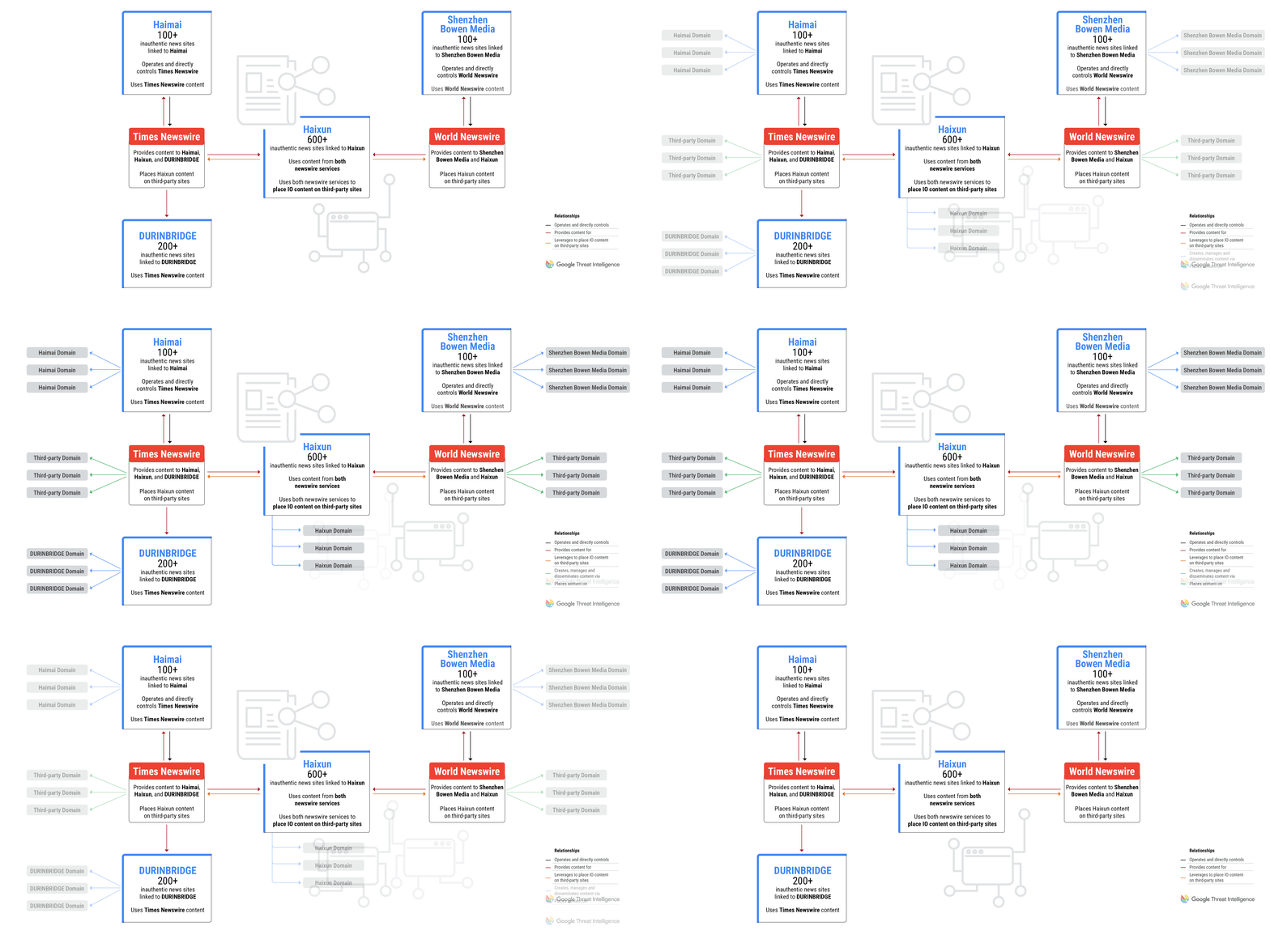
The use of newswire services is a shared tactic across all campaigns, and two of the PR firms directly control and operate the newswire services.
Figure 1: GLASSBRIDGE is an ecosystem of companies and newswire services that publish inauthentic news content
The Most Prolific: Shanghai Haixun Technology
Of the PR and marketing firms we have observed supporting pro-China IO campaigns, the most prolific is Shanghai Haixun Technology Co., Ltd or “Haixun”. Since TAG first began tracking Haixun, Google has removed more than 600 policy-violating domains linked to the firm from the ability to appear in Google News features. The sites target English- and Chinese-speaking audiences, as well as audiences in a number of countries such as Brazil, India, Japan, Kenya, Korea, Malaysia, Saudi Arabia, Singapore, Spain, Russia, Thailand, Qatar, and Vietnam. Google has also terminated a limited number of policy-violating YouTube channels tied to the group.
In July 2023, Mandiant identified Haixun using both Times Newswire and World Newswire to place pro-Beijing content on the subdomains of legitimate news outlets. Mandiant also identified Haixun’s use of freelance services such as Fiverr to recruit for-hire social media accounts to promote pro-Beijing content.
Haixun’s inauthentic news sites are generally low quality, and much of the content on the domains is spammy and repetitive. Mixed in with “filler” articles on topics such as the metaverse, the sites publish news content that is politically aligned to the views of the PRC government. This includes articles from the Global Times, a PRC state-controlled media outlet, and narratives aligned to common PRC talking points on Beijing’s territorial claims in the South China Sea, Taiwan, ASEAN, Falun Gong, Xinjiang, and the COVID-19 pandemic.
Figure 2: Haixun inauthentic news featuring a mix of content, including PRC government talking points, Global Times articles, and content on the metaverse
Times Newswire and Shenzhen Haimai Yunxiang Media
In February 2024, we removed policy-violating domains from appearing on Google News surfaces associated with a pro-PRC coordinated influence campaign reported by Citizen Lab as PAPERWALL that operated a network of over 100 websites in more than 30 countries masquerading as local news outlets. The imitation news sites published localized news content copied from legitimate local news outlets alongside articles republished from PRC state-controlled media, as well as press releases, conspiracy theories, and ad hominem attacks targeting specific individuals.
Based on technical indicators, TAG determined the inauthentic news websites were operated and controlled directly by Times Newswire, one of the news wire services that has distributed content on behalf of Haixun. TAG believes Times Newswire is, in turn, operated by another Chinese media company, Shenzhen Haimai Yunxiang Media Co., Ltd., or “Haimai”, which bills itself as a service provider specialized in global media communication and overseas network promotion.
The views expressed in the conspiracy and smear content were similar to past pro-PRC IO campaigns—for example, character attacks against the Chinese virologist Yan Limeng and claims that the US is conducting biological experiments on humans. Much of the smear content targeting specific individuals was ephemeral—it was posted on imitation news sites for a short period of time and then removed.
DURINBRIDGE
Another example of a commercial firm distributing content linked to pro-China IO campaigns is DURINBRIDGE, an alias we use to track a technology and marketing company that has multiple subsidiaries that provide news and PR services. DURINBRIDGE operates a network of over 200 websites designed to look like independent media outlets that publish news content on various topics. These domains violated our policies and have been blocked from appearing on Google News surfaces and Discover.
Importantly, DURINBRIDGE itself is not an IO actor and likely published the IO content on behalf of a customer or partner. Most of the content on the sites is news and press releases from various sources and has no apparent links to coordinated influence campaigns. However, a small portion of the content includes pro-PRC narratives and content directly linked to IO campaigns from Haixun and DRAGONBRIDGE. DURINBRIDGE sites also used articles and images from Times Newswire, which is operated by the aforementioned Chinese PR firm Haimai.
We identified multiple DRAGONBRIDGE articles published to DURINBRIDGE’s news sites. The content included narratives focused on exiled businessman Guo Wengui, a perennial topic for DRAGONBRIDGE, and multiple narratives amplified by DRAGONBRIDGE in the lead up to the Taiwanese presidential election.
Figure 3: DRAGONBRIDGE content published to inauthentic news sites operated by DURINBRIDGE
Figure 4: “Secret History of Tsai Ing-Wen,” on DURINBRIDGE-operated inauthentic news site
Figure 5: Narratives about then-candidate Lai Ching-te promoted by DRAGONBRIDGE prior to the Taiwanese presidential election
Shenzhen Bowen Media
In early 2024, TAG and Mandiant identified a fourth marketing firm that operates a network of over 100 domains that pose as independent news sites focused on countries and cities across Europe, the Americas, Asia, and Australia. These domains violated our policies and have been blocked from appearing on Google News surfaces and Discover. The operator of the sites, Shenzhen Bowen Media Information Technology Co., Ltd., is a PRC-based marketing firm that also operates World Newswire, the same press release service used by Haixun to place content on the subdomains of legitimate news outlets.
Figure 6: Sites linked to Shenzhen Bowen with localized content for Brazil and Germany
Shenzhen Bowen’s sites present themselves as local outlets focused on a particular country or city, with articles in the local language about business, sports, and politics. The content is in multiple languages, aligned to each target audience, including Chinese, English, French, German, Japanese, and Thai. The sites do not disclose their connection to the marketing firm.
Side-by-side with local content, the sites include narratives promoting the Chinese government’s interests, much of it sourced from World Newswire. In more than one case, TAG and Mandiant have identified content linked to DRAGONBRIDGE published on Shenzhen Bowen-operated sites.
Figure 7: DRAGONBRIDGE content on “Boston Journal” website linked to Shenzhen Bowen Media
Conclusion
The inauthentic news sites operated by GLASSBRIDGE illustrate how information operations actors have embraced methods beyond social media in an attempt to spread their narratives. We have observed similar behavior from Russian and Iranian IO actors. By posing as independent, and often local news outlets, IO actors are able to tailor their content to specific regional audiences and present their narratives as seemingly legitimate news and editorial content. In fact, the content has been crafted or amplified by PR and newswire firms who conceal their role, or actively misrepresent their content as local and independent news coverage. In the case of GLASSBRIDGE, the consistency in content, behavioral similarities, connections across firms, and pro-PRC messaging suggests the private firms take direction from a shared customer who outsourced the creation of influence campaigns. Google is committed to information transparency, and we will continue tracking GLASSBRIDGE and blocking their inauthentic content on Google’s platforms. We regularly disclose our latest enforcement actions in the TAG Bulletin.
Generative AI is transforming industries across the globe, and telecommunications is no exception. From personalized customer interactions and streamlined content creation to network optimization and enhanced productivity, generative AI is poised to redefine the very fabric of the telco industry.
Vodafone, a global leader in telecommunications, recognizes the immense potential of gen AI to revolutionize its network operations, engineering and development. As part of its growing, decades-long partnership Google Cloud, Vodafone is embarking on an exciting journey to integrate generative AI into its network departments, aiming to drive innovation, optimize costs, and enhance efficiency.
This blog post will dive into the new and novel ways Vodafone and Google Cloud deployed generative AI to unlock new levels of efficiency, creativity, and customer satisfaction. We’ll explore real-world use cases and provide a glimpse into the future of this transformative technology within Vodafone.
aside_block
<ListValue: [StructValue([(‘title’, ‘Try Google Cloud for free’), (‘body’, <wagtail.rich_text.RichText object at 0x3ecc007e0ca0>), (‘btn_text’, ‘Get started for free’), (‘href’, ‘https://console.cloud.google.com/freetrial?redirectPath=/welcome’), (‘image’, None)])]>
The genesis of generative AI in Vodafone’s network
The seeds of this collaboration were sown in late 2023 when Vodafone and Google Cloud initiated discussions about the potential applications of gen AI in network use cases. Recognizing the transformative power of this technology, Vodafone and Google Cloud organized a hackaton in March 2024, bringing together over 120 network engineers with limited experience with AI/ML, but a lot of experience on networks and telecommunications.
This event served as a catalyst for innovation, resulting in the development of 13 demo use cases powered by a mix of Vertex AI Search & Conversation, Gemini 1.5 Pro, code generation model, and traditional ML algorithms. These included:
AI-powered site assessments: Using images to instantly assess the feasibility of solar panel installations at RAN sites.
Doc search for Root-Cause-Analysis (RCA): Enabling employees to quickly discover relevant data through natural language queries.
Natural language to SQL (NL2SQL): Creating user-friendly interfaces to empower non-technical colleagues to leverage generative AI for tasks like generating SQL queries.
Network optimization: Developing AI-powered tools to diagnose network issues, predict potential outages, and assist with configuration tasks.
These innovative solutions demonstrate the ease with which generative AI can be applied to real-world challenges within the telecommunications industry, made possible by combining Vodafone’s industry expertise with the growing capabilities of cloud technology. The innovative use cases explored during the Vodafone and Google Cloud hackathon, particularly those focused on RCA and NL2SQL, were showcased jointly at the DTW 2024 event in Copenhagen, sparking significant interest from other telecommunications providers eager to harness the power of generative AI.
Unveiling the potential: Understanding the network design, deployment and operations workflows
Vodafone and Google Cloud conducted extensive interviews with various network stakeholders to gain a deep understanding of the typical working day in network departments. These interviews shed light on the pain points and challenges faced by network professionals, revealing a vast landscape of opportunities where gen AI could add significant value.
The subsequent business case analysis demonstrated the potential for substantial cost and time savings through the implementation of gen AI solutions.
With more than 100 use cases outcoming from this discovery phase in the network space (in the image above we have reported only the ones for Network Engineering department), Vodafone and Google Cloud showcased the tangible benefits of gen AI in streamlining workflows, enhancing decision-making, and driving efficiency. Here’s a prioritized sample of gen AI for network use cases which Vodafone is developing with Google Cloud:
Empowering network operations with knowledge at their fingertips
Network operations teams often face the challenge of accessing critical information during complex incidents. Shifting from vast documentation, incident reports, network architectures, and strategic blueprints can be time-consuming and hinder swift resolution. Vodafone is using Vertex AI Agent Builder ability to extract and synthesize pertinent information from these documents, providing network operators with instant access to the knowledge they need. This empowers them to make informed decisions faster, reducing downtime and enhancing overall network reliability.
Streamlining network engineering with automated documentation
The creation of technical documentation, such as network diagrams, high-level designs (HLDs) and low-level designs (LLDs), is a complex and time-intensive process. It often involves multiple engineers and vendors, leading to potential delays and inconsistencies. Vodafone will leverage AI and Gemini multimodal capabilities to automate the drafting of these documents. While human oversight remains crucial, gen AI can provide a solid foundation, saving engineers valuable time, accelerating time-to-market, and improving the accuracy and consistency of technical documentation.
Transforming network development with data-driven insights
Network development teams are inundated with vast amounts of contractual data, making analysis and decision-making a daunting task. Vodafone will use gen AI to analyze thousands of contracts, extracting key clauses and providing valuable insights for contract template generation. Furthermore, gen AI can enable the creation of digital twins of the Vodafone network, coupled with ground classification capabilities. This allows for more efficient and accurate planning and execution of new network interventions, minimizing errors and optimizing resource allocation.
Enhancing customer fulfillment with AI-powered field technicians
Field technicians play a crucial role in ensuring customer satisfaction. However, truck rolls (on-site visits) are costly and time-consuming. Vodafone will use gen AI to empower field technicians with real-time information and multimodal troubleshooting guidance, reducing the need for truck rolls and enabling more effective on-field resolutions and avoiding repeat dispatch. This will translate into significant cost savings for Vodafone and improved customer experiences.
These use cases highlight the transformative potential of gen AI in revolutionizing various aspects of Vodafone’s network operations. By embracing gen AI, Vodafone is not only driving innovation but also paving the way for a more efficient, agile, and customer-centric future.
Vodafone’s big bet: generative AI for the future
The integration of gen AI into Vodafone’s network departments is poised to deliver a multitude of benefits:
Accelerated automation and zero-touch ops: Gen AI can expedite the automation of network tasks, enabling Vodafone to achieve its automation goals faster and more efficiently.
Cost reduction: By automating routine tasks and optimizing network operations, gen AI can significantly reduce operational costs for Vodafone.
Time savings: Gen AI-powered solutions can streamline workflows and enable faster decision-making, leading to substantial time savings for network professionals.
Enhanced efficiency: Through intelligent automation and optimization, gen AI can improve the overall efficiency of Vodafone’s network operations.
Innovation catalyst: Gen AI opens up new possibilities for innovation in network design, optimization, and management, empowering Vodafone to stay ahead of the curve.
Building on past success: AI Booster and Neuron
Vodafone is embarking on an ambitious journey to integrate generative AI across its operations, and this endeavor is firmly rooted in two powerful programs: AI Booster and Neuron. These initiatives provide the foundation for Vodafone’s exploration and implementation of cutting-edge AI solutions.
AI Booster, a sophisticated machine learning platform built on Google Cloud’s Vertex AI, serves as the engine room for Vodafone’s AI development. This platform is designed for speed and efficiency, enabling rapid development and deployment of AI models. With robust automation and security features, AI Booster empowers Vodafone’s data scientists to seamlessly move from proof-of-concept to production, significantly accelerating the pace of innovation.
Complementing AI Booster is Neuron, Vodafone’s custom-built “data ocean” residing on Google Cloud. Neuron acts as a central hub, aggregating vast amounts of data from across the organization into a unified and readily accessible repository. This data serves as the lifeblood for AI model training and analysis, fueling the development of powerful generative AI applications.
Imagine having an AI that can analyze the performance of network components, predict potential failures, and even suggest optimal configurations to prevent outages. This is the type of transformative power that Vodafone is unlocking by combining AI Booster’s model development capabilities with Neuron’s rich data resources.
The synergy between AI Booster and Neuron allows Vodafone to not only develop cutting-edge AI solutions but also to deploy them quickly and effectively. This translates to faster insights, more accurate predictions, and ultimately, a superior customer experience. By investing in this robust foundation, Vodafone is positioning itself at the forefront of the generative AI revolution in the telecommunications industry.
Conclusion
Vodafone’s work on generative AI marks a significant milestone in the journey towards an AI-powered future for CSPs. By harnessing the transformative capabilities of gen AI, Vodafone is poised to unlock new levels of efficiency, innovation, and cost savings. This strategic partnership with Google Cloud exemplifies Vodafone’s commitment to pushing the boundaries of technological advancement and delivering exceptional network experiences to its customers.
Starting today, EC2 Auto Scaling and EC2 Fleet customers can express their EC2 instances’ CPU-performance requirements as part of the Attribute-Based Instance Type Selection (ABIS) configuration. With ABIS, customers can already choose a list of instances types by defining a set of desired resource requirements, such as the number of vCPU cores and memory per instance. Now, in addition to the quantitative resource requirements, customers can also identify an instance family that ABIS will use as a baseline to automatically select instance types that offer similar or better CPU performance, enabling customers to further optimize their instance-type selection.
ABIS is a powerful tool for customers looking to leverage instance type diversification to meet their capacity requirements. For example, customers who use Spot Instances to launch into limited EC2 spare capacity for a discounted price, access multiple instance types to successfully fulfill their larger capacity needs and experience fewer interruptions. With this release, for example, customers can use ABIS in a launch request for instances that can be in the C, M, and R instance classes, with a minimum of 4 vCPUs, and provide CPU performance in line with the C6i instance family, or better.
The feature is available in all AWS commercial and the AWS GovCloud (US) Regions. You can use Amazon Management Console, CLI, SDKs, and CloudFormation to update your instance requirements. To get started, refer the user guide for EC2 Auto Scaling and EC2 Fleet.
The Amazon S3 Express One Zone storage class is now available in three additional AWS Regions: Asia Pacific (Mumbai), Europe (Ireland), and US East (Ohio).
S3 Express One Zone is a high-performance, single-Availability Zone storage class purpose-built to deliver consistent single-digit millisecond data access for your most frequently accessed data and latency-sensitive applications. S3 Express One Zone delivers data access speed up to 10x faster and request costs up to 50% lower than S3 Standard. It enables workloads such as machine learning training, interactive analytics, and media content creation to achieve single-digit millisecond data access speed with high durability and availability.
S3 Express One Zone is now generally available in seven AWS Regions. For information on AWS service and AWS Partner integrations with S3 Express One Zone, visit the S3 Express One Zone integrations page. To learn more about S3 Express One Zone, visit the S3 User Guide.
Amazon S3 Express One Zone now supports the ability to append data to an object. For the first time, applications can add data to an existing object in S3.
Applications that continuously receive data over a period of time need the ability to add data to existing objects. For example, log-processing applications continuously add new log entries to the end of existing log files. Similarly, media-broadcasting applications add new video segments to video files as they are transcoded and then immediately stream the video to viewers. Previously, these applications needed to combine data in local storage before copying the final object to S3. Now, applications can directly append new data to existing objects and then immediately read the object, all within S3 Express One Zone.
You can append data to objects in S3 Express One Zone in all AWS Regions where the storage class is available. You can get started using the AWS SDK, the AWS CLI, or Mountpoint for Amazon S3 (version 1.12.0 or higher). To learn more, visit the S3 User Guide.
Starting today, the Amazon EC2 G6e instances powered by NVIDIA L40S Tensor Core GPUs are now available in Asia Pacific (Tokyo) and Europe (Frankfurt, Spain). G6e instances can be used for a wide range of machine learning and spatial computing use cases. G6e instances deliver up to 2.5x better performance compared to G5 instances and up to 20% lower inference costs than P4d instances.
Customers can use G6e instances to deploy large language models (LLMs) with up to 13B parameters and diffusion models for generating images, video, and audio. Additionally, the G6e instances will unlock customers’ ability to create larger, more immersive 3D simulations and digital twins for spatial computing workloads. G6e instances feature up to 8 NVIDIA L40S Tensor Core GPUs with 384 GB of total GPU memory (48 GB of memory per GPU) and third generation AMD EPYC processors. They also support up to 192 vCPUs, up to 400 Gbps of network bandwidth, up to 1.536 TB of system memory, and up to 7.6 TB of local NVMe SSD storage. Developers can run AI inference workloads on G6e instances using AWS Deep Learning AMIs, AWS Deep Learning Containers, or managed services such as Amazon Elastic Kubernetes Service (Amazon EKS) and AWS Batch, with Amazon SageMaker support coming soon.
Amazon EC2 G6e instances are available today in the AWS US East (N. Virginia, Ohio), US West (Oregon), Asia Pacific (Tokyo), and Europe (Frankfurt, Spain) regions. Customers can purchase G6e instances as On-Demand Instances, Reserved Instances, Spot Instances, or as part of Savings Plans.
Application Load Balancer (ALB) now supports HTTP request and response header modification giving you greater controls to manage your application’s traffic and security posture without having to alter your application code.
This feature introduces three key capabilities: renaming specific load balancer generated headers, inserting specific response headers, and disabling server response header. With header rename, you can now rename all ALB generated Transport Layer Security (TLS) headers that the load balancer adds to requests, which includes the six mTLS headers and two TLS headers (version and cipher). This capability enables seamless integration with existing applications that expect headers in a specific format, thereby minimizing changes to your backends while using TLS features on the ALB. With header insertion, you can insert custom headers related to Cross-Origin Resource Sharing (CORS) and critical security headers like HTTP Strict-Transport-Security (HSTS). Finally, the capability to disable the ALB generated “Server” header in responses reduces exposure of server-specific information, adding an extra layer of protection to your application. These response header modification features give you the ability to centrally enforce your organizations security posture at the load balancer instead of enforcement at individual applications, which can be prone to errors.
CloudWatch Synthetics, which continuously monitors web applications and APIs by running scripted canaries to help you detect issues before they impact end-users, now supports the Playwright framework for creating NodeJS canaries enabling comprehensive monitoring and diagnosis of complex user journeys and issues that are challenging to automate with other frameworks.
Playwright is an open-source automation library for testing web applications. You can now create multi-tab workflows in a canary using the Playwright runtime which comes with the advantage of troubleshooting failed runs with logs stored directly to CloudWatch Logs database in your AWS account. This replaces the previous method of storing logs as text files and enables you to leverage CloudWatch Logs Insights for query-based filtering, aggregation, and pattern analysis. You can now query CloudWatch logs for your canaries using the canary run ID or step name, making the troubleshooting process faster and more precise than one relying on timestamp correlation for searching logs. Playwright-based canaries also generate artifacts like reports, metrics, and HAR files, even when canaries times out, ensuring you have the required data needed for root cause analysis in those scenarios. Additionally, the new runtime simplifies canary configuration by allowing customization through a JSON file, removing the need to call a library function in the canary code.
Playwright runtime is available for creating canaries in NodeJS in all commercial regions at no additional cost to users.
To learn more about the runtime, see documentation, or refer to the user guide to get started with CloudWatch Synthetics.
Amazon S3 Express One Zone, a high-performance S3 storage class for latency-sensitive applications, now supports object expiration using S3 Lifecycle. S3 Lifecycle can expire objects based on age to help you automatically optimize storage costs.
Now, you can configure S3 Lifecycle rules for S3 Express One Zone to expire objects on your behalf. You can configure an S3 Lifecycle expiration rule either for your entire bucket or for a subset of objects by filtering by prefix or object size. For example, you can create an S3 Lifecycle rule that expires all objects smaller than 512 KB after 3 days and another rule that expires all objects in a prefix after 10 days. Additionally, S3 Lifecycle logs S3 Express One Zone object expirations in AWS CloudTrail, giving you the ability to monitor, set alerts for, and audit them.
Amazon S3 Express One Zone support for S3 Lifecycle expiration is generally available in all AWS Regions where the storage class is available. You can get started with S3 Lifecycle using the Amazon S3 REST API, AWS Command Line Interface (CLI), or AWS Software Development Kit (SDK) client. To learn more about S3 Lifecycle, visit the S3 User Guide.
AWS Lambda announces new Amazon CloudWatch metrics for Lambda Event Source Mappings (ESMs), which provide customers visibility into the processing state of events read by ESMs that subscribe to Amazon SQS, Amazon Kinesis, and Amazon DynamoDB event sources. This enables customers to easily monitor issues or delays in event processing and take corrective actions.
Customers use ESMs to read events from event sources and invoke Lambda functions. Lack of visibility into processing state of events ingested by ESMs delays diagnosis of event processing issues. Customers can now use the following CloudWatch metrics to monitor the processing state of events ingested by ESMs — PolledEventCount, InvokedEventCount, FilteredOutEventCount, FailedInvokeEventCount, DeletedEventCount, DroppedEventCount, and OnFailureDestinationDeliveredEventCount. PolledEventCount counts the events read by an ESM, and InvokedEventCount counts the events that invoked a Lambda function. FilteredOutEventCount counts the events filtered out by an ESM. FailedInvokeEventCount counts the events that attempted to invoke a Lambda function, but encountered failure. DeletedEventCount counts the events that have been deleted from the SQS queue by Lambda upon successful processing. DroppedEventCount counts the events dropped due to event expiry or exhaustion of retry attempts. OnFailureDestinationDeliveredEventCount counts the events successfully sent to an on-failure destination.
This feature is generally available in all AWS Commercial Regions where AWS Lambda is available.
You can enable ESM metrics using Lambda event source mapping API, AWS Console, AWS CLI, AWS SDK, AWS CloudFormation, and AWS SAM. To learn more about these metrics, visit Lambda developer guide. These new metrics are charged at standard CloudWatch pricing for metrics.
Starting today, Amazon Elastic Compute Cloud (Amazon EC2) Flex (C7i-flex, M7i-flex) instances powered by custom 4th Gen Intel Xeon Scalable processors (code-named Sapphire Rapids) are available in Asia Pacific (Malaysia) region. These custom processors, available only on AWS, offer up to 15% better performance over comparable x86-based Intel processors utilized by other cloud providers.
Flex instances are the easiest way for you to get price-performance benefits for a majority of general-purpose and compute intensive workloads. C7i-flex and M7i-flex instances deliver up to 19% better price-performance compared to C6i and M6i instances respectively. These instances offer the most common sizes, from large to 8xlarge, and are a great first choice for applications that don’t fully utilize all compute resources such as web and application servers, virtual desktops, batch-processing, microservices, databases, caches, and more. For workloads that need larger instance sizes (up to 192 vCPUs and 768 GiB memory) or continuous high CPU usage, you can leverage C7i and M7i instances.
C7i-flex instances are available in the following AWS Regions: US East (N. Virginia, Ohio), US West (N. California, Oregon), Europe (Frankfurt, Ireland, London, Paris, Spain, Stockholm), Canada (Central), Asia Pacific (Malaysia, Mumbai, Seoul, Singapore, Sydney, Tokyo), and South America (São Paulo).
M7i-flex instances are available in the following AWS Regions: US East (N. Virginia, Ohio), US West (N. California, Oregon), Europe (Frankfurt, Ireland, London, Paris, Spain, Stockholm), Canada (Central), Asia Pacific (Malaysia, Mumbai, Seoul, Singapore, Sydney, Tokyo), South America (São Paulo), and the AWS GovCloud (US-East, US-West).
Today, AWS Marketplace is extending transaction purchase order number support to products with pay-as-you-go pricing, including Amazon Bedrock subscriptions, software as a service (SaaS) contracts with consumption pricing, and AMI annuals. Additionally, you can update purchase order numbers post-subscription prior to invoice creation to ensure your invoices reflect the proper purchase order. This launch helps you allocate costs and makes it easier to process and pay invoices.
The purchase order feature in AWS Marketplace allows the purchase order number that you provide at the time of the transaction in AWS Marketplace to appear on all invoices related to that purchase. Now, you can provide a purchase order at the time of purchase for most products available in AWS Marketplace, including products with pay-as-you-go pricing. You can add or update purchase orders post-subscription, prior to invoice generation, within the AWS Marketplace console. You can also provide more than one PO for products appearing on your monthly AWS Marketplace invoice and receive a unique invoice for each purchase order. Additionally, you can add a unique PO for each fixed charge and associated AWS Marketplace monthly usage charges at the time of purchase, or post-subscription in the AWS Marketplace console.
You can update purchase orders for existing subscriptions under manage subscriptions in the AWS Marketplace console. To enable transaction purchase orders for AWS Marketplace, sign in to the management account (for AWS Organizations) and enable the AWS Billing integration in the AWS Marketplace Console settings. To learn more, read the AWS Marketplace Buyer Guide.
Starting today, Amazon Elastic Compute Cloud (Amazon EC2) R8g instances are available in AWS Europe (Stockholm) region. These instances are powered by AWS Graviton4 processors and deliver up to 30% better performance compared to AWS Graviton3-based instances. Amazon EC2 R8g instances are ideal for memory-intensive workloads such as databases, in-memory caches, and real-time big data analytics. These instances are built on the AWS Nitro System, which offloads CPU virtualization, storage, and networking functions to dedicated hardware and software to enhance the performance and security of your workloads.
AWS Graviton4-based Amazon EC2 instances deliver the best performance and energy efficiency for a broad range of workloads running on Amazon EC2. AWS Graviton4-based R8g instances offer larger instance sizes with up to 3x more vCPU (up to 48xlarge) and memory (up to 1.5TB) than Graviton3-based R7g instances. These instances are up to 30% faster for web applications, 40% faster for databases, and 45% faster for large Java applications compared to AWS Graviton3-based R7g instances. R8g instances are available in 12 different instance sizes, including two bare metal sizes. They offer up to 50 Gbps enhanced networking bandwidth and up to 40 Gbps of bandwidth to the Amazon Elastic Block Store (Amazon EBS).